</noscript><link rel="preload" as="image" href="https://fearless-surprise-ac87093411.media.strapiapp.com/pirateswap_trade_lock_e4c1967ea4.png"/><div id="__next"><div style="height:100%;width:100%" class="golos_text_7250fa10-module__pb6qGq__variable goldman_852c37c6-module__KEgexa__variable montserrat_3b030180-module__CCcRuq__variable lato_1286178c-module__R-Yb1W__variable poppins_81fdb58b-module__tf3s-q__variable"><style> #nprogress { pointer-events: none; } #nprogress .bar { background: #FEA235; position: fixed; z-index: 9999; top: 0; left: 0; width: 100%; height: 4px; } #nprogress .peg { display: block; position: absolute; right: 0px; width: 100px; height: 100%; box-shadow: 0 0 10px #FEA235, 0 0 5px #FEA235; opacity: 1; -webkit-transform: rotate(3deg) translate(0px, -4px); -ms-transform: rotate(3deg) translate(0px, -4px); transform: rotate(3deg) translate(0px, -4px); } #nprogress .spinner { display: block; position: fixed; z-index: 1031; top: 15px; right: 15px; } #nprogress .spinner-icon { width: 18px; height: 18px; box-sizing: border-box; border: solid 2px transparent; border-top-color: #FEA235; border-left-color: #FEA235; border-radius: 50%; -webkit-animation: nprogresss-spinner 400ms linear infinite; animation: nprogress-spinner 400ms linear infinite; } .nprogress-custom-parent { overflow: hidden; position: relative; } .nprogress-custom-parent #nprogress .spinner, .nprogress-custom-parent #nprogress .bar { position: absolute; } @-webkit-keyframes nprogress-spinner { 0% { -webkit-transform: rotate(0deg); } 100% { -webkit-transform: rotate(360deg); } } @keyframes nprogress-spinner { 0% { transform: rotate(0deg); } 100% { transform: rotate(360deg); } } </style><div id="_rht_toaster" style="position:fixed;z-index:9999;top:16px;left:16px;right:16px;bottom:16px;pointer-events:none" class="toast-container"></div><div></div><header class="sc-eb98df62-0 ljZnRh"><div class="sc-eb98df62-1 bKAMWY"><a aria-label="Link zur Homepage" href="/de"><svg xmlns="http://www.w3.org/2000/svg" width="139" height="50" fill="none" viewBox="0 0 139 50" class="sc-eb98df62-5 eFexjg"><path fill="#F48E3D" d="M21.947 39.707c.124 1.197-.721 2.294-1.914 2.419s-2.287-.723-2.411-1.92c-.05-.524-.249-1.946.174-3.292.547-1.746 1.715-3.417 1.715-3.417s-.2 1.82.646 2.968c.77 1.072 1.64 1.82 1.79 3.242M19.81 27.039c-.15-.125-.274-.25-.423-.35-2.187-1.57-3.927-1.745-5.07-1.745h-.82a4.17 4.17 0 0 0-3.132 1.422c.77.299 1.839.523 2.808.698.92.174 1.765.324 2.46.574 2.536.922 3.953 2.144 4.25 3.616.05.274.05.523.026.748.1 0 .223-.025.323-.025q.447 0 .82.074c.075 0 .15.05.224.05.174.05.373.075.547.15.099.025.174.075.273.1.15.05.273.124.398.174.074.05.149.075.248.125.124.075.224.125.323.2.075.05.125.074.2.124.099.075.173.125.248.175.05.025.1.075.124.1.075.05.124.1.174.15 0 0 .05.024.05.05l.074.074s-1.317-4.215-4.126-6.534z"></path><path fill="#F48E3D" d="M12.08 28.336c-.92-.174-1.79-.399-2.51-.748a4.3 4.3 0 0 0-.324 1.596 4.23 4.23 0 0 0 4.226 4.24c.845 0 3.057-.649 4.92-1.098.075-.25.1-.499.05-.773-.099-.474-.422-.923-.994-1.347-1.566-.947-1.79.35-3.927.15-.1 0-.397-.1-.397-.1a1.457 1.457 0 0 1-1.07-1.77l.05-.15z"></path><path fill="#fff" d="M17.398 34.046c-1.913.5-3.156.798-3.927.798-3.107 0-5.642-2.543-5.642-5.66 0-.823.2-1.596.497-2.32a19.7 19.7 0 0 1-3.653-3.142 7.7 7.7 0 0 0-1.989 1.77c-1.168 1.447-1.416 3.193-1.416 3.193s.522-1.122 1.391-1.696c1.119-.773 1.964-.773 1.964-.773s-1.914 1.596-3.405 4.713C.273 32.9 0 35.243 0 35.243s.646-1.221 1.765-2.094c.994-.773 1.193-.748 1.193-.748s-.87.847-1.89 3.566c-.372.997-.471 1.77-.496 2.344 0 0 1.913 1.322 4.92 2.045-.024-.499-.049-1.073 0-1.571.075-1.222.697-2.32.697-2.32s-.274 2.17 1.143 4.215c.746.1 1.541.15 2.361.15a4 4 0 0 0 .547-.05c0-.05-.05-.1-.074-.125-.572-1.097-.622-2.344-.622-2.344s.572 1.322 2.013 2.369c1.815-.25 3.38-.773 4.524-1.247-.05-.773-.025-1.845.298-2.918.274-.922.721-1.795 1.094-2.469-.05 0-.075 0-.124.025zM9.097 25.692c1.044-1.296 2.61-2.144 4.375-2.144h.845c1.317 0 3.38.2 5.89 1.995.05.025.075.075.125.124 1.118-2.568 1.615-2.892 1.615-2.892s-5.79-2.22-14.987.1a18 18 0 0 0-.895.274c.671.698 1.715 1.67 3.032 2.568z"></path><path fill="url(#paint0_linear_27781_10323)" d="m15.212 16.041-.323.574-.323.548h1.292l-.323-.548z"></path><path fill="url(#paint1_linear_27781_10323)" d="M16.155 14.396a.67.67 0 0 0-.67.673.67.67 0 0 0 .67.673.67.67 0 0 0 .671-.673.67.67 0 0 0-.67-.674"></path><path fill="url(#paint2_linear_27781_10323)" d="M14.938 15.069a.67.67 0 0 0-.67-.674.67.67 0 0 0-.672.674.67.67 0 0 0 .671.673.67.67 0 0 0 .671-.673"></path><path fill="url(#paint3_linear_27781_10323)" d="M25.924 13.148a4.23 4.23 0 0 1-3.132 1.397c-1.242 0-2.46-.599-3.23-1.521a1 1 0 0 1-.2-.25c-.05-.05-.074-.124-.124-.174-.373-.549-.67-1.147-.92-1.646-.323-.649-.62-1.247-.994-1.746-.05-.075-.149-.15-.223-.224l-.2-.2c-.074-.075-.148-.124-.248-.2l-.447-.299-.15-.074a3 3 0 0 0-.62-.225c-.025 0-.05 0-.075-.025-.249-.05-.497-.1-.77-.1-1.517 0-2.784.998-3.232 2.395 0 .024-.025.05-.05.1v.1c-.05.199-.074.423-.099.623v.199c0 .324.05.624.15.923.049.15.074.274.074.274s-.124-.075-.298-.175c-.1-.05-.175-.074-.274-.1-.074-.024-.124-.074-.224-.074v.025c-.149-.025-.298-.1-.472-.1a2.247 2.247 0 0 0-2.237 2.245c0 .349.075.648.224.947a4 4 0 0 1-1.64.35c-.1 0-.224 0-.324-.026h-.124a4 4 0 0 1-.77-.15h-.05a6 6 0 0 1-.696-.274 4.43 4.43 0 0 1-1.616-1.496c-.149-.25-.248-.399-.248-.399s-1.293 4.688 2.883 8.629c0 0 3.505-1.546 10.116-1.646 4.598-.05 6.96 1.172 6.96 1.172s1.764-1.297 2.758-3.84c.845-2.145.547-4.315.547-4.34zm-9.345 3.99v1.148h-2.71v-1.148c-.67-.449-1.143-1.172-1.143-2.045a2.51 2.51 0 0 1 2.51-2.518 2.51 2.51 0 0 1 2.51 2.519c0 .872-.471 1.595-1.142 2.044z"></path><path fill="#fff" d="M37.218 25.856V14.914L37 13.158h9.9c.943 0 1.705.11 2.285.293.58.22 1.016.475 1.306.841a3.1 3.1 0 0 1 .58 1.208c.109.476.145.951.145 1.464v1.72c0 .695-.109 1.317-.326 1.903a2.62 2.62 0 0 1-1.197 1.39c-.58.366-1.45.512-2.539.512h-1.487c-.906 0-1.74 0-2.502-.073s-1.342-.073-1.74-.11v3.477h-4.171zm4.17-6.22h4.424c.472 0 .798-.11.98-.294.18-.183.29-.476.29-.915V17.33c0-.403-.073-.732-.254-.915s-.508-.293-.98-.293h-4.424v3.477zM53.585 25.856V13.158h3.95v12.698zM74.077 25.856c-.559 0-1.153-.072-1.817-.252q-.996-.27-1.992-1.295l-.874-.899a10 10 0 0 0-1.188-1.043 4.8 4.8 0 0 0-1.293-.612c-.49-.144-1.083-.216-1.817-.216h-.175v4.101h-4.018V14.885l-.21-1.726h9.54c.874 0 1.573.108 2.132.324.559.215.943.503 1.258.863.28.36.49.755.594 1.223.105.468.175.9.175 1.367v.396q0 1.295-.63 2.266c-.419.647-1.083 1.151-1.991 1.439.35.216.664.432.978.647.315.216.664.432 1.049.684a4.7 4.7 0 0 0 1.258.575c.384.108.733.18.978.216.28 0 .42.036.454.036l-.629 2.41s-.419.072-.733.144c-.35.036-.7.072-1.084.072zm-6.744-7.122h1.013c.314 0 .629 0 .874-.072.454-.072.769-.216.943-.468.175-.252.245-.54.245-.9v-.215c0-.324-.07-.54-.245-.72-.174-.18-.49-.251-.943-.251h-4.264v2.554c.35 0 .734 0 1.118.036h1.259zM97.82 25.856v-9.77h-4.746v-2.928H106.5v2.927h-4.815v9.771zM108.869 25.856V13.158h13.301v2.936h-9.254v1.798h6.861v3.01h-6.861v2.018h8.937l1.232 2.716s-.176.11-.563.147c-.388.037-1.021.073-1.936.073zM39.815 39.348c-.962 0-1.64-.034-2.102-.137-.464-.07-.677-.172-.677-.276l1.247-2.614c.32.068.997.103 1.995.137s2.316.069 3.919.069h1.675c.498 0 .82-.069.997-.206.178-.138.25-.344.25-.585v-.207c0-.31-.072-.55-.25-.654s-.499-.172-.997-.172h-4.81c-1.425 0-2.459-.24-3.1-.757Q37 33.174 37 31.47v-.722c0-.585.107-1.136.356-1.652.25-.482.642-.894 1.176-1.204.57-.31 1.318-.447 2.316-.447h6.983c.855 0 1.568.034 2.138.137q.855.155.855.31l-.641 2.512c-.392-.035-1.14-.07-2.21-.138a127 127 0 0 0-4.132-.069h-1.497c-.427 0-.748.034-.926.138-.178.103-.285.344-.285.654v.137c0 .31.107.516.285.654.214.137.499.172.962.172h4.596c.89 0 1.675.103 2.28.275.606.172 1.105.482 1.461.964.32.447.499 1.135.499 2.064v.723c0 .997-.285 1.823-.82 2.442s-1.46.93-2.814.93zM56.396 39.348l-4.39-11.904h4.355l2.056 6.778.452 1.755h.21l.278-1.17 2.126-7.363h4.703l2.23 7.363.384 1.17h.209l.487-1.755 1.882-6.778h4.32l-.208 1.204-4.216 10.666H66.57l-2.16-6.537-.419-1.686h-.209l-.383 1.686-2.16 6.537h-4.774zM94.069 39.348V29.09l-.206-1.646h9.352c.889 0 1.609.103 2.157.274.547.206.959.446 1.233.79.274.342.445.72.548 1.131.102.446.137.892.137 1.373v1.612c0 .652-.103 1.235-.308 1.784a2.46 2.46 0 0 1-1.13 1.304c-.549.343-1.371.48-2.398.48h-1.405c-.855 0-1.644 0-2.362-.069-.72-.068-1.268-.068-1.645-.102v3.259h-3.939zm3.939-5.832h4.179c.445 0 .753-.103.924-.274s.274-.446.274-.858v-1.03c0-.377-.068-.685-.239-.857-.172-.172-.48-.274-.926-.274h-4.178v3.259z"></path><path fill="#F48E3D" d="M88.652 13.158h-5.338l-6.036 12.698h4.326l1.117-2.312h6.49l1.011 2.312h4.431zm-2.407 8.588v-2.092h-3.49v-1.688h3.49v-2.092l3.035 2.936zM86.283 27.444h-5.338l-6.036 11.904h4.326l1.117-2.167h6.49l1.011 2.167h4.43zm.593 5.298v.792h-3.454v1.96l-3.035-2.752 3.035-2.752v1.96h3.454z"></path><defs><linearGradient id="paint0_linear_27781_10323" x1="14.566" x2="15.858" y1="16.602" y2="16.602" gradientUnits="userSpaceOnUse"><stop stop-color="#E97649"></stop><stop offset="1" stop-color="#FFA434"></stop></linearGradient><linearGradient id="paint1_linear_27781_10323" x1="15.484" x2="16.826" y1="15.069" y2="15.069" gradientUnits="userSpaceOnUse"><stop stop-color="#E97649"></stop><stop offset="1" stop-color="#FFA434"></stop></linearGradient><linearGradient id="paint2_linear_27781_10323" x1="13.596" x2="14.938" y1="15.069" y2="15.069" gradientUnits="userSpaceOnUse"><stop stop-color="#E97649"></stop><stop offset="1" stop-color="#FFA434"></stop></linearGradient><linearGradient id="paint3_linear_27781_10323" x1="2.496" x2="26" y1="14.869" y2="14.869" gradientUnits="userSpaceOnUse"><stop stop-color="#E97649"></stop><stop offset="1" stop-color="#FFA434"></stop></linearGradient></defs></svg></a><div class="sc-eb98df62-1 sc-eb98df62-2 bKAMWY fgbswW"><div class="sc-eb98df62-6 dttBGY"><div class="sc-4a319ce5-1 hgttvX"><a title="Trade" aria-label="Trade" data-testid="exchanger-link" class="sc-88c754c5-1 hbario" href="/de/exchanger"><svg xmlns="http://www.w3.org/2000/svg" width="24" height="24" fill="none" viewBox="0 0 24 24"><path fill="currentColor" d="M3 3h18a1 1 0 0 1 1 1v16a1 1 0 0 1-1 1H3a1 1 0 0 1-1-1V4a1 1 0 0 1 1-1m12 4v2h-4v2h4v2l3.5-3zM9 17v-2h4v-2H9v-2l-3.5 3z"></path></svg></a></div><div style="height:100%" class="sc-4a319ce5-0 crFaHW"><a data-testid="exchanger-link" class="sc-440f27e5-1 faewsR" href="/de/exchanger"><svg xmlns="http://www.w3.org/2000/svg" width="24" height="24" fill="none" viewBox="0 0 24 24"><path fill="currentColor" d="M3 3h18a1 1 0 0 1 1 1v16a1 1 0 0 1-1 1H3a1 1 0 0 1-1-1V4a1 1 0 0 1 1-1m12 4v2h-4v2h4v2l3.5-3zM9 17v-2h4v-2H9v-2l-3.5 3z"></path></svg>Trade</a></div><div class="sc-4a319ce5-1 hgttvX"><div title="Get free $10" class="sc-9236df17-0 dOknRd"><button class="sc-88c754c5-1 igUtC sc-9236df17-1 dBjWpO" aria-label="Get free $10"><svg xmlns="http://www.w3.org/2000/svg" width="24" height="24" fill="none" viewBox="0 0 24 24"><path fill="currentColor" d="M14 2a8 8 0 0 1 3.292 15.293A8 8 0 1 1 6.706 6.707 8 8 0 0 1 14 2m-3 7H9v1a2.5 2.5 0 0 0-.164 4.995L9 15h2l.09.008a.5.5 0 0 1 0 .984L11 16H7v2h2v1h2v-1a2.5 2.5 0 0 0 .164-4.995L11 13H9l-.09-.008a.5.5 0 0 1 0-.984L9 12h4v-2h-2zm3-5a5.99 5.99 0 0 0-4.484 2.013 8 8 0 0 1 8.47 8.471A6 6 0 0 0 14 4"></path></svg></button><p class="sc-9236df17-2 lpuTzP">Free $10</p></div></div><div style="height:100%" class="sc-4a319ce5-0 crFaHW"><button class="sc-9236df17-3 hvMHZt"><svg xmlns="http://www.w3.org/2000/svg" width="24" height="24" fill="none" viewBox="0 0 24 24"><path fill="currentColor" d="M14 2a8 8 0 0 1 3.292 15.293A8 8 0 1 1 6.706 6.707 8 8 0 0 1 14 2m-3 7H9v1a2.5 2.5 0 0 0-.164 4.995L9 15h2l.09.008a.5.5 0 0 1 0 .984L11 16H7v2h2v1h2v-1a2.5 2.5 0 0 0 .164-4.995L11 13H9l-.09-.008a.5.5 0 0 1 0-.984L9 12h4v-2h-2zm3-5a5.99 5.99 0 0 0-4.484 2.013 8 8 0 0 1 8.47 8.471A6 6 0 0 0 14 4"></path></svg>Get free $10</button></div></div></div></div><div class="sc-eb98df62-3 hkbWtN"><div class="sc-4a319ce5-0 gPIWHB"><div class="sc-eb98df62-9 eCHAJG"><a data-testid="trusted-us-link" class="sc-eb98df62-10 gHCkRR" href="/de/trusted-us"><svg xmlns="http://www.w3.org/2000/svg" width="24" height="24" fill="none" viewBox="0 0 24 24"><path fill="currentColor" d="M2 9h3v12H2a1 1 0 0 1-1-1V10a1 1 0 0 1 1-1m5.293-1.293 6.4-6.4a.5.5 0 0 1 .654-.047l.853.64a1.5 1.5 0 0 1 .553 1.57L14.6 8H21a2 2 0 0 1 2 2v2.104a2 2 0 0 1-.15.762l-3.095 7.515a1 1 0 0 1-.925.619H8a1 1 0 0 1-1-1V8.414a1 1 0 0 1 .293-.707"></path></svg>Vertraue uns</a><a class="sc-eb98df62-10 jHgVrn" href="/de/help-center"><svg xmlns="http://www.w3.org/2000/svg" width="24" height="24" fill="none" viewBox="0 0 24 24"><path fill="currentColor" d="M22 17.002a6 6 0 0 1-4.713 5.86l-.638-1.914A4 4 0 0 0 19.465 19H17a2 2 0 0 1-2-2v-4a2 2 0 0 1 2-2h2.938a8 8 0 0 0-15.876 0H7a2 2 0 0 1 2 2v4a2 2 0 0 1-2 2H4a2 2 0 0 1-2-2v-5C2 6.477 6.477 2 12 2s10 4.477 10 10z"></path></svg>Hilfe-Center</a><a target="_blank" class="sc-eb98df62-10 gHCkRR" href="/de/anti-scam"><svg xmlns="http://www.w3.org/2000/svg" width="24" height="24" fill="none" viewBox="0 0 24 24"><path fill="currentColor" d="m12 1 8.217 1.826a1 1 0 0 1 .783.976v9.987a6 6 0 0 1-2.672 4.992L12 23l-6.328-4.219A6 6 0 0 1 3 13.79V3.802a1 1 0 0 1 .783-.976zm4.452 7.222-4.95 4.949-2.828-2.828-1.414 1.414L11.503 16l6.364-6.364z"></path></svg>Anti-Scam</a></div></div><button class="sc-88c754c5-0 kdWoCx sc-eb98df62-12 jmOAYy" data-testid="login-button"><div class="sc-88c754c5-2 gHIdXJ"><svg xmlns="http://www.w3.org/2000/svg" width="32" height="32" fill="none" viewBox="0 0 32 32"><path fill="currentColor" d="M15.972 0C7.556 0 .654 6.48 0 14.715l8.592 3.546a4.5 4.5 0 0 1 2.553-.787q.126.001.252.008l3.822-5.524v-.078c0-3.328 2.709-6.032 6.043-6.032 3.332 0 6.043 2.707 6.043 6.035s-2.712 6.034-6.043 6.034h-.14l-5.445 3.881c0 .07.005.141.005.213 0 2.5-2.023 4.528-4.529 4.528a4.555 4.555 0 0 1-4.448-3.637L.553 20.36C2.457 27.075 8.635 32 15.973 32 24.825 32 32 24.837 32 16c0-8.835-7.177-16-16.028-16M8.076 23.467c.35.723.954 1.331 1.753 1.666a3.41 3.41 0 0 0 4.452-1.832c.352-.84.352-1.76.006-2.6a3.402 3.402 0 0 0-4.347-1.883l2.034.84a2.5 2.5 0 0 1 1.347 3.273 2.507 2.507 0 0 1-3.277 1.349zm17.216-11.592a4.03 4.03 0 0 0-4.029-4.019 4.026 4.026 0 0 0-4.026 4.02c0 2.22 1.803 4.02 4.026 4.02s4.027-1.8 4.027-4.02zm-4.02-3.027a3.026 3.026 0 0 1 3.026 3.02 3.025 3.025 0 0 1-3.027 3.022 3.022 3.022 0 1 1 0-6.042"></path></svg></div><span class="sc-88c754c5-3 iCiyEU">Anmeldung über Steam</span></button></div></header><div class="sc-1c7e41b1-0 iXlnMt"><div class="sc-4bba18da-0 isgSSf"><div class="sc-4bba18da-1 hFYxhT"><div class="sc-4a319ce5-0 kACCWt"><div class="sc-e02f1068-0 gExmPn"><button class="sc-88c754c5-0 kVslVt"><div class="sc-88c754c5-2 gHIdXJ"><svg xmlns="http://www.w3.org/2000/svg" width="24" height="24" fill="none" viewBox="0 0 24 24" class="sc-e02f1068-1 eYsdVi"><path fill="currentColor" d="M7.828 11H20v2H7.828l5.364 5.364-1.414 1.414L4 12l7.778-7.778 1.414 1.414z"></path></svg></div><span class="sc-88c754c5-3 iCiyEU">Zurück</span></button></div></div><div class="sc-4a319ce5-1 DbnGI"><button class="sc-88c754c5-1 bwaGuv"><svg xmlns="http://www.w3.org/2000/svg" width="24" height="24" fill="none" viewBox="0 0 24 24"><path fill="currentColor" d="M12 13v7l-8-8 8-8v7h8v2z"></path></svg></button></div><div class="sc-4bba18da-2 kjuoZz"><h1 class="sc-4bba18da-3 kELYax">Where can I see more details about a skin? </h1><p class="sc-4bba18da-4 hJdSqM">See detailed info about any CS2 skin on PirateSwap! Check float, rarity, and trade lock status with a quick click.</p></div><div style="z-index:0" class="sc-1c7e41b1-3 OnLAO"><span></span><span></span><span></span><span></span><span></span><span></span><span></span><span></span><span></span><span></span><span></span><span></span><span></span><span></span><span></span></div></div></div><article class="sc-1d9b630f-0 fLXYLk"><p class="sc-1d9b630f-1 bKnQul">Want to inspect a skin before trading? Just click and check the details! To view more details about a skin on PirateSwap, simply hover over its tile and click the small square icon at the bottom. This will open a detailed overview, showing important information such as the item’s float, rarity, and other key stats.</p> <p class="sc-1d9b630f-1 bKnQul">If a skin has an active Trade Lock, you’ll see a small padlock icon along with the number of days remaining until the lock expires (e.g., 8D = 8 days). This helps you keep track of when the item will be available to withdraw.</p> <p class="sc-1d9b630f-1 bKnQul"><img src="https://fearless-surprise-ac87093411.media.strapiapp.com/pirateswap_trade_lock_e4c1967ea4.png" alt="Trade-locked items shown in the PirateSwap trade tab" class="sc-1d9b630f-8 isilrF"/></p> <p class="sc-1d9b630f-1 bKnQul">You can trade for trade-locked items, they’ll just sit in your PirateSwap Equipment until the lock expires—you’ll then be able to claim them to your Steam inventory.</p><div class="sc-e6fe16e4-0 kQakJj"><h5 class="sc-e6fe16e4-1 hyDhXd">Brauchen Sie weitere Hilfe?</h5><p class="sc-e6fe16e4-2 iQhGxh">Unser Support-Team ist für Sie da, um Ihnen bei allen Fragen und Anliegen zu helfen</p><button class="sc-88c754c5-0 fsaxhG sc-e6fe16e4-3 gPiOFM" aria-label="Unterstützung"><div class="sc-88c754c5-2 gHIdXJ"><svg xmlns="http://www.w3.org/2000/svg" width="24" height="24" fill="none" viewBox="0 0 24 24"><path fill="currentColor" d="M10 3h4a8 8 0 0 1 0 16v3.5c-5-2-12-5-12-11.5a8 8 0 0 1 8-8"></path></svg></div><span class="sc-88c754c5-3 iCiyEU">Unterstützung</span></button><img alt="Chicken" draggable="false" loading="lazy" width="550" height="260" decoding="async" data-nimg="1" class="sc-e6fe16e4-4 JBptq" style="color:transparent;background-size:cover;background-position:50% 50%;background-repeat:no-repeat;background-image:url("data:image/svg+xml;charset=utf-8,%3Csvg xmlns='http://www.w3.org/2000/svg' viewBox='0 0 320 160'%3E%3Cfilter id='b' color-interpolation-filters='sRGB'%3E%3CfeGaussianBlur stdDeviation='20'/%3E%3CfeColorMatrix values='1 0 0 0 0 0 1 0 0 0 0 0 1 0 0 0 0 0 100 -1' result='s'/%3E%3CfeFlood x='0' y='0' width='100%25' height='100%25'/%3E%3CfeComposite operator='out' in='s'/%3E%3CfeComposite in2='SourceGraphic'/%3E%3CfeGaussianBlur stdDeviation='20'/%3E%3C/filter%3E%3Cimage width='100%25' height='100%25' x='0' y='0' preserveAspectRatio='none' style='filter: url(%23b);' href='data:image/webp;base64,UklGRgwBAABXRUJQVlA4TP8AAAAvB8AAEM1VICICHgiwCQAAAIAVBIAQEKIgIAAiCAAACAACAAAAACAAAAAAAAAABAAgIoBAODoAAMADATkBAAAAOP97hQgGAQAAAAAAAAAAAAAAAAAAAAAAAAAAAAAAAAACAkihfR4IyAkAAADA+R/7KQggBIAAAAAAAAAAAAAAAAAAAAAAAAAAAAAQAACEgICy4oEAmwAAAACc/xIA4DkCABDAIQCgECABAAAAQAAAAAgIAAAAAAAAAAAhEMJBkqYcvtYV2G9jDd9mGLOXlXkD0M+Y6e+o9UmFZEY9hD0AeGdKQZGtns9bzq22nl0B4NOv0nNbavR/4WhqpTQJBgAA'/%3E%3C/svg%3E")" srcSet="/_next/image?url=%2F_next%2Fstatic%2Fmedia%2Fchicken.452e7c32.webp&w=768&q=75 1x, /_next/image?url=%2F_next%2Fstatic%2Fmedia%2Fchicken.452e7c32.webp&w=1200&q=75 2x" src="/_next/image?url=%2F_next%2Fstatic%2Fmedia%2Fchicken.452e7c32.webp&w=1200&q=75"/><img alt="Guns" draggable="false" loading="lazy" width="454" height="260" decoding="async" data-nimg="1" class="sc-e6fe16e4-5 gysHiI" style="color:transparent;background-size:cover;background-position:50% 50%;background-repeat:no-repeat;background-image:url("data:image/svg+xml;charset=utf-8,%3Csvg xmlns='http://www.w3.org/2000/svg' viewBox='0 0 320 200'%3E%3Cfilter id='b' color-interpolation-filters='sRGB'%3E%3CfeGaussianBlur stdDeviation='20'/%3E%3CfeColorMatrix values='1 0 0 0 0 0 1 0 0 0 0 0 1 0 0 0 0 0 100 -1' result='s'/%3E%3CfeFlood x='0' y='0' width='100%25' height='100%25'/%3E%3CfeComposite operator='out' in='s'/%3E%3CfeComposite in2='SourceGraphic'/%3E%3CfeGaussianBlur stdDeviation='20'/%3E%3C/filter%3E%3Cimage width='100%25' height='100%25' x='0' y='0' preserveAspectRatio='none' style='filter: url(%23b);' href='data:image/webp;base64,UklGRjIBAABXRUJQVlA4TCUBAAAvBwABEM1VICICHgiACQMAAADvIQwgIOOAAQfgEEAcAAAAAAAAAAAAAAAADgADEQ5AAqCAY2fEcQAAADwQgBoIAACA8z8r+T7DAAYAAAAAAAAAAAAAAAAAAAAAAAAAAAAAAAAA8ODfnmUpDwTgBAIAAOD871cKIgIBAAAAAAAAAAAAAAAAAAAAAAAAAAAAAAAAAPBAmLbp5oEAgCAAAACc/4gBAAAUAiEDAAAgBRAgAIQxAARABhEqAAEAAIIBANjgEAD0QpC7gKWP3jy9lMF4Ky+l/BdggcT6vvI8aUPmJRu/A3ehAQEPT3nCg6UAgP9tizpfubuukNiyN02iV3Qu91Vbzbt+Ee6wPj/O2BxZW4P2a5jDeiUOpHJwjdZ/l5P/xTmmAQA='/%3E%3C/svg%3E")" srcSet="/_next/image?url=%2F_next%2Fstatic%2Fmedia%2Fguns.496aeb62.webp&w=768&q=75 1x, /_next/image?url=%2F_next%2Fstatic%2Fmedia%2Fguns.496aeb62.webp&w=1024&q=75 2x" src="/_next/image?url=%2F_next%2Fstatic%2Fmedia%2Fguns.496aeb62.webp&w=1024&q=75"/></div></article><div class="sc-3a8b15d6-0 iEpkja"><footer class="sc-3a8b15d6-1 hEUuXC"><div class="sc-3a8b15d6-2 icgkhV"><div data-testid="footer-logo" class="sc-3a8b15d6-5 hzEPbF"><svg xmlns="http://www.w3.org/2000/svg" width="216" height="76" fill="none" viewBox="0 0 216 76"><path fill="#8F8F93" d="M48.289 70.118c.279 2.56-1.62 4.905-4.3 5.172-2.681.266-5.139-1.547-5.418-4.106-.111-1.12-.558-4.158.391-7.038 1.229-3.732 3.853-7.304 3.853-7.304s-.446 3.892 1.453 6.345c1.73 2.292 3.685 3.892 4.02 6.93M43.506 41.805c-.328-.29-.601-.578-.929-.81-4.81-3.643-8.635-4.048-11.15-4.048h-1.803c-2.733 0-5.193 1.272-6.887 3.296 1.694.695 4.045 1.215 6.176 1.62 2.022.405 3.88.752 5.411 1.33 5.575 2.14 8.69 4.974 9.346 8.386.11.636.11 1.214.055 1.735.218 0 .492-.058.71-.058q.985 0 1.804.173c.164 0 .328.116.492.116.383.116.82.174 1.202.347.219.058.383.174.602.232.328.115.6.289.874.404.164.116.328.174.547.29.273.173.491.289.71.462.164.116.273.174.437.29.22.173.383.289.547.404.11.058.218.174.273.232.164.115.273.231.383.347 0 0 .11.058.11.115l.163.174s-2.897-9.774-9.073-15.153z"></path><path fill="#8F8F93" d="M26.444 45.692c-2.126-.382-4.137-.874-5.803-1.64-.46 1.094-.746 2.242-.746 3.499 0 5.137 4.366 9.291 9.766 9.291 1.953 0 7.066-1.421 11.375-2.405a3.36 3.36 0 0 0 .114-1.694c-.23-1.039-.976-2.022-2.297-2.952-3.62-2.077-4.137.766-9.077.328-.23 0-.92-.218-.92-.218-1.838-.438-2.93-2.187-2.47-3.88l.115-.329z"></path><path fill="#8F8F93" d="M38.205 57.824c-4.203 1.077-6.932 1.723-8.624 1.723-6.822 0-12.389-5.493-12.389-12.226 0-1.777.437-3.447 1.092-5.008a43 43 0 0 1-8.023-6.787 16.8 16.8 0 0 0-4.367 3.824c-2.565 3.124-3.11 6.894-3.11 6.894S3.93 43.82 5.84 42.582c2.456-1.67 4.312-1.67 4.312-1.67s-4.203 3.447-7.478 10.18C.6 55.345 0 60.408 0 60.408s1.419-2.64 3.875-4.524c2.183-1.67 2.62-1.616 2.62-1.616s-1.91 1.831-4.148 7.702c-.819 2.154-1.037 3.824-1.092 5.063 0 0 4.203 2.854 10.807 4.416-.055-1.077-.11-2.316 0-3.393.164-2.64 1.528-5.009 1.528-5.009s-.6 4.686 2.51 9.102c1.638.216 3.384.323 5.185.323.437 0 .82-.053 1.201-.107 0-.108-.109-.216-.163-.27-1.256-2.37-1.365-5.062-1.365-5.062s1.255 2.854 4.42 5.116c3.985-.538 7.423-1.67 9.934-2.693-.11-1.67-.054-3.985.655-6.301.6-1.993 1.583-3.878 2.401-5.332-.109 0-.163 0-.273.054zM19.572 39.735c2.335-2.835 5.838-4.689 9.785-4.689h1.891c2.946 0 7.56.436 13.176 4.362.111.054.167.163.278.272 2.502-5.615 3.614-6.324 3.614-6.324s-12.954-4.852-33.525.218c-.611.164-1.334.382-2.001.6a43.6 43.6 0 0 0 6.782 5.615zM34.105 18.474l-.71.726-.71.695h2.841l-.71-.695zM35.526 14.21c-.789 0-1.42.632-1.42 1.422s.631 1.421 1.42 1.421c.79 0 1.422-.631 1.422-1.421s-.632-1.421-1.422-1.421M32.684 15.632c0-.79-.631-1.421-1.42-1.421-.79 0-1.422.631-1.422 1.421s.632 1.421 1.421 1.421c.79 0 1.421-.631 1.421-1.421"></path><path fill="#8F8F93" d="M56.677 11.793c-1.677 1.892-4.111 3.115-6.816 3.115s-5.356-1.335-7.033-3.393c-.162-.167-.325-.334-.433-.556-.108-.111-.162-.278-.27-.39-.812-1.223-1.46-2.559-2.002-3.671-.703-1.446-1.352-2.781-2.164-3.894-.108-.167-.324-.334-.487-.5l-.433-.446c-.162-.167-.324-.278-.54-.445l-.974-.667L35.2.779a6.7 6.7 0 0 0-1.352-.5c-.054 0-.108 0-.163-.056C33.146.11 32.603 0 32.008 0c-3.3 0-6.059 2.225-7.032 5.34 0 .056-.054.112-.109.223v.222c-.108.445-.162.946-.216 1.391v.44500000000000006c0 .723.108 1.39.325 2.058.108.334.162.612.162.612s-.27-.167-.65-.39a2.6 2.6 0 0 0-.594-.222c-.162-.055-.27-.167-.487-.167v.056c-.325-.056-.65-.222-1.028-.222-2.705 0-4.869 2.28-4.869 5.006 0 .779.163 1.447.487 2.114a8.6 8.6 0 0 1-3.57.779c-.217 0-.487 0-.704-.056h-.27a8 8 0 0 1-1.677-.334h-.108c-.541-.166-1.028-.389-1.515-.611a9.75 9.75 0 0 1-3.516-3.338c-.325-.556-.541-.89-.541-.89S3.283 22.474 12.37 31.263c0 0 7.628-3.449 22.018-3.671 10.008-.112 15.147 2.614 15.147 2.614s3.841-2.892 6.005-8.567c1.84-4.784 1.19-9.623 1.19-9.679zm-20.34 8.9v2.56h-5.898v-2.56c-1.46-1-2.488-2.614-2.488-4.56 0-3.116 2.434-5.62 5.464-5.62s5.464 2.504 5.464 5.62c0 1.946-1.028 3.56-2.489 4.56zM72.822 41.21V24.069l-.348-2.752h15.834c1.509 0 2.727.172 3.655.459.928.344 1.624.745 2.088 1.318s.754 1.204.928 1.892c.174.746.232 1.49.232 2.294v2.694c0 1.09-.174 2.064-.522 2.982-.348.917-.986 1.662-1.914 2.178-.928.574-2.32.803-4.06.803h-2.379c-1.45 0-2.784 0-4.002-.115-1.218-.114-2.146-.114-2.784-.172v5.447h-6.67zm6.67-9.746h7.076c.755 0 1.276-.172 1.567-.459.29-.286.463-.745.463-1.433v-1.72c0-.63-.115-1.147-.406-1.433-.29-.287-.811-.46-1.566-.46H79.55v5.448zM99.474 41.21V21.317h7.105V41.21zM133.937 41.21c-.905 0-1.867-.112-2.943-.394q-1.612-.423-3.225-2.029l-1.415-1.409a16 16 0 0 0-1.924-1.634 8 8 0 0 0-2.094-.958c-.792-.226-1.754-.339-2.943-.339h-.283v6.426h-6.507V24.02l-.34-2.705h15.449c1.415 0 2.547.169 3.452.507.906.338 1.528.79 2.038 1.353.452.563.792 1.183.962 1.916s.283 1.409.283 2.142v.62q0 2.029-1.019 3.55c-.679 1.015-1.754 1.804-3.226 2.254.566.339 1.075.677 1.585 1.015.509.338 1.075.676 1.697 1.07.736.452 1.415.733 2.038.902s1.188.282 1.584.339c.453 0 .679.056.736.056l-1.019 3.776s-.679.113-1.188.225a17 17 0 0 1-1.754.113zm-10.922-11.158h1.641c.51 0 1.019 0 1.415-.113.736-.113 1.245-.338 1.528-.733s.396-.845.396-1.409v-.338c0-.507-.113-.845-.396-1.127s-.792-.395-1.528-.395h-6.904v4.002c.566 0 1.188 0 1.811.056h2.037zM174.302 41.21V25.903h-8.039v-4.586H189v4.587h-8.154V41.21zM191.842 41.21V21.317h22.603v4.6h-15.726v2.817h11.66v4.715h-11.66v3.163h15.188L216 40.866s-.299.172-.957.23c-.658.057-1.734.115-3.289.115zM75.836 65.368c-1.635 0-2.785-.057-3.572-.23-.787-.115-1.15-.287-1.15-.46l2.119-4.37c.545.115 1.695.173 3.39.23s3.936.115 6.66.115h2.846c.848 0 1.393-.115 1.695-.345s.424-.575.424-.977v-.345c0-.518-.121-.92-.424-1.093-.302-.172-.847-.287-1.695-.287h-8.174c-2.422 0-4.177-.403-5.267-1.265q-1.635-1.294-1.635-4.14v-1.207c0-.978.182-1.898.606-2.76.423-.806 1.09-1.495 1.998-2.013.968-.517 2.24-.747 3.935-.747h11.867c1.453 0 2.664.057 3.633.23q1.453.259 1.453.517l-1.09 4.198c-.666-.058-1.937-.115-3.754-.23a219 219 0 0 0-7.023-.115h-2.543c-.727 0-1.272.057-1.574.23-.303.172-.485.575-.485 1.092v.23c0 .518.182.863.485 1.092.363.23.847.288 1.634.288h7.811c1.514 0 2.846.172 3.875.46s1.877.805 2.482 1.61c.545.748.848 1.898.848 3.45v1.207c0 1.668-.484 3.048-1.393 4.083-.908 1.035-2.482 1.552-4.783 1.552zM104.005 65.368l-7.373-19.894h7.314l3.452 11.327.761 2.932h.351l.468-1.955 3.57-12.304h7.899l3.745 12.304.643 1.955h.352l.819-2.932 3.16-11.327h7.255l-.351 2.012-7.08 17.825h-7.899l-3.628-10.925-.702-2.817h-.351l-.644 2.817-3.628 10.925h-8.016zM166.633 65.368V48.226l-.37-2.752h16.825c1.601 0 2.896.172 3.883.458.984.344 1.725.746 2.217 1.319.494.573.802 1.204.987 1.892.184.745.246 1.49.246 2.293v2.695c0 1.09-.184 2.064-.554 2.981-.371.918-1.047 1.663-2.034 2.179-.986.573-2.465.803-4.314.803h-2.528c-1.539 0-2.957 0-4.25-.115-1.295-.115-2.282-.115-2.959-.172v5.447h-7.088zm7.087-9.746h7.519c.801 0 1.355-.172 1.663-.46.309-.286.493-.744.493-1.432v-1.72c0-.631-.122-1.147-.431-1.434-.308-.286-.862-.458-1.664-.458h-7.518v5.446zM157.868 21.316h-8.732l-9.873 19.895h7.077l1.826-3.623h10.615l1.655 3.623h7.248zM153.93 34.77v-3.278h-5.707v-2.645h5.707v-3.277l4.965 4.6zM153.605 45.474h-8.732L135 65.368h7.077l1.826-3.622h10.615l1.655 3.622h7.248zm.97 8.855v1.322h-5.65v3.277l-4.965-4.6 4.965-4.6v3.278h5.65z"></path></svg><div class="sc-3a8b15d6-8 kRREGt"><a target="_blank" aria-label="Link zu Facebook" title="Link zu Facebook" class="sc-5e732276-0 bdIXSd" href="https://www.facebook.com/PirateSwap"><svg xmlns="http://www.w3.org/2000/svg" width="24" height="25" fill="none" viewBox="0 0 24 25"><rect width="24" height="24" y="0.316" fill="currentColor" rx="2"></rect><path fill="#fff" d="M12.976 18.316v-5.474h1.93l.289-2.133h-2.22V9.347c0-.618.181-1.039 1.111-1.039h1.187V6.4c-.205-.026-.91-.084-1.73-.084-1.71 0-2.881.994-2.881 2.82v1.573H8.727v2.133h1.935v5.474z"></path></svg></a><a target="_blank" aria-label="Link zu X (Twitter)" title="Link zu X (Twitter)" class="sc-5e732276-0 bdIXSd" href="https://www.twitter.com/pirateswapcom"><svg xmlns="http://www.w3.org/2000/svg" width="24" height="25" fill="none" viewBox="0 0 24 25"><rect width="24" height="24" y="0.316" fill="currentColor" rx="2"></rect><g clip-path="url(#clip0_19091_128805)"><path fill="#fff" fill-rule="evenodd" d="M10.495 12.535 6 6.815h3.56l2.776 3.535L15.3 6.832h1.961l-3.977 4.726L18 17.566h-3.55l-3.005-3.823-3.208 3.812H6.266zm4.472 3.971-6.784-8.63h.86l6.775 8.63z" clip-rule="evenodd"></path></g><defs><clipPath id="clip0_19091_128805"><path fill="#fff" d="M6 6.316h12v12H6z"></path></clipPath></defs></svg></a><a target="_blank" aria-label="Link zu Instagram" title="Link zu Instagram" class="sc-5e732276-0 bdIXSd" href="https://www.instagram.com/pirateswap_official/"><svg xmlns="http://www.w3.org/2000/svg" width="24" height="25" fill="none" viewBox="0 0 24 25"><rect width="24" height="24" y="0.316" fill="currentColor" rx="2"></rect><path fill="#fff" fill-rule="evenodd" d="M6 12.316c0-2.397 0-3.595.571-4.459a3.4 3.4 0 0 1 .97-.97c.864-.571 2.062-.571 4.459-.571s3.595 0 4.458.57c.386.256.716.586.97.971C18 8.721 18 9.92 18 12.316s0 3.595-.571 4.458a3.4 3.4 0 0 1-.97.97c-.864.572-2.062.572-4.459.572s-3.595 0-4.458-.572a3.4 3.4 0 0 1-.97-.97C6 15.911 6 14.712 6 12.316m9.106 0a3.106 3.106 0 1 1-6.212 0 3.106 3.106 0 0 1 6.212 0M12 14.373a2.055 2.055 0 1 0 0-4.11 2.055 2.055 0 0 0 0 4.11m3.229-4.589a.73.73 0 1 0 0-1.46.73.73 0 0 0 0 1.46" clip-rule="evenodd"></path></svg></a><a target="_blank" aria-label="Link zur Steam-Community" title="Link zur Steam-Community" class="sc-5e732276-0 bdIXSd" href="https://steamcommunity.com/groups/pirateswap"><svg xmlns="http://www.w3.org/2000/svg" width="24" height="25" fill="none" viewBox="0 0 24 25"><rect width="24" height="24" y="0.316" fill="currentColor" rx="2"></rect><g clip-path="url(#clip0_19091_128805)"><path fill="#fff" d="M12.002 6.482a5.83 5.83 0 0 0-5.812 5.365l3.127 1.293c.264-.18.584-.287.929-.287l.091.003 1.391-2.014v-.028a2.2 2.2 0 0 1 2.2-2.2c1.212 0 2.198.988 2.198 2.2 0 1.214-.987 2.2-2.199 2.2h-.05l-1.982 1.416.002.077a1.649 1.649 0 0 1-3.267.325l-2.239-.927a5.833 5.833 0 0 0 11.444-1.59 5.833 5.833 0 0 0-5.833-5.833M9.13 15.038c.127.264.347.486.638.607a1.24 1.24 0 0 0 .953-2.287 1.24 1.24 0 0 0-.913-.015l.74.306a.912.912 0 0 1-.702 1.686zm6.265-4.226a1.466 1.466 0 1 0-2.929.002 1.466 1.466 0 0 0 2.928-.002M13.93 9.708a1.102 1.102 0 1 1-.002 2.205 1.102 1.102 0 0 1 .002-2.205"></path></g><defs><clipPath id="clip0_19091_128805"><path fill="#fff" d="M5 5.316h14v14H5z"></path></clipPath></defs></svg></a><a target="_blank" aria-label="Link zu Discord" title="Link zu Discord" class="sc-5e732276-0 bdIXSd" href="https://discord.gg/pirateswap"><svg xmlns="http://www.w3.org/2000/svg" width="24" height="25" fill="none" viewBox="0 0 24 25"><rect width="24" height="24" y="0.316" fill="currentColor" rx="2"></rect><path fill="#fff" d="M16.852 8.145a12 12 0 0 0-2.85-.829.04.04 0 0 0-.046.02c-.123.206-.26.473-.355.684a11.4 11.4 0 0 0-3.2 0 7 7 0 0 0-.36-.683.05.05 0 0 0-.046-.02c-1 .16-1.957.443-2.85.828a.04.04 0 0 0-.019.015c-1.815 2.54-2.312 5.02-2.068 7.467a.04.04 0 0 0 .018.03 12 12 0 0 0 3.496 1.657.05.05 0 0 0 .049-.015q.406-.517.715-1.09c.012-.023 0-.05-.024-.058q-.57-.205-1.092-.488a.04.04 0 0 1-.005-.07q.111-.077.217-.159a.05.05 0 0 1 .046-.006c2.29.98 4.771.98 7.035 0a.05.05 0 0 1 .046.005q.106.083.218.16a.04.04 0 0 1-.004.07 7.4 7.4 0 0 1-1.093.487.04.04 0 0 0-.024.059q.316.572.715 1.09.018.022.05.015a11.9 11.9 0 0 0 3.5-1.656.04.04 0 0 0 .019-.03c.292-2.83-.49-5.289-2.07-7.468a.04.04 0 0 0-.018-.015m-7.174 5.992c-.69 0-1.258-.594-1.258-1.323s.558-1.322 1.258-1.322c.707 0 1.27.599 1.258 1.322 0 .73-.557 1.323-1.258 1.323m4.652 0c-.69 0-1.258-.594-1.258-1.323s.557-1.322 1.258-1.322c.707 0 1.27.599 1.258 1.322 0 .73-.551 1.323-1.258 1.323"></path></svg></a></div></div><div class="sc-3a8b15d6-6 doGwzb"><a aria-label="support 24/7" class="sc-3a8b15d6-9 jpQpxA" href="/de/help-center/tickets">support 24/7</a></div><div class="sc-3a8b15d6-4 fyixZG"><div class="sc-835623fe-0 kqcAvB"><h6 class="sc-835623fe-1 hMWWgX">PirateSwap</h6><ul class="sc-835623fe-2 dhFPtg"><li class="sc-835623fe-3 QwZsu"><a class="sc-835623fe-4 nqEIw" href="/de/exchanger">Handel mit Fellen</a></li><li class="sc-835623fe-3 QwZsu"><a class="sc-835623fe-4 nqEIw" href="/de/instant-sell">Sofortiger Verkauf</a></li><li class="sc-835623fe-3 QwZsu"><a class="sc-835623fe-4 nqEIw" href="/de/freebies">Werbegeschenke</a></li></ul></div><div class="sc-835623fe-0 kqcAvB"><h6 class="sc-835623fe-1 hMWWgX">Gemeinschaft</h6><ul class="sc-835623fe-2 dhFPtg"><li class="sc-835623fe-3 QwZsu"><a class="sc-835623fe-4 nqEIw" href="/de/blog">Blog</a></li><li class="sc-835623fe-3 QwZsu"><a class="sc-835623fe-4 nqEIw" href="/de/help-center">Hilfe-Center</a></li></ul></div><div class="sc-835623fe-0 kqcAvB"><h6 class="sc-835623fe-1 hMWWgX">Unternehmen</h6><ul class="sc-835623fe-2 dhFPtg"><li class="sc-835623fe-3 QwZsu"><a class="sc-835623fe-4 nqEIw" href="/de/privacy-policy">Datenschutzbestimmungen</a></li><li class="sc-835623fe-3 QwZsu"><a class="sc-835623fe-4 nqEIw" href="/de/refunds-policy">Erstattungspolitik</a></li><li class="sc-835623fe-3 QwZsu"><a class="sc-835623fe-4 nqEIw" href="/de/terms-of-service">AGBs</a></li></ul></div></div></div><div class="sc-3a8b15d6-3 iaJaKb"><div class="sc-3a8b15d6-7 hmSJVS">PirateSwap ist Eigentum und wird betrieben von: <br/> IT MARKET BG, 24 Morska Sirena S,t. fl. 10, apt.58, 9000 Varna, Bulgarien<br/> <br/> Zahlungen und andere Dienstleistungen können von externen Unternehmen erbracht werden. Kontaktieren Sie uns über <a href="/cdn-cgi/l/email-protection" class="__cf_email__" data-cfemail="1e767b726e5e6e776c7f6a7b6d697f6e307d7173">[email protected]</a>.</div><div class="sc-3a8b15d6-7 ihODDZ">Copyright © 2025 PirateSwap.com<br/>All rights reserved</div></div></footer></div></div><div id="cf-turnstile" style="width:0;height:0;overflow:hidden"></div></div></div><script data-cfasync="false" src="/cdn-cgi/scripts/5c5dd728/cloudflare-static/email-decode.min.js"></script><script id="__NEXT_DATA__" type="application/json">{"props":{"pageProps":{"article":{"id":20,"body":"Want to inspect a skin before trading? Just click and check the details! To view more details about a skin on PirateSwap, simply hover over its tile and click the small square icon at the bottom. This will open a detailed overview, showing important information such as the item’s float, rarity, and other key stats.\n\nIf a skin has an active Trade Lock, you’ll see a small padlock icon along with the number of days remaining until the lock expires (e.g., 8D = 8 days). This helps you keep track of when the item will be available to withdraw. \n\n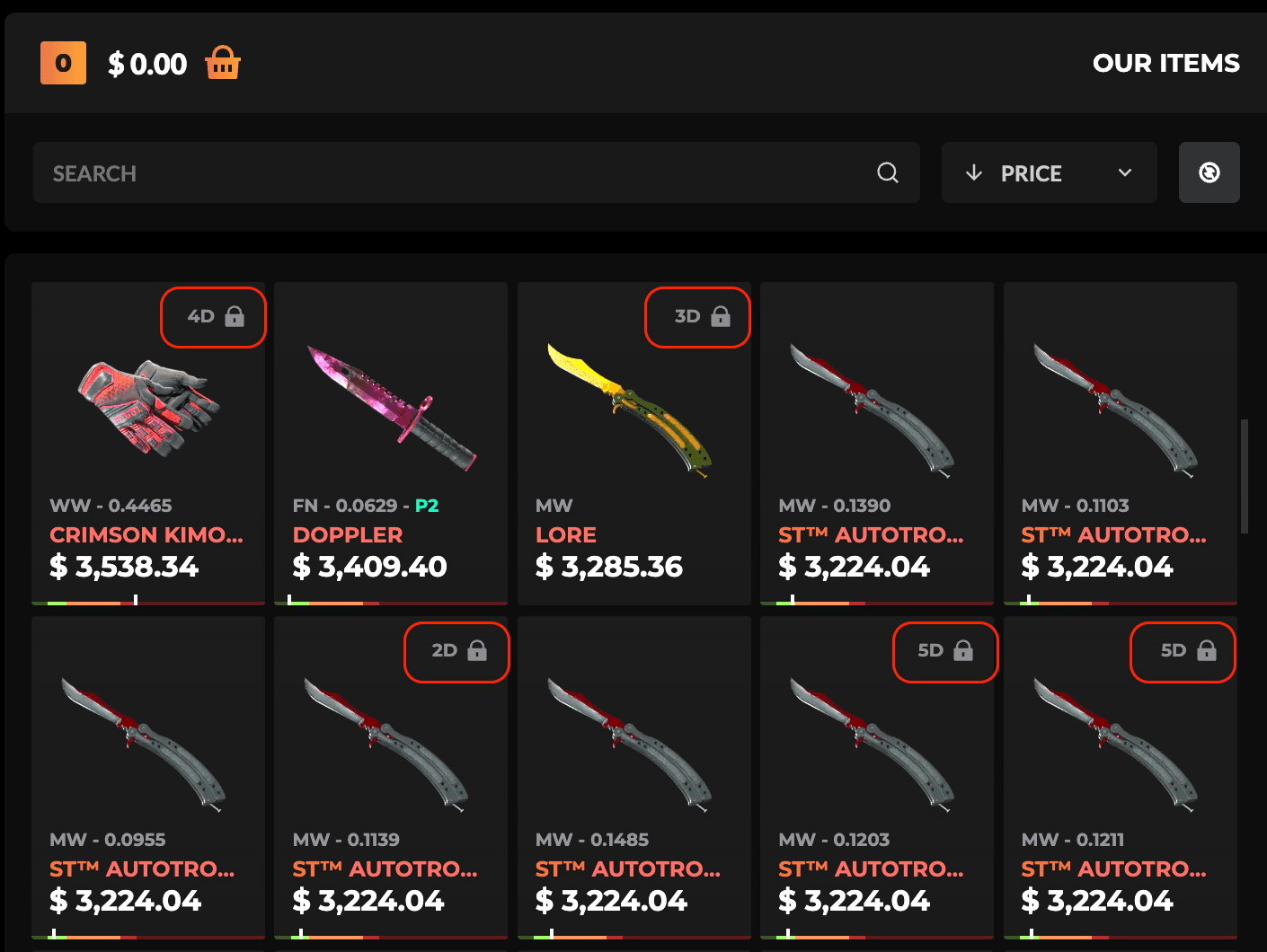\n\nYou can trade for trade-locked items, they’ll just sit in your PirateSwap Equipment until the lock expires—you’ll then be able to claim them to your Steam inventory. ","title":"Where can I see more details about a skin? ","description":"See detailed info about any CS2 skin on PirateSwap! Check float, rarity, and trade lock status with a quick click.","slug":"more-details-about-skin","createdAt":"2025-02-23T11:21:26.170Z","updatedAt":"2025-02-23T11:21:32.607Z","publishedAt":"2025-02-23T11:21:32.599Z","locale":"en","isFeatured":true,"isFrequentlyRead":null,"documentId":"zb30rtym4s9s4dkwevm7fdq0","category":{"id":3,"name":"items","description":"Get details about skins, trade locks, and the Equipment tab on PirateSwap.","createdAt":"2025-02-19T10:55:40.869Z","updatedAt":"2025-02-24T10:26:56.094Z","publishedAt":"2025-02-19T10:55:41.731Z","documentId":"euwz7r0e9swir1u454kk6elp"},"seo":{"id":133,"metaTitle":"Where can I see more details about a skin?","metaDescription":"See detailed info about any CS2 skin on PirateSwap! Check float, rarity, and trade lock status with a quick click.","keywords":"cs2 skins, pirateswap"}},"_nextI18Next":{"initialI18nStore":{"de":{"common":{"404page":{"button":"Zurück nach Hause","title":"Nun, es scheint, dass hier etwas schief gelaufen ist."},"achievements":"Errungenschaften","achievementToast":{"button":"Jetzt anfordern!","title":"Arr! \u003cbr/\u003eErrungenschaft freigeschaltet!"},"alertBanner":{"botsAvailabilityIssues":"Wir haben derzeit vorübergehende technische Schwierigkeiten, die die Verfügbarkeit einiger Bots beeinträchtigen. Alle Trades mit den derzeit verfügbaren Skins sind absolut sicher und werden normal ausgeführt. Wir versichern Ihnen, dass wir bald mit vielen weiteren verfügbaren Skins zu Ihnen zurückkehren werden."},"back":"Zurück","backToHome":"Zurück nach Hause","balanceBadge":{"copy":"bis zu \u003cstrong\u003e+{{bonus}}%\u003c/strong\u003e","title":"Bilanz"},"blog":"Blog","bonusWidgetTitle":"\u003cGreyText\u003eBonus\u003c/GreyText\u003e","bonusWidgetTitle_second":"\u003cGreyText\u003eBonus\u003c/GreyText\u003e","bonusWidgetTitle_third":"\u003cGreyText\u003eBonus\u003c/GreyText\u003e","Cancelled":"Abgebrochen","captcha":{"payment":{"description":"Bitte vervollständigen Sie die nachstehende Verifizierung, um mit Ihrer Zahlung fortzufahren."},"title":"Prüfen Sie, ob Sie ein Mensch sind"},"claimItemsToast":{"button":"Skins beanspruchen","label":"Deine handelsgesperrten Skins \u003ccolor\u003esind bereit, um eingefordert zu werden/color\u003e"},"claimPscCardsToast":{"button":"Anspruchskarten","label":"Ihre PSC-Karten \u003ccolor\u003eliegen zur Abholung bereit\u003c/color\u003e"},"clearAll":"Alle löschen","close":"Schließen","contactSupport":"Kontakt zum Support","copied":"Kopiert!","copiedToClipboard":"In die Zwischenablage kopiert.","create":"Erstellen","description":{"antiScam":"Anti-Scam - Sicherer Handel, geprüfte Community-Schutzmechanismen und volle Transparenz für jeden Nutzer.","blog":"Hol dir die neuesten CS2-News, Tipps und Tricks mit PirateSwap, der besten CS2-Tauschbörse auf den sieben Weltmeeren! Leitfäden, CS2-Skins, Events - wir decken hier alles ab. ","exchanger":"Pireateswap Exchanger - Tauschen Sie CS2 Skins sofort. Entdecken Sie jetzt eine breite Palette von CS2 Skins.","helpCenter":"Hilfe-Center - Haben Sie Fragen? Wir sind für Sie da. Erhalten Sie schnelle Antworten von unserem Support-Team","landing":"Verkaufe deine CS2 Skins sofort gegen Bargeld oder tausche sie gegen andere Skins auf PirateSwap, dem besten CS2 Trade Bot und Skin Exchange im Internet! Schnell und 100% sicher."},"error":"Fehler","Failed":"Gescheitert","FailedNeedManualAction":"FailedNeedManualAction","FailNeedManualAction":"Manuelle Aktion","filters":"Filter","follow":"Folge uns","freebieRewardModal":{"button":"ZU AUSRÜSTUNG GEHEN","reward":"BELOHNUNG","subtitle":"DU BEKOMMST EINE BELOHNUNG","title":"HERZLICHEN GLÜCKWUNSCH"},"frequentlyAskedQuestions":"Häufig gestellte Fragen","giveawayToast":{"title":"Nimm JETZT am laufenden Giveaway teil!"},"home":"Startseite","InProgress":"In Arbeit","instantSellBalance":"INSTANT SELL GUTHABEN","instantSellBalanceTooltip":{"description":"Geld aus Ihren Sofortverkäufen, das Sie sofort abheben können. Restbeträge (z. B. von Gutscheinen) und zurückerstattete Auszahlungen werden automatisch hier verbucht."},"invalidEmail":"Ungültige E-Mail","invalidSteamTradeUrl":"Ungültige Steam-Trade-Url","keywords":{"blog":"cs2 blog","exchanger":"cs2 skins, cs2 skin exchange, cs2 exchanger, instant cs2 swap, pirate swap cs2, trade cs2 skins, cs2 trading platform, swap skins instantly, counter strike 2 marketplace, skin exchanger","landing":"cs2 trade Seite, verkaufe cs2 skins, cs2 trade bot"},"loading":"Laden","loginWithSteam":"Log in","logout":"Abmelden","privacyPolicy":"Datenschutzbestimmungen","privacyPolicySubtitle":"Eine Datenschutzrichtlinie ist ein Dokument, das erklärt, wie wir Ihre persönlichen Daten sammeln, verwenden und schützen. Es hilft Ihnen zu verstehen, welche Daten bei der Nutzung unserer Anwendung gesammelt werden und wie sie verwendet werden.","promo":{"banner":{"title":"\u003chighlight\u003e+35%\u003c/highlight\u003e Nachfüllbonus","tradeWith":"Handel mit"},"bwBanner":{"first":"Erhalte \u003ccolor\u003ezusätzlichen Wert\u003c/color\u003e für die Skins, die du \u003ccolor\u003everkaufst\u003c/color\u003e und \u003ccolor\u003etauschst\u003c/color\u003e","second":"\u003ccolor\u003e+40% Bonus\u003c/color\u003e auf jede Aufladung für eine begrenzte Zeit!","third":"Handel mit:"},"extra":"\u003cHighlight\u003e35%\u003c/Highlight\u003e extra","forExchanging":"\u003cHighlight\u003efür den\u003c/Highlight\u003e Austausch von Fellen","springBanner":{"first":"\u003c1\u003e\u003ccolor\u003eFrühling\u003c/color\u003e\u003c/1\u003e\u003cbr /\u003e\u003c2\u003eRabatte\u003c/2\u003e","fourth":"\u003c1\u003e\u003ccolor\u003eBis zu $30\u003c/color\u003e\u003c/1\u003e\u003cbr /\u003e\u003c2\u003eFür den Austausch von Fellen\u003c/2\u003e","second":"\u003c1\u003e\u003ccolor\u003eErhalten Sie mehr\u003c/color\u003e\u003c/1\u003e\u003cbr /\u003e\u003c2\u003efür Ihre Häute\u003c/2\u003e","third":"\u003c1\u003e\u003ccolor\u003e35%\u003c/color\u003e extra\u003c/1\u003e\u003cbr /\u003e\u003c2\u003eAufstockungsbonus\u003c/2\u003e"},"title":"Promo-Video","topUpBonus":"top up \u003cHighlight\u003eBonus\u003c/Highlight\u003e","upTo":"bis zu \u003cHighlight\u003e$30\u003c/Highlight\u003e","useCode":"Handel \u003cHighlight\u003emit:\u003c/Highlight\u003e","wrongCode":"Arr! Prüfe deinen Promocode!","xmasBanner":{"first":"\u003c1\u003eBis zu \u003ccolor\u003e$30\u003c/color\u003e\u003c/1\u003e\u003cbr /\u003e\u003c2\u003efür den \u003ccolor\u003eAustausch von\u003c/color\u003e Fellen\u003c/2\u003e","second":"\u003c1\u003e\u003ccolor\u003e35%\u003c/color\u003e extra\u003c/1\u003e\u003cbr /\u003e\u003c2\u003e\u003ccolor\u003eEinzahlungsbonus\u003c/color\u003e\u003c/2\u003e","third":"Verwendung:"}},"promocodeBanner":{"claimedState":{"bonus":"Bonus","copy":"Dein Code: \u003c1\u003e{{promocode}}\u003c/1\u003e","header":"Code \u003c1\u003eaktiviert\u003c/1\u003e"},"editState":{"button":"Anwenden","copy":"Wenn du keinen Promocode hast, gib \u003c1\u003ePIRATESWAP\u003c/1\u003e ein.","placeholder":"PROMO-CODE EINGEBEN"},"emptyState":{"button":"Jetzt hinzufügen","secondaryTitle":"Gib deinen Promo-Code \u003c1 /\u003e ein und aktiviere den \u003c2\u003e{{bonus}}% Bonus\u003c/2\u003e","title":"Promocode"},"error":"Fehler bei der Beantragung eines Promocodes"},"readMore":"Mehr lesen","refundsPolicy":"Erstattungspolitik","refundsPolicySubtitle":"Eine Rückerstattungsrichtlinie ist ein Dokument, in dem die Bedingungen und Verfahren für die Beantragung und den Erhalt von Geldrückerstattungen erläutert werden. Es wird dargelegt, wann Sie eine Rückerstattung beantragen können, wie der Prozess abläuft und welche Fristen für Rückerstattungsanträge gelten.","Rollback":"Rollback","save":"Speichern","search":"Suche","sessionExpiredModal":{"button":"Zurückgehen","subtitle":"Du wirst zur Startseite weitergeleitet.","title":"Deine Sitzung ist abgelaufen"},"somethingWentWrong":"Etwas ist schief gelaufen","sortBy":"Sortieren nach","springDiscount":"SPRING DISCOUNT\n","springDiscountModal":{"button":"SCHECK-AKTION","description":"\u003cspan\u003eGenieße exklusive Frühlingsrabatte\u003c/span\u003e auf CS2-Skins, nur bei Pirateswap. Schnapp dir deine Lieblingsartikel - zeitlich begrenztes Angebot!","title":"SPRINGS \u003cbr /\u003e\u003cspan\u003eDISCOUNTS\u003c/span\u003e"},"storeBalance":"STORE BALANCE","Success":"Erfolgreich","support":"Unterstützung","termsOfService":"AGBs","termsOfServiceSubtitle":"Bei den Nutzungsbedingungen handelt es sich um ein Dokument, das die Regeln, Richtlinien und Vereinbarungen für die Nutzung unserer Plattform darlegt und Ihre Rechte und Pflichten als Nutzer sowie unsere Verpflichtungen als Dienstanbieter erläutert.","title":{"achievements":"Auszeichnungen - Erfülle Aufgaben, um kostenlose CS2 Skins zu erhalten | PirateSwap","affiliate":"Affiliate | Der beste CS2-Skin-Tausch | PirateSwap","antiScam":"Anti-Scam | Der beste CS2-Skin-Tausch | PirateSwap","blog":"CS2 Neuigkeiten, Tipps \u0026 Tricks | PirateSwap Blog","comingSoon":"Demnächst verfügbar! | Der beste CS2-Skin-Tausch | PirateSwap","errorPage404":"404 | Der beste CS2-Skin-Tausch | PirateSwap","exchanger":"Verkaufe CS2 (CS:GO) Skins | Beste CS2 (CS:GO) Trading Site! | PirateSwap.com","faq":"Häufig gestellte Fragen zum CS2-Trade | PirateSwap","freebies":"Freebies | PirateSwap - Die beste Seite um CS2 Skins zu tauschen","helpCenter":"Hilfe-Center | PirateSwap","instantSell":"Instant Sell - Verkaufe CS2 Skins sofort und mit Gewinn | PirateSwap","landing":"Verkaufe CS2 (CS:GO) Skins | Beste CS2 (CS:GO) Trading Site! | PirateSwap.com","maintenance":"Unterrr Wartung | PirateSwap","privacyPolicy":"Datenschutz | Der beste CS2-Skin-Tausch | PirateSwap","promo":"Promo-Leitfaden","refundsPolicy":"Erstattungsrichtlinie | PirateSwap - Die beste Seite zum Tauschen von CS2 Skins","store":"Laden | PirateSwap","storeCheckout":"Shop-Kasse | PirateSwap","storeProtrader":"Handeln wie ein PRO | PirateSwap","termsOsService":"Nutzungsbedingungen | Der beste CS2-Skin-Tausch | PirateSwap","trustedUs":"Vertraue uns | Beste CS2 (CS:GO) Trading Site! | PirateSwap.com","userProfile":"Dein Profil auf der besten CS2-Skinbörse | PirateSwap"},"toast":{"success":{"default":{"title":"Erfolgreich"},"emailChanged":{"description":"Deine E-Mail Adresse wurde gespeichert"},"tradeUrlChanged":{"description":"Deine Trade-URL wurde gespeichert"}},"warning":{"tradeUrlMissing":{"description":"Du musst die Tausch-URL hinzufügen, um den Austausch fortzusetzen","title":"Die Trade-URL fehlt"}}},"tradeBonusModal":{"bonus":"Bonus:","description":"Es ist eigentlich ganz einfach. Je mehr Sie handeln, desto höher ist der Bonus. Unten sehen Sie, wie die Bonusmeilensteine strukturiert sind.","title":"Wie funktioniert der Bonus?","trade":"Handel:"},"tradeBonusTable":{"bonus":"Bonus","minimumDeposit":"Mindestanzahlung","minimumDepositShort":"Mindesteinlage","tab":{"1":{"text":"Erste"},"2":{"text":"Zweite"},"3":{"text":"Dritte"}}},"tradeBonusTooltip":{"1":{"text":"Erster Tradebonus"},"2":{"text":"Zweiter Tradebonus"},"3":{"text":"Dritter Tradebonus"},"currentBonus":"Bonus:","currentDeposit":"Kaution:"},"tradeBonusWidget":{"addPromoCode":"\u003cturquoiseBold\u003eGib den Promo-Code ein\u003c/turquoiseBold\u003e, um einen Bonus für deine erste Transaktion zu erhalten!","addPromoCodeButton":"Promocode hinzufügen","addPromoCodeInfo":"Gib den Promo-Code ein, um einen Bonus für deine erste Transaktion zu erhalten!","addPromoCodeLG":"Gib den \u003cbold\u003ePromocode\u003c/bold\u003e ein, um einen Bonus für deine erste Transaktion zu erhalten!","allPromoCodesUsed":"Sie haben alle Handelsboni gesammelt.","completedButtonText":"Belohnungen erhalten","completedText":"Hallo Pirat! Überprüfe deine Erfolge und \u003c1\u003eerhalte Belohnungen!\u003c/1\u003e","congratulations":"Herzlichen Glückwunsch!","getFree":"Get free $10","text":{"1":{"long":"Erster Handelsbonus"},"2":{"long":"Zweiter Handelsbonus"},"3":{"long":"Dritter Handelsbonus"},"activated":"Aktiviert","short":"Handels-Bonus"}},"validateCryptoWallet":{"error":"Fehler bei der Überprüfung der Adresse","invalidWalletFormat":"Ungültiges Adressformat {{name}} "},"WaitingForTradeProtected":"In Arbeit","withdraw":{"noEnoughFundsToWithdraw":"Keine ausreichenden Mittel zum Abheben"}},"helpCenter":{"articles":"Artikel","banner":{"button":"Unterstützung","description":"Unser Support-Team ist für Sie da, um Ihnen bei allen Fragen und Anliegen zu helfen","title":"Brauchen Sie weitere Hilfe?"},"browseAllCategories":"Alle Kategorien","category":{"account":"Konto","bonuses":"Boni","instantSell":"Sofortiger Verkauf","security":"Sicherheit","topUp":"Kontoeinlage","trading":"Handel"},"foundArticles":"Gefundene Artikel","frequentlyReadArticles":"Häufig gelesene Artikel","header":{"description":"Sie brauchen Hilfe oder haben eine Frage? Schauen Sie sich unsere Artikel an und finden Sie die Antworten, nach denen Sie suchen!","title":"Wie können wir helfen?"},"noFoundArticles":{"description":"Keine Artikel entsprechen Ihren Suchkriterien. Versuchen Sie es mit anderen Schlüsselwörtern oder überprüfen Sie Ihre Suchanfrage auf Tippfehler.","title":"Keine Artikel gefunden"},"tickets":{"confirmLeave":{"description":"Ihre Nachricht wird verloren gehen, wenn Sie jetzt gehen.","leave":"Verlassen","stay":"Bleiben","title":"Anfrage verwerfen?"},"contentLabel":"Beschreibung","contentPlaceholder":"Beschreiben Sie Ihr Problem...","createTicket":"Anfrage erstellen","hasOpenTickets":"Du kannst eine Anfrage erneut öffnen, sobald alle anderen geschlossen sind.","imageUpload":{"dragHint":"Bilder hierher ziehen oder aus der Zwischenablage einfügen (Strg+V","invalidType":"Nur JPG, PNG, GIF Dateien sind erlaubt","tooLarge":"Das Bild muss unter 5 MB groß sein.","tooMany":"Maximal 5 Bilder erlaubt"},"maxOpenTickets":"Du kannst maximal 5 offene Anfragen gleichzeitig haben.","message":"Nachricht","messages":"Nachrichten","myTickets":"Meine Anfragen","new":"Neu","noTickets":"Noch keine Anfragen","noTicketsDescription":"Erstellen Sie eine Anfrage, um Hilfe von unserem Support-Team zu erhalten","pageDescription":"Erstellen und verwalten Sie Ihre Supportanfragen. Unser Team wird so schnell wie möglich antworten.","pageTitle":"Supportanfragen","pendingReply":"Wir arbeiten daran und werden so bald wie möglich antworten. \u003cbr/\u003e In der Regel antworten wir innerhalb von 15 Minuten. \u003cbr/\u003e Sie können dieses Fenster schließen - wir werden Sie benachrichtigen, wenn wir antworten.","reopen":"wieder öffnen.","status":{"closed":"Geschlossen","open":"Offen"},"submit":"Anfrage senden","submitError":"Es ist etwas schief gegangen. Bitte überprüfen Sie Ihre Eingaben und versuchen Sie es erneut.","submitting":"Einreichen...","titleLabel":"Titel","titlePlaceholder":"Titel der Anfrage eingeben","topicLabel":"Thema","topicPlaceholder":"Wählen Sie ein Thema","typeMessage":"Geben Sie eine Nachricht ein..."}},"footer":{"account":"Konto","community":"Gemeinschaft","company":"Unternehmen","copy":"Copyright © 2025 PirateSwap.com\u003cbr /\u003eAll rights reserved","copyright":"Urheberrecht © 2023 PIRATESWAP.COM","discordAriaLabel":"Link zu Discord","exchanger":"Handel mit Fellen","exchange":{"text":"Austausch"},"facebookAriaLabel":"Link zu Facebook","faq":{"bonuses":{"description":"\u003cp\u003ePirateSwap richtet seine Boni nach der Aktivität der Nutzer aus – nicht nach Glück oder langen Wartezeiten. Mit jeder Neuanmeldung wird ein Handelsbonus in Höhe von 30 $ freigeschaltet, der auf die ersten drei Trades des Nutzers aufgeteilt wird. Jede Transaktion bringt einen proportionalen Bonus ein, wobei die vollen 30 $ nach drei qualifizierenden Trades erreicht werden.\u003c/p\u003e\u003cp\u003ePromo-Codes wie PIRATESWAP erhöhen jede Guthabenaufladung um 35 %, sodass eine Einzahlung von 10 $ ein nutzbares Guthaben von 13,50 $ ergibt. Diese Codes werden über Affiliate-Kanäle und Influencer-Partner verbreitet und unterstützen so unsere aktive Trading-Community.\u003c/p\u003e\u003cp\u003eFreebies bieten jedem Trader die Chance, bei jeder Guthabenaufladung oder jedem Handel einen kostenlosen CS2-Skin zu erhalten. Nutzer wählen ein Freebie-Event aus, erfüllen die Mindestaktivitätsanforderungen und erhalten nach Abschluss eine Belohnung. Im Gegensatz zu den restriktiven Systemen anderer CS-Trading-Websites gibt PirateSwap alle Boni sofort und mit voller Transparenz frei.\u003c/p\u003e\n","note":"Jede Prämie wird unmittelbar nach Abschluss der qualifizierenden Transaktion auf Ihrem Konto gutgeschrieben.","table":"\u003ctable\u003e\u003cthead\u003e\u003ctr\u003e\u003cth\u003eBonus\u003c/th\u003e\u003cth\u003eSo erhalten Sie\u003c/th\u003e\u003cth\u003eden\u003c/th\u003e\u003c/tr\u003e\u003c/thead\u003e\u003ctbody\u003e\u003ctr\u003e\u003ctd\u003e30 $ Handelsbonus\u003c/td\u003e\u003ctd\u003eRegistrieren, die ersten 3 Trades\u003c/td\u003e\u003ctd\u003eBis zu 30 $ über 3 Trades\u003c/td\u003e\u003c/tr\u003e\u003ctr\u003e\u003ctd\u003eAktionscode (+35 %)\u003c/td\u003e\u003ctd\u003eCode bei Einzahlung eingeben\u003c/td\u003e\u003ctd\u003e10 $ Einzahlung = 13,50 $\u003c/td\u003e\u003c/tr\u003e\u003ctr\u003e\u003ctd\u003eGratisangebote\u003c/td\u003e\u003ctd\u003eBei jeder Einzahlung/jedem Handel\u003c/td\u003e\u003ctd\u003eChance auf einen kostenlosen CS2-Skin\u003c/td\u003e\u003c/tr\u003e\u003c/tbody\u003e\u003c/table\u003e\n","title":"Boni speziell für aktive Trader"},"content":{"description":"Bei PirateSwap profitieren CS2-Händler von schnellen, fairen Skin-Trades, die in nur 30 Sekunden abgewickelt werden. Wir arbeiten über die Steam-Anmeldung und die sofortige Übermittlung von Trade-URLs und unterstützen so sichere CS2-Trades für jede Inventargröße. Jeder neue Nutzer erhält einen Handelsbonus von bis zu 30 $ sowie zusätzliche Vorteile durch Promo-Codes wie „PIRATESWAP“ und tägliche Gratisgeschenke für aktiven Handel. Durch Sponsoring-Partnerschaften mit E-Sport-Teams wie The MongolZ, Imperial Esports und paiN Gaming stehen wir im Mittelpunkt der CS2-Skin-Handelsszene. Unser Prozess umfasst transparente Auszahlungen und Support rund um die Uhr und ist darauf ausgelegt, die typischen Frustrationen und Verzögerungen zu beseitigen, die auf CS-Tausch-Websites häufig auftreten."},"howItWorks":{"description":"Die Registrierung und der Start eines CS2-Tauschs über PirateSwap erfordern nur wenige Schritte und ersparen die üblichen Wartezeiten, die anderswo anfallen. Jeder CS2-Tauscher wird von der Steam-Anmeldung bis zum sofortigen Abschluss begleitet.","list":"\u003col\u003e\u003cli\u003eMelde dich bei PirateSwap mit Steam an.\u003c/li\u003e\u003cli\u003eFüge deine Tausch-URL und deine verifizierte E-Mail-Adresse zu deinem Konto hinzu.\u003c/li\u003e\u003cli\u003eAktiviere Steam Guard in deinem Steam-Profil, stelle dein Inventar auf „öffentlich“ ein und stelle sicher, dass für die Gegenstände, die du tauschen möchtest, keine Tauschbeschränkung aktiv ist.\u003c/li\u003e\u003cli\u003eVervollständige dein Profil, um den Zugang zum Tausch von CS2-Skins mit sofortigen Ergebnissen freizuschalten.\u003c/li\u003e\u003cli\u003eDurchsuche die verfügbaren Skins oder wähle den Sofortverkauf für deine CS2-Gegenstände.\u003c/li\u003e\u003cli\u003eStarte deinen CS2-Tausch – der Vorgang ist in etwa 30 Sekunden abgeschlossen, schneller als bei Mitbewerbern, die in der Regel mehrere Minuten oder länger benötigen.\u003c/li\u003e\u003c/ol\u003e\n","note":"PirateSwap bietet einen rund um die Uhr verfügbaren Support zur Behebung von Problemen mit Konten oder Transaktionen. Im Gegensatz zu den meisten CS-Handelsplattformen gibt es für zugelassene Nutzer keine künstlichen Verzögerungen oder unnötige Verifizierungsschleifen. Eine Transaktion. Dreißig Sekunden. Das Ergebnis ist sofort sichtbar.","title":"So funktioniert PirateSwap"},"instantSell":{"description":"\u003cp\u003ePirateSwap bietet jedem Nutzer Zugriff auf Sofortverkaufsfunktionen, mit denen sich CS2-Skins ohne Verzögerung in Bargeld umwandeln lassen. Die Auszahlungsoptionen erfolgen ausschließlich über Geschenkkarten durch den Verkauf Ihrer im Inventar befindlichen Skins. Die Plattformguthaben sind für den Handel und Verkauf von Skins vorgesehen. Nur der Erlös aus dem Sofortverkauf von Skins kann sofort ausgezahlt werden.\u003c/p\u003e\u003cp\u003eHändler, die sich für den Sofortverkauf entscheiden, profitieren von einer sofortigen Abwicklung mit niedrigen Gebühren und ohne versteckte Abzüge bei der Auszahlung. Die unterstützten Auszahlungsmethoden sind auf ein globales Publikum zugeschnitten und umfassen sichere Auszahlungsmethoden sowie Geschenkkarten. Jede Sofortauszahlung ist transparent und zeigt zum Zeitpunkt der Anfrage den Abzug sowie den endgültig erhaltenen Betrag an.\u003c/p\u003e\u003cp\u003eDer Tausch ermöglicht es Händlern auf \u003clinkTo\u003ePirateSwap, Skins\u003c/linkTo\u003e sofort über das CS2-Skin-Handelssystem \u003clinkTo\u003ezu tauschen\u003c/linkTo\u003e, während der Sofortverkauf Vermögenswerte ausschließlich in Geld umwandelt. Für alle Auszahlungen sind ein Steam-Guard-aktiviertes Konto und eine gültige Handels-URL erforderlich. Probleme mit der Handelssperre oder der Vollständigkeit des Profils können eine sofortige Auszahlung verhindern, lassen sich jedoch über unser Hilfezentrum leicht beheben.\u003c/p\u003e\n","title":"Sofortverkauf und Auszahlungsoptionen"},"proScene":{"description":"\u003cp\u003ePirateSwap knüpft enge Verbindungen zur professionellen CS2-Szene, unterstützt Teams und veröffentlicht Einblicke in den Bestand – sowohl für begeisterte CS-Tausch-Nutzer als auch für Gelegenheitssammler. Durch Sponsoring-Vereinbarungen ist PirateSwap mit Organisationen wie The MongolZ, Imperial Esports, paiN Gaming, Chinggis Warriors und MIBR verbunden. Unser Blog-Bereich bietet aktuelle Aufschlüsselungen der Bestandswerte von Spielern, beispielsweise mit Skins im Wert von 700 bis 98.000 US-Dollar – darunter Favoriten wie die AK-47 Gold Arabesque und die AWP Dragon Lore bis hin zur Karambit Gamma Doppler und dem Butterfly Knife Fade.\u003c/p\u003e\u003cp\u003eDie Partner unter den Content-Erstellern erreichen ein Publikum von 163.000 bis 2,17 Millionen, von Tiagovski und Izak bis hin zu Boltz – und erweitern so die Reichweite und Authentizität von PirateSwap CS2. PirateSwap verfügt über 4.329 Bewertungen, die als „ausgezeichnet“ eingestuft wurden und somit soziale Bestätigung sowie qualitatives Feedback liefern. CS-Händler sehen ihre Skin-Aktivitäten im Vergleich zu denen der Top-Profis, was das Vertrauen in jede Skin-Transaktion stärkt.\u003c/p\u003e\n","title":"Im Zusammenhang mit der Pro CS2-Szene"},"questions":{"1":{"answer":"Melde dich bei Steam an, füge deine Trade-URL hinzu, vervollständige dein Profil und stelle sicher, dass Steam Guard aktiviert ist. Für den ersten Tausch von CS2-Skins sind ein öffentliches Inventar und die Deaktivierung der Tauschsperre erforderlich.","question":"Wie kann ich einen CS2-Tausch auf PirateSwap starten?"},"2":{"answer":"PirateSwap kann keinen CS2-Skin-Tausch für Gegenstände durchführen, die mit einer Tauschsperre versehen sind. Hebe die Tauschsperre auf, um fortzufahren, oder wähle Skins aus, die für den Tausch zugelassen sind.","question":"Was passiert, wenn mein Gegenstand während eines CS2-Skin-Tauschs mit einer Tauschsperre versehen ist?"},"3":{"answer":"Ja, jeder Nutzer kann die Sofortverkaufsfunktion nutzen. Artikel müssen die Überprüfungen zur Handelbarkeit bestehen und die Steam-Guard-Verifizierung durchlaufen, um gegen Bargeld verkauft werden zu können.","question":"Bietet PirateSwap einen Sofortverkauf für alle CS2-Skins an?"},"4":{"answer":"PirateSwap erhebt sowohl für den CS2-Tausch als auch für den Sofortverkauf nur geringe Gebühren. Bei keiner Auszahlungs- oder Überweisungsmethode fallen versteckte Gebühren an.","question":"Fallen Gebühren an, wenn ich CS2-Skins tausche oder die Sofortverkaufsfunktion nutze?"},"5":{"answer":"Nur der durch den Sofortverkauf Ihrer CS2-Skins erzielte Wert kann ausgezahlt werden. Sobald die Handelsbedingungen erfüllt sind, erfolgt die Auszahlung sofort.","question":"Wie kann ich nach einem Sofortverkauf Geld abheben?"},"6":{"answer":"Nein, das eingezahlte Guthaben oder das Bonusguthaben kann ausschließlich für den Handel mit CS2-Skins oder für Einkäufe im Store verwendet werden. Eine Auszahlung ist nur für Erlöse aus dem Verkauf Ihrer eigenen Skins möglich.","question":"Kann ich den Guthabenbetrag, der durch eine Einzahlung oder einen Aktionscode gutgeschrieben wurde, abheben?"},"7":{"answer":"Registrieren Sie sich und führen Sie bis zu drei berechtigte Trades durch. Der Trade-Bonus wird automatisch gutgeschrieben, die Auszahlung beträgt bis zu 30 $.","question":"Wie erhalte ich den 30-Dollar-Handelsbonus?"},"8":{"answer":"Gib beim Aufladen deines Guthabens Codes wie „PIRATESWAP“ ein. Mit jedem Code erhältst du bis zu 35 % zusätzlich auf deinen Einzahlungsbetrag für den Handel mit CS2-Skins.","question":"Wo kann ich einen Aktionscode für eine Aufladung eingeben?"},"9":{"answer":"Die meisten auf PirateSwap gehandelten CS2-Skins sind zulässig – StatTrak, Messer, Handschuhe und Sondereditionen. Überprüfe vor dem Tausch den Status des Gegenstands und die Steam-Guard-Einstellungen in deinem Steam-Konto.","question":"Welche Skins kommen für den Tausch und den Sofortverkauf in CS2 in Frage?"},"10":{"answer":"Die Nutzungsbedingungen, die Datenschutzerklärung und die Rückerstattungsrichtlinien finden Sie im Hilfe-Center. Auf der Website von CS Trading sind alle Bedingungen, Anforderungen und Kontaktdaten aufgeführt.","question":"Wo finde ich die Nutzungsbedingungen und Datenschutzhinweise?"},"11":{"answer":"PirateSwap sponsert The MongolZ, Imperial Esports, paiN Gaming, Chinggis Warriors und MIBR. In den Bereichen „Blog“ und „Shop“ werden die Ausrüstungen der Profispieler sowie Skin-Trends für den CS2-Handel vorgestellt.","question":"Wer sind die E-Sport-Partner von PirateSwap?"}},"questionsTitle":"Häufig gestellte Fragen","sections":{"description":"PirateSwap cs2 deckt alle wichtigen Handelsanforderungen durch sechs spezielle Bereiche ab, die jeweils über das Menü der Website aufgerufen werden können. Nutzer finden hier gezielte Unterstützung und Tools für jedes Handelsziel.","list":"\u003cul\u003e\u003cli\u003e\u003clinkTo\u003ePirateSwap Store\u003c/linkTo\u003e: Ein Katalog mit Tausenden von CS2-Skins, StatTrak-Modellen, Messern, Handschuhen und seltenen Gegenständen wie AWP Crakow und Nova Koi.\u003c/li\u003e\u003cli\u003e\u003cstrong\u003eExchanger:\u003c/strong\u003e Der Soforttausch für CS2-Händler macht manuelle Angebote überflüssig und beschleunigt jeden Handel.\u003c/li\u003e\u003cli\u003e\u003cstrong\u003eFreebies:\u003c/strong\u003e Laufende Events, bei denen man kostenlose CS2-Skins gewinnen kann, mit aktivitätsbasierten Teilnahmebedingungen.\u003c/li\u003e\u003cli\u003e\u003cstrong\u003eBlog:\u003c/strong\u003e Artikel über Profiteams, Spieler-Inventare, Sammeltrends und die technischen Aspekte von Skin-Werten.\u003c/li\u003e\u003cli\u003e\u003cstrong\u003eHilfezentrum:\u003c/strong\u003e Ressourcen zu Handelsboni, Unterstützung bei Transaktionen, Fehlerbehebung bei Auszahlungen, Steam-Sicherheit, Richtlinien und Transaktionsverlauf.\u003c/li\u003e\u003cli\u003e\u003cstrong\u003eVertrauenswürdige Creator:\u003c/strong\u003e Eine Liste verifizierter Influencer und Ratgeber, um den Wert beim Handel mit CS2-Skins zu maximieren und die neuesten CS2-Handelsveranstaltungen zu verfolgen.\u003c/li\u003e\u003c/ul\u003e\n","note":"Jeder Abschnitt ist auf einen bestimmten Schritt im CS2-Skin-Handel ausgerichtet, wodurch sichergestellt wird, dass pirateSwap CS2 als umfassende Plattform und nicht nur als reine CS-Handelsseite fungiert.","title":"Entdecken Sie die Bereiche von PirateSwap"},"security":{"description":"\u003cp\u003ePirateSwap wird als rechtmäßig registriertes Unternehmen unter dem Namen IT MARKET BG, Morska Sirena Str. 24, Etage 10, Wohnung 58, Varna, Bulgarien, betrieben. Alle Nutzer müssen mindestens 18 Jahre alt sein und den Nutzungsbedingungen, der Datenschutzerklärung sowie den Rückerstattungsrichtlinien zustimmen, bevor sie CS-Trades tätigen können.\u003c/p\u003e\u003cp\u003eTransaktionen erfolgen über sichere Verbindungen, wobei externe Unternehmen die gesamte Zahlungsabwicklung übernehmen, um Betrugsrisiken zu minimieren. Jeder Handel und jede Auszahlung unterliegt rechtsverbindlichen Bedingungen mit klaren Regeln für Rückerstattungen oder die Beilegung von Streitfällen. Die CS-Handelsplattform verfügt über 3.783 Bewertungen und bietet Support-Mitarbeiter zur Lösung von Problemen bei Handelsvorgängen, der KYC-Prüfung oder Zahlungen.\u003c/p\u003e\u003cp\u003eDie Privatsphäre der Nutzer bleibt geschützt. Die Einhaltung der Vorschriften wird durch obligatorische Zahlungsbelege gewährleistet, sofern erforderlich, und alle Richtlinien sind öffentlich einsehbar.\u003c/p\u003e","title":"Sicherheit und klare Regeln"}},"freebies":"Werbegeschenke","helpCenter":"Hilfe-Center","instagramAriaLabel":"Link zu Instagram","instantSell":"Sofortiger Verkauf","mainHeader":"\u003c1\u003eNr.1 CS2\u003c/1\u003e\u003c2 /\u003eSkin Austausch\u003c3 /\u003e Online","owned":"PirateSwap ist Eigentum der MESSIDOR LTD und wird von dieser betrieben. \u003cbr /\u003eZahlungen und andere Dienstleistungen können von externen Unternehmen erbracht werden. Kontaktieren Sie uns über help@pirateswap.com.","ownedBy":"Pirate Swap ist Eigentum und wird betrieben von MESSIDOR LTD","ownedNew":"PirateSwap ist Eigentum und wird betrieben von: \u003cbr /\u003e\nIT MARKET BG, 24 Morska Sirena S,t. fl. 10, apt.58, 9000 Varna, Bulgarien\u003cbr /\u003e\n\u003cbr /\u003e\nZahlungen und andere Dienstleistungen können von externen Unternehmen erbracht werden. Kontaktieren Sie uns über help@pirateswap.com.","pirateSwap":"PirateSwap","privacyPolicy":"Datenschutzbestimmungen","rights":"Alle Rechte vorbehalten 2023","rightsReserved":"Alle Rechte vorbehalten","sell":"Verkaufen","steamCommunityAriaLabel":"Link zur Steam-Community","support":"Unterstützung","termsAndConditions":"Bedingungen und Konditionen","twitterAriaLabel":"Link zu X (Twitter)","userAccount":"Benutzerkonto"},"header":{"achievements":"Errungenschaften","affiliate":"Affiliate","antiScam":"Anti-Scam","balanceBadge":{"storeBalance":"Gleichgewicht speichern","totalBalance":"Gesamtsaldo"},"exchanger":"Exchanger","followUs":"Folge uns:","freebies":"Werbegeschenke","getBonus":{"long":"Get free $10","short":"Free $10"},"giveaways":"Werbegeschenk","helpCenter":"Hilfe-Center","instantSell":"Instant Sell","loginViaSteam":"Anmeldung über Steam","logoAriaLabel":"Link zur Homepage","logout":"Abmeldung","privacyPolicy":"Datenschutzbestimmungen","promo":"Brief","promoCodeActivated":{"desc":"Wenn du mit $30 auflädst, bekommst du stattdessen \u003ccolor\u003e$40,5\u003c/color\u003e!","title":"\u003ccolor\u003e35%\u003c/color\u003e Promo-Code aktiviert"},"refundsPolicy":"Erstattungspolitik","sell":{"long":"Instant Sell","short":"Sell"},"store":"Laden Sie","support":"Support","termsOfService":"Allgemeine Geschäftsbedingungen","trade":{"long":"Trade Skins","short":"Trade"},"trustedUs":"Vertraue uns","userAccount":"Benutzerkonto","welcomePhrase":"Ahoi Pirat!","wiki":"Wiki"},"modals":{"blackWeek":{"button":"Bonus für die Black Week erhalten","disclaimer":"Der Black Friday-Bonus kann nicht mit einem anderen Bonus kombiniert werden.","paragraphOne":"\u003ccolor\u003eErhalte einen Mehrwert für die Skins\u003c/color\u003e, die du auf PirateSwap verkaufst und tauschst!","paragraphTwo":"Außerdem gibt es für begrenzte Zeit einen \u003ccolor\u003e40 % Bonus\u003c/color\u003e auf jede Aufladung!"},"claimItem":"Item fordern","claimItemDesc":"Dadurch wird ein sicherer Handel eingeleitet, bei dem wir Ihnen diese Haut liefern.","claimItemTitle":"Sind Sie bereit, Ihren Artikel zu reklamieren?","downloadAvatar":"Avatar herunterladen","goBack":"Zurückgehen","skinDetails":{"add":"hinzufügen","addToCard":"In den Warenkorb legen","addToTrade":"hinzufügen","claimItem":"Einlösen","collection":"Sammlung","description":{"agent":"Die 2019 zu Counter-Strike hinzugefügten Agenten-Skins ermöglichen es euch, euer Spielermodell in einen völlig anderen Charakter zu verwandeln. Einige Agenten ändern auch die Funkstimme, mit der dein Charakter spricht, was die Veränderung noch lustiger macht. Agenten gibt es in 4 Raritäten: Distinguished, Exceptional, Superior und Master.","ak-47":"Die AK (Avtomat Kalashnikova, Kalashnikov's Automatic) ist vielleicht das kultigste Gewehr sowohl in Counter-Strike als auch im echten Leben. Sie wird seit 1949 produziert und ist damit die älteste Waffe in Counter-Strike. Dieses klassische Gewehr ist das beliebteste Gewehr der Terroristen, da es trotz seines ziemlich starken Rückstoßes mit einem Kopfschuss tötet.","aug":"Das in den 1960er Jahren entwickelte und 1978 von Steyr-Daimler-Puch auf den Markt gebrachte AUG ist aufgrund seiner Bauweise die bevorzugte Waffe des österreichischen Bundesheeres. Im Spiel ist es aufgrund seines Umfangs und seiner Schadensleistung ein leistungsstarkes Gewehr, auch wenn sein hoher Preis manche abschreckt.","awp":"Das britische Accuracy International Arctic Warfare Scharfschützengewehr wird seit 1982 produziert, auch wenn einige behaupten, die Variante im Spiel sei die AWM und nicht die AWP. Die Waffe ist ein ikonischer Bestandteil von Counter-Strike, da sie unabhängig von der Panzerung mit einem Schuss in den Rumpf oder Kopf tötet und damit das drittbeliebteste Gewehr hinter der AK und der M4 ist.","bayonet":"Das Bajonett basiert auf dem M9M4-Bajonett, einem Messer, das normalerweise am Lauf eines Gewehrs befestigt wird. Messer in Counter-Strike sind nur kosmetisch und verändern den von der Waffe verursachten Schaden in keiner Weise.","bloodhound-gloves":"Die Bloodhound Gloves sind gepanzerte Handschuhe mit einem grausamen Design, mit Metallbeschichtung und aggressiven Motiven. Inspiriert von der Bloodhound-Fraktion in Counter-Strike, sollen diese Handschuhe einschüchtern. Im Spiel sind die Bloodhound Gloves eine kosmetische Wahl, die das Spiel aufpeppen, ohne die Spielmechanik zu beeinflussen.","bowie-knife":"Das Bowie-Messer ist ein großes Messer mit feststehender Klinge, benannt nach dem amerikanischen Pionier Jim Bowie. Es ist für seine Stärke und Vielseitigkeit bekannt und ein Favorit für schwere Aufgaben. In Counter-Strike ist das Bowie-Messer eine kosmetische Wahl und hat keinen Einfluss auf den von der Waffe verursachten Schaden.","butterfly-knife":"Das Butterfly-Messer, auch Balisong genannt, verfügt über einen einzigartigen Mechanismus zum Aufklappen der Klinge, der auffällige Animationen beim Öffnen und Schließen ermöglicht. Dieses aus den Philippinen stammende Messer ist sowohl ein Werkzeug als auch eine Waffe. In Counter-Strike bietet es außer seinem ästhetischen Reiz keinen Spielvorteil, da alle Messer den gleichen Schaden verursachen.","classic-knife":"Das Classic Knife ist ein zeitloses Design, das an das Standardmesser in früheren Versionen von Counter-Strike erinnert. Es ist geradlinig, zuverlässig und ikonisch. In Counter-Strike ist das Classic Knife eine nostalgische, kosmetische Option, die keinen Einfluss auf den Schadensausstoß oder die Werte der Waffe hat.","container":"Cases in Counter-Strike sind virtuelle Behälter, die eine Vielzahl von kosmetischen Gegenständen enthalten, wie z. B. Waffen-Skins, Handschuhe oder Messer. Jeder Koffer bietet eine zufällige Auswahl an Gegenständen, die von gewöhnlich bis extrem selten reichen.","cz75-auto":"Die CZ75-Auto ist eine modifizierte Version der tschechischen CZ75 von Ceska Zbrojovka, dem ehemaligen nationalen Waffenhersteller der Tschechischen Republik. Dies ist die einzige automatische Pistole in Counter-Strike, mit einer lächerlichen Feuerrate, die nur von ihrem Rückstoß übertroffen wird, was sie zu einer extrem gefährlichen Waffe macht, wenn man sie beherrscht.","desert-eagle":"Die von Magnum Research und Israel Military Industries entworfene Desert Eagle gibt es in der Realität seit 1983 und hat seitdem einige kleine Veränderungen erfahren. Im Spiel ist diese 700-Dollar-Waffe ein Biest, das mit einem einzigen Kopfschuss tötet, unabhängig von der Panzerung des Gegners. Der Nachteil? Wenn Sie einen Schuss verfehlen, verfehlen Sie wahrscheinlich alle, denn die Waffe hat einen starken Rückstoß.","driver-gloves":"Die Driver Gloves bieten ein elegantes, hochwertiges Design, das von Rennhandschuhen der alten Schule inspiriert ist, und sorgen für hervorragenden Grip und Kontrolle am Steuer. Ihre Lederkonstruktion und die sorgfältigen Nähte spiegeln Luxus und Leistung wider. In Counter-Strike sind Driver Gloves rein kosmetisch und haben keinen Einfluss auf die Spielmechanik.","dual-berettas":"Die Dual Berettas sind von der in Italien hergestellten Beretta 92 inspiriert. Die Idee, sie mit zwei Waffen auszustatten, stammt von ihrer Verwendung als Pistolen mit zwei Waffen in John Woos klassischen Hongkong-Actionfilmen wie Hard Boiled. Im Spiel sind sie aufgrund ihrer geringen Panzerungsdurchdringung am nützlichsten bei Pistolenschüssen.","falchion-knife":"Das Falchion-Messer ist von mittelalterlichen europäischen Schwertern inspiriert und verfügt über eine leicht gebogene Klinge, die Elemente eines Messers und eines Schwertes vereint. Sein historisches Design ist bei Counter-Strike rein ästhetisch, da es den von der Waffe verursachten Schaden in keiner Weise verändert.","famas":"Das FAMAS wurde 1978 entwickelt und steht für Fusil d'Assaut de la Manufacture d'Armes de Saint-Étienne. Es ist ein billigeres und schadensärmeres Gewehr als das M4, aber dennoch effektiv bei Truppenaufkäufen und Anti-Ökos.","five-seven":"Die von FN Herstal in Belgien hergestellte Version dieser Waffe wurde in Verbindung mit einer anderen CS2-Waffe, der P90, entwickelt. Die Waffe ist eine gute Wahl für Force Buys und hat eine viel größere Durchschlagskraft, als man erwarten würde.","flip-knife":"Das Flip Knife ist eine moderne taktische Klinge mit einem schnell ausklappbaren, federbelasteten Mechanismus. Sein schlankes Design wird von vielen wegen seiner kompakten Größe und schnellen Wirkung bevorzugt. Trotz seines praktischen Aussehens ist es in Counter-Strike rein kosmetisch und hat keinen Einfluss auf den Schadensoutput oder andere Werte.","g3sg1":"Diese Waffe wurde 1959 von Heckler \u0026 Koch entwickelt und ist die Scharfschützenvariante des G3-Sturmgewehrs. Im Spiel ist der Autosniper eine mächtige, aber teure Waffe. Sie eignet sich hervorragend für Gelegenheitsspieler, wird aber aufgrund ihres geringeren Schadens am Rumpf leicht von einem konsequenten AWPer zunichte gemacht.","galil-ar":"Die von Israel Military Industries entwickelte und nach dem Konstrukteur Yisrael Galili benannte Waffe ist seit 1972 im Einsatz und wird noch immer von den israelischen Verteidigungskräften verwendet. Ihr Design lässt sich auf die AK-47 zurückführen. Das passt, denn im Spiel ist die Galil im Wesentlichen eine schwächere Version des russischen Gewehrs, die für einen niedrigeren Preis weniger Schaden verursacht.","glock-18":"Die Glock-18 ist eine der beliebtesten Pistolen der Welt. Sie wird in Österreich hergestellt und wird seit 1982 von Militärs und Strafverfolgungsbehörden (sowie von Banden) auf der ganzen Welt verwendet. Sie ist die Standardpistole auf der T-Seite. Sie ist nur in der ersten Runde der beiden Hälften wirklich nützlich.","gut-knife":"Das Gut Knife verfügt über einen Haken am Klingenrücken, der ursprünglich für das Abrichten von Wild gedacht war. Dieses robuste Design ist bei Jägern und Survivalisten sehr beliebt. In Counter-Strike verleiht das einzigartige Aussehen des Darmmessers deinem Loadout Stil, verändert aber nicht den Schaden oder die Funktionalität der Waffe.","hand-wraps":"Hand Wraps sind robuste, behelfsmäßige Handschuhe aus Stoffstreifen, die typischerweise bei Kampfsportarten oder von Soldaten im Feld verwendet werden. Sie bieten Schutz und Halt und sind gleichzeitig flexibel. In Counter-Strike bieten Hand Wraps ein raues, taktisches Aussehen, bleiben aber kosmetisch und haben keinen Einfluss auf das Gameplay.","huntsman-knife":"Das Huntsman Knife ist ein robustes, für den Outdoor-Einsatz konzipiertes Kampfmesser mit einer breiten Klinge, die sich sowohl zum Hacken als auch zum Schneiden eignet. Sein robustes Design macht es bei Survivalisten beliebt. In Counter-Strike ist das Huntsman Knife rein kosmetisch und bietet keine Gameplay-Vorteile.","hydra-gloves":"Die Hydra Gloves bieten ein einzigartiges, aggressives Design mit komplizierten Mustern und hochwertigen Materialien. Benannt nach der mythischen Bestie, sind diese Handschuhe ebenso stilvoll wie funktional. In Counter-Strike sind die Hydra-Handschuhe nur kosmetischer Natur und sorgen für einen besonderen Look, ohne die Spieldynamik zu verändern.","karambit":"Das Karambit ist ein exotisches, von südostasiatischen Kampfkünsten inspiriertes Messer mit einer gebogenen Klinge, die zum Schneiden und Zerreißen gedacht ist. In Counter-Strike ist es für sein furchteinflößendes Aussehen und seine flüssige Animation bekannt. Die Messer in Counter-Strike sind rein kosmetischer Natur. Das Karambit verändert den von der Waffe verursachten Schaden in keiner Weise.","m249":"Diese 1984 eingeführte Waffe ist eine Adaption des LMG von FN Herstal, dem FN Minimi (was für ein Name!), das für die US-Streitkräfte entwickelt wurde. Im Spiel wird sie aufgrund ihrer langsamen Bewegungsgeschwindigkeit und ihres hohen Preises nur selten eingesetzt, was sie mehr zu einer Meme-Waffe als zu einer echten Waffe macht.","m4a1-s":"Trotz seines Namens basiert dieses M4 eigentlich auf dem M16A1, dem früheren Kampfgewehr des US-Militärs. Die schallgedämpfte Version hat eine langsamere Feuerrate und ein kleineres Magazin als das M4A4, macht dies aber durch den geringeren Rückstoß, die höhere Präzision und den Schalldämpfer mehr als wett.","m4a4":"Das M4A4 ist eigentlich eine fiktive Variante des Colt M4, die vom US-Militär seit über 30 Jahren verwendet wird. Aufgrund des höheren Preises und der geringeren Genauigkeit ist sie in Counter-Strike etwas weniger beliebt als die M4A1-S. Mit einem größeren Magazin und einer schnelleren Feuerrate ist sie aber sicherlich eine gute Wahl für den Nahkampf.","m9-bayonet":"Das M9-Bajonett ist eine moderne Variante des M9M4-Bajonetts mit einer gezackten Klinge, die am Lauf eines Gewehrs befestigt werden kann. Messer in Counter-Strike sind nur kosmetisch und verändern den von der Waffe verursachten Schaden in keiner Weise.","mac-10":"Auch wenn es aussieht, als sei es eine ziemlich moderne Waffe, so ist sie doch eine der ältesten Waffen in Counter-Strike, wenn es um das echte Leben geht. Sie wird seit 1970 von der Military Armament Corporation hergestellt und wurde sogar im Vietnamkrieg eingesetzt. Im Spiel ist sie eine sehr beliebte Wahl für Anti-Ökos, da sie gegen ungepanzerte Gegner extrem effektiv ist.","mag-7":"Die von der südafrikanischen Firma Techno Arms entwickelte MAG-7 ist eine Pump-Action-Flinte, die seit 1995 produziert wird. Sie wurde für den Nahkampf entwickelt, wobei auch eine zivile Version mit einem nicht abnehmbaren Holzschaft hergestellt wurde. Im Spiel ist sie für ihre enorme Schadenswirkung bekannt und eignet sich daher hervorragend für den Kampf auf engem Raum.","moto-gloves":"Moto Gloves sind stark gepolsterte, robuste Handschuhe für Motorradfahrer. Sie verfügen über verstärkte Knöchel und Handflächen für zusätzlichen Schutz und Grip bei Hochgeschwindigkeitsfahrten. In Counter-Strike verleihen die Moto Gloves deinem Charakter eine harte, aggressive Ästhetik, verändern aber weder Gameplay noch Waffenwerte.","mp5-sd":"Die MP5-SD wurde von Heckler \u0026 Koch entwickelt und ist eine Variante einer Waffe, die es bereits seit 1966 gibt. Die schallgedämpfte SMG war früher ein Ersatz für die MP7 und wird aufgrund ihrer langsameren Feuerrate allgemein als minderwertig angesehen, einige Spieler schwören jedoch auf sie.","mp7":"Die MP7 wurde 2001 von Heckler \u0026 Koch für NATO-Kunden entwickelt, um weiche Körperpanzerungen zu durchdringen. Im Spiel ist sie die beste SMG gegen gepanzerte Gegner, weshalb sie häufig gekauft wird.","mp9":"Die MP9 wurde 2001 von Brügger \u0026 Thomet entwickelt und ist eine Weiterentwicklung der Steyr TMP - der Waffe, die sie in Counter-Strike ersetzt. Im Spiel wird die Waffe aufgrund ihrer Leistung gegen ungepanzerte Gegner am besten mit Anti-Eco-Munition eingesetzt.","music-kit":"Mit den Music Kits, die seit Oktober 2014 im Spiel sind, könnt ihr den Sound anpassen, den eure Gegner hören, wenn ihr MVP im Spiel gewinnt. Die Musik-Kits enthalten eine Sammlung verschiedener Songs von verschiedenen Künstlern und sind eine unterhaltsame Möglichkeit, sich in Counter-Strike 2 auszudrücken.","navaja-knife":"Das Navaja-Messer ist von traditionellen spanischen Klappmessern inspiriert und hat eine elegante, gebogene Klinge. Ursprünglich wurde es sowohl als Gebrauchsgegenstand als auch zur Selbstverteidigung verwendet und ist eine Mischung aus Geschichte und Handwerkskunst. In Counter-Strike ist das einzigartige Design des Navaja-Messers rein kosmetisch und hat keinen Einfluss auf die Waffenwerte oder den Schaden.","negev":"Die von Israel Weapon Industries entworfene und nach der Wüste Negev benannte Negev wird seit 1995 produziert, und wir müssen ganz klar sagen, dass sie im wirklichen Leben KEINE SUPER-PRÄZISE LASER-WAFFE ist. In Counter-Strike ist sie jedoch eine. Unspielbar auf der Profi-Ebene, aber wirklich lustig für PUGs... wenn man weiß, wie man sie benutzt.","nomad-knife":"Das Nomad Knife ist ein robustes, vielseitiges Werkzeug, das für das Überleben und den Einsatz in rauen Umgebungen entwickelt wurde. Mit seiner dicken, stabilen Klinge und dem ergonomischen Griff ist es auf Haltbarkeit und Zuverlässigkeit in der Wildnis ausgelegt. In Counter-Strike verleiht das Nomad Knife eurem Charakter eine robuste, taktische Ästhetik, bleibt aber rein kosmetisch und hat keinen Einfluss auf die Spielmechanik oder den Waffenschaden.","nova":"Diese italienische Schrotflinte wurde von der italienischen Firma Benelli entwickelt und wird seit den 1990er-Jahren produziert, wobei sie hauptsächlich für die Jagd und die Selbstverteidigung eingesetzt wird. Im Spiel ist sie eine sehr präzise Schrotflinte, die bei ungepanzerten Gegnern sofortigen Schaden durch Kopfschüsse verursacht, aber aufgrund ihrer geringen Feuerrate und ihres Preises ist sie nicht die beliebteste Option.","p2000":"Die von der deutschen Firma Heckler \u0026 Koch entwickelte P2000 wurde Anfang der 2000er Jahre für die deutsche Zollbehörde entwickelt, passenderweise als Nachfolger der USP, da die Behörde eine kompaktere Pistole benötigte. Ironischerweise ist sie, obwohl sie seit Jahren die Standard-CT-Pistole im Spiel ist, weit weniger beliebt als die USP.","p250":"Die von SIG Arms entwickelte und 2007 eingeführte P250 ist eine der neuesten Waffen in CS2. Mit einem Preis von 300 $ im Spiel und der Fähigkeit, gepanzerte Gegner mit ein paar Kopfschüssen auszuschalten, ist diese Waffe vielseitig und beliebt, insbesondere bei Force Buys und als Seitenwaffe für AWPer. ","p90":"Sie wurde vom belgischen Unternehmen FN Herstal zusammen mit der Five-seveN entwickelt und verwendet die gleiche Munition wie die Pistole. Diese SMG ist bei neueren Spielern aufgrund ihrer hohen Laufgenauigkeit und ihres Schadensausstoßes sehr beliebt. Bessere Spieler meiden sie jedoch aufgrund ihres hohen Preises und ihrer geringen Kill-Belohnung.","paracord-knife":"Das Paracord-Messer zeichnet sich durch ein einfaches, robustes Design mit einem mit Paracord umwickelten Griff aus, was es in Überlebenssituationen sowohl praktisch als auch haltbar macht. In Counter-Strike ist es eine weitere kosmetische Option, die keinen Einfluss auf das Gameplay oder den von der Waffe verursachten Schaden hat.","pp-bizon":"1993 von Victor Kalashnikov und Alexei Dragunov (beide Söhne berühmter Waffenkonstrukteure) mit einem einzigartigen Spiralmagazin entwickelt. Im Spiel ist sie vor allem ein Anti-Eco-Werkzeug, da sie gegen ungepanzerte Gegner mit einem Schlag einen Kopfschuss abgeben kann.","r8-revolver":"Das Modell Smith \u0026 Wesson 327 R8 ist eine modernisierte Version eines klassischen Revolvers. Das ursprüngliche Modell wird seit 1935 produziert, die neuen Modelle kamen in den 2000er Jahren auf den Markt. Eine Nischenwaffe in Counter-Strike aufgrund ihres umständlichen Feuermodells. Im Grunde ist sie eine Deagle mit Eingabeverzögerung und einer unzuverlässigen sekundären Feueroption.","sawed-off":"Die Waffe wurde von der Remington 870 (oder, wie die Gravur sagt, der Relphington 808) inspiriert, wobei der Lauf mit einer Säge gekürzt wurde. Diese Waffe wird im Spiel nur selten eingesetzt, da sie trotz ihres hohen Schadens aufgrund ihrer geringen Reichweite und langsamen Bewegungsgeschwindigkeit nicht übermäßig beliebt ist.","scar-20":"Das von FN Herstal entwickelte 20 ist die Scharfschützenvariante des Gewehrs 2004. Im Spiel ist der Autoschütze eine mächtige, aber teure Waffe. Sie eignet sich hervorragend für Gelegenheitsspieler, wird aber durch einen konsequenten AWPer aufgrund ihres geringeren Schadens am Rumpf leicht zunichte gemacht.","sg-553":"Das von der Schweizerischen Industrie Gesellschaft (SIG) in den 90er Jahren entwickelte SG 553 (für Sturmgewehr) ist eine Variante des SG 550, das 2008 auf den Markt kam. Im Spiel ist das \"Krieg\" ein mächtiges Biest mit einem Kopfschusszielfernrohr. Es feuert etwas langsamer als die AK-47 und ist aufgrund des höheren Preises nicht die erste Wahl, aber dennoch eine gute Wahl für die Ts.","shadow-daggers":"Die Schattendolche bestehen aus einem Paar kleiner, leicht zu verbergender Klingen, die für den schnellen Nahkampf entwickelt wurden. Ihr markanter, beidhändig geführter Stil ist ein echter Hingucker, aber in Counter-Strike sind sie rein kosmetisch und haben keinen Einfluss auf den Schadensausstoß oder andere Gameplay-Aspekte.","skeleton-knife":"Das Skeleton Knife ist ein leichtes, minimalistisches Messer mit einem offenen Griff, der es sowohl tragbar als auch effizient macht. Sein modernes, taktisches Design ist ein echter Hingucker, aber in Counter-Strike dient es nur als kosmetische Wahl und verändert weder den Schaden noch die Leistung der Waffe.","specialist-gloves":"Specialist Gloves sind taktische Hochleistungshandschuhe, die häufig von Militär- und Polizeikräften verwendet werden. Diese Handschuhe sind für maximale Geschicklichkeit und Schutz in Kampfszenarien konzipiert. In Counter-Strike sind Specialist Gloves rein kosmetisch und bieten keine Gameplay-Vorteile.","sport-gloves":"Sporthandschuhe sind auf Beweglichkeit und Griffigkeit ausgelegt und werden typischerweise bei Aktivitäten wie Motorradfahren oder Extremsportarten eingesetzt. Ihre leichten Materialien und die verstärkte Polsterung bieten sowohl Komfort als auch Schutz. In Counter-Strike sind Sporthandschuhe ein kosmetisches Upgrade, das deiner Ausrüstung Stil verleiht, ohne das Gameplay zu beeinträchtigen.","ssg-08":"Dieses 2008 von Steyr hergestellte Scharfschützengewehr mit .308 Winchester-Patronen ist die neueste Waffe in Counter-Strike. Im Spiel ist es eine \"Baby-AWP\", die nur mit Kopfschüssen Insta-Kills erzielt, dies aber durch einen niedrigeren Preis und eine höhere Bewegungsgeschwindigkeit wettmacht. Ein guter Scharfschütze kann mit dem SSG eine Patrone wechseln.","sticker":"Sticker in Counter-Strike sind dekorative Aufkleber, die Spieler auf ihren Waffen anbringen können, um ihnen eine persönliche Note zu verleihen oder ihre Unterstützung für Teams und Events zu zeigen. Aufkleber gibt es in verschiedenen Designs, darunter Teamlogos, benutzerdefinierte Kunstwerke und spezielle Eventthemen. Wie andere kosmetische Gegenstände haben die Aufkleber keinen Einfluss auf das Spielgeschehen, sondern bieten den Spielern eine Möglichkeit, ihren Stil oder ihre Vorliebe zum Ausdruck zu bringen. Einmal aufgeklebt, können sie nicht gehandelt werden und bleiben auf der Waffe, bis sie abgekratzt werden.","stiletto-knife":"Das Stiletto-Messer ist eine schlanke, spitze Klinge, die ursprünglich für Stichangriffe konzipiert wurde. Sein schmales Profil und sein schlankes Aussehen machen es zu einer stilvollen Wahl. In Counter-Strike ist das Stiletto Knife rein kosmetisch und bietet keine Änderungen am Schaden oder der Leistung der Waffe.","survival-knife":"Das Survival Knife wurde für Extremsituationen entwickelt und verfügt über eine robuste, universell einsetzbare Klinge, die in Überlebensszenarien eine Vielzahl von Aufgaben übernehmen kann. Sein schnörkelloses Design legt den Schwerpunkt auf Zweckmäßigkeit statt auf Effekthascherei. In Counter-Strike verleiht das Survival Knife deinem Loadout einen robusten, utilitaristischen Look und ist gleichzeitig eine kosmetische Wahl, die keinen Einfluss auf das Gameplay oder den Schadensoutput hat.","talon-knife":"Das Talon Knife ist vom Karambit inspiriert und besitzt eine gebogene Klinge, die die Form einer Klaue nachahmt. Dieses Messer ist zum Aufschlitzen und für Nahkampfszenarien gedacht. In Counter-Strike dient das grimmige Design des Talon Knife nur der Optik, da es weder den Schaden noch andere Aspekte des Gameplays verändert.","tec-9":"Die von der schwedisch-amerikanischen Firma Intratec entwickelte Tec-9 ist eine Waffe, die wegen ihres relativ niedrigen Preises und ihrer hohen Feuerrate hauptsächlich mit amerikanischen Gangs in Verbindung gebracht wird. In Counter-Strike ist sie aufgrund ihrer hohen Bewegungsgenauigkeit bei der Vorwärtsbewegung eine beliebte Wahl für Force rounds.","title":"Beschreibung","ump-45":"Die UMP-45 wurde von Heckler \u0026 Koch als Nachfolgerin der MP5 entwickelt und fasst .45 ACP-Patronen. Einst war sie die stärkste SMG in Counter-Strike, doch eine Reihe von Nerfs machte sie sehr situationsabhängig, mit hohem Schaden im Nahkampf und großem Schadensabfall.","ursus-knife":"Das Ursus Knife ist ein modernes taktisches Messer mit einem praktischen Design und einer leicht gebogenen Klinge, die sich ideal zum Schneiden eignet. Sein ergonomischer Griff und die ausgewogene Klinge machen es zu einem zuverlässigen Werkzeug in realen Szenarien. In Counter-Strike dient es nur als kosmetisches Feature, ohne Einfluss auf das Gameplay oder den Schaden.","usp-s":"Die von Heckler \u0026 Koch entwickelte USP ist seit 1993 als Waffe für die Strafverfolgung im Einsatz. In Counter-Strike ist ihre schallgedämpfte Version aufgrund ihrer Genauigkeit und Tarnwirkung die beliebteste CT-Starterpistole.","xm1014":"Die XM1014 wurde in Italien entwickelt und hieß ursprünglich Benelli M4. Das US-Militär bezeichnete sie jedoch als experimentelle Waffe (daher das X), bevor es den Buchstaben schließlich fallen ließ, was bedeutet, dass die XM1014 im wirklichen Leben eigentlich die M1014 ist. Sie ist vielleicht die beliebteste Schrotflinte im Spiel, da sie mit ihrer automatischen Feuerfunktion mehreren Gegnern massiven Schaden zufügen kann."},"finish":"Finish","float":"Float","inspectInGame":"Im Spiel inspizieren","paintIndex":"Paint index","paintSeed":"Paint seed","paintSeedDescription":"Der Farbkern bestimmt das genaue Muster der Farbe auf einem bestimmten Gegenstand.","rarity":"Rarity","removeFromTrade":"Artikel entfernen","stickers":"Aufkleber","summary":"Zusammenfassung"}},"addPromocodeModal":{"back":"Zurück","bonusActivated":"Bonus aktiviert","bottomText":"Wie funktioniert der Promo-Code?","claimingError":"Fehler bei der Beantragung","claimingSuccess":"Promocode beansprucht!","getBonus":{"button":"Beantragen Sie Ihren Bonus","description":"Geben Sie unten den Code Ihres Lieblingserstellers ein und beginnen Sie mit dem Tausch Ihrer Artikel.","inputPlaceholder":"Code eingeben","promoCodeInfo":"Sie haben noch keinen Code? \u003ccolor\u003eCode verwenden\u003c/color\u003e","title":"Beanspruchen Sie Ihren kostenlosen $10 Bonus"},"header":"Hol dir jetzt deinen \u003c1 /\u003e $30 Bonus","howItWorks":"Wie funktioniert das?","howItWorksDescription":"Je mehr du tauschst, desto höher ist der Bonus, den du erhältst. Du erhältst einen Bonus für jeden deiner ersten drei Tauschvorgänge","howItWorksHeader":"Wie es funktioniert:","promoCodeInfoText":"Du hast keinen Code? Benutze:","promocodeInputPlaceholder":"Dein Promocode","savePromocode":"Promocode speichern","secondaryHeader":"Um einen Bonus von bis zu $30 zu erhalten, verwendest du den Code Ihres Lieblingserstellers!"},"exchanger":{"addItem":"Auswählen","addToTrade":"Auswählen","addVoucher":"Gutschein hinzufügen","allExchangerItemsWillBeRemoved":"Alle Einträge in der Liste \"Du erhälst\" werden entfernt.","allUserItemsWillBeRemoved":"Alle Einträge in der Liste \"Dein Angebot\" werden entfernt.","amount":"Betrag","antiScam":"Anti-Scam","areYouSure":"Bist du dir sicher?","balanceCard":{"addFunds":"Mittel hinzufügen","afterTrade":"Nach dem Trade","balance":"Saldo","bonus":"Bonus","button":"Geld+","openBalanceHistoryModal":"Saldogeschichte öffnen","primaryText":"Saldo erhöhen","primaryTextShort":"Aufladen","secondaryText":"bis zu {{bonus}}%","totalAmount":"Gesamtbetrag","totalBalance":"Gesamtsaldo","yourBalance":"Dein Guthaben","yourItems":"Deine Items"},"balanceHistoryModal":{"errorMessage":"Wir können keine Übereinstimmung mit dem Gesuchten finden."},"balanceModal":{"amount":{"bonus":"Bonus","header":"den Betrag","inputLabel":"Zahlungsbetrag","summary":"Du erhälst"},"backToHome":"Zurückgehen","button":"Einkauf bestätigen","comingSoon":"Demnächst...","giftcards":{"apply":"anwenden.","error":"Falscher Code","giftcardTitle":"GESCHENKKARTE","header":"Geschenkkarte eingeben","inputLabel":"Hast du bereits einen Code?","inputPlaceholder":"Gib den Gutscheincode hier ein","redeemError":"Bei der Beantragung des Codes ist etwas schief gelaufen"},"header":"Guthaben auffüllen","paymentDetails":{"date":"Datum:","label":"Einzelheiten zur Zahlung","paymentMethod":"Zahlungsmethode:","paymentStatus":"Zahlungsstatus:","success":"Erfolg","transactionId":"Transaktions-ID:"},"paymentMethods":{"header":"Methoden","secondaryHeader":"Wähle eine Zahlungsmethode:","tabs":{"cards":"Karten","crypto":"Kryptowährungen","eWallet":"E-Wallet","giftcards":"Geschenkgutscheine","top":"Top"},"terms":"Wenn du zur Kasse gehst, stimmst du unseren \u003c1\u003eNutzungsbedingungen\u003c/1\u003e, \u003c2\u003eDatenschutzbestimmungen\u003c/2\u003e und \u003c3\u003eRückerstattungsbestimmungen\u003c/3\u003e zu."},"promoCode":{"banner":"Gib deinen Promocode ein und aktiviere den Bonus.","button":"einlösen","claimed":"gefordert","header":"Promocode verwenden","placeholder":"Promocode eingeben"},"status":{"message":{"failed":"Etwas ist schief gelaufen","success":"Dein Guthaben wird in Kürze auf deinem Konto erscheinen. Viel Spaß!"},"title":{"failed":"Transaktion erfolglos!","loading":"Verarbeitung...","success":"Transaktion erfolgreich!"}}},"basket":{"empty":{"left":{"description":"Fügen Sie die Artikel hinzu, die Sie tauschen möchten","title":"Ihr Angebot"},"right":{"description":"Wählen Sie die Artikel, die Sie erhalten möchten","title":"Sie erhalten"}},"mobileModal":{"title":"Wagen"}},"cancel":"Abbrechen","categoryFilter":{"all":"Alle sehen","label":{"agents":"Agenten","charms":"Charms","gloves":"Handschuhe","heavy":"Schwer","knives":"Messer","pin":"Stecknadeln","pistols":"Pistolen","rifles":"Gewehre","smg":"Smg","snipers":"Scharfschützengewehre","sticker":"Aufkleber"}},"chevron":"Chevron","claim":"Anspruch","clear":"Löschen","clearBasket":"Warenkorb löschen","coin":"Münze","confirmTrade":"Bestätige den Trade","confirmTrades":"Du musst nun alle Trades bestätigen","csLogo":"Counter Strike-Logo","date":"Datum","dateFrom":"Datum von","dateTo":"Datum bis","error":{"rateLimitExceeded":"Ratengrenze überschritten"},"exchangeCheckout":"Austauschkasse","exchangeHub":{"connectionWarningDescription":"Informationen über den Status des Austauschs können mit Verzögerung eintreffen.","connectionWarningTitle":"Es gibt ein Problem mit der Aktualisierung von Börsen."},"exchangeId":"Austausch-ID","exchangeModal":{"acceptance":"Wähle die Akzeptanzmethode","acceptanceButtonSteam":"Über Steam akzeptieren","acceptanceButtonWeb":"über Steam Web","accepted":"Angenommen","acceptedTrades":"Akzeptierte Trades","acceptOffers":"Es gibt frühere Angebote","allConfirmed":"Alle Bestätigt","botLevel":"NIVEAU","botRegisteredAt":"REGISTRIERUNG","chickenAlt":"Huhn mit Piratenteleskop","clickHere":"Klicke hier:","confirm":"Bestätigen","errorOccured":"Fehler aufgetreten","exchangeCompleted":{"title":"\u003ccolor\u003eHerzlichen Glückwunsch!\u003c/color\u003e Dein Austausch ist nun abgeschlossen!"},"finalizationLoader":"Abschluss der Bestellung","fold":"Liste falten","incoming":"Eingehend","instantSellPSCSuccess":{"subtitle":"Ihre Codes werden Ihnen per E-Mail zugesandt und erscheinen in Ihrem Transaktionsverlauf im Profil."},"instantSellSuccess":{"cryptoRateDisclaimer":"Dieser Betrag kann je nach dem zum Zeitpunkt der Auszahlung geltenden Wechselkurs von {{code}} von der endgültigen Auszahlung abweichen.","payoutDetails":"Details zur Auszahlung","subtitle":"Ihr Geld wird automatisch überwiesen, sobald die Handelsschutzfrist von Steam endet.","title":"Transaktion erfolgreich!"},"kycCongratulations":"Herzlichen Glückwunsch!","kycContinue":"KYC fortsetzen","kycDescription":"Nur noch eine Sache, bevor du weiter segelst. \u003cbold\u003eWir müssen deine Identität bestätigen.\u003c/bold\u003e Um unser KYC-Verfahren zu starten und mit dem Traden fortzufahren, wende dich bitte an unser Support-Team.","kycRequiredDescription":"\u003cHighlight\u003eDie ganze PirateSwap-Welt hat von dir gehört!\u003c/Highlight\u003e\n\nNur eine Sache, bevor du weitersegelst. Wir müssen deine Identität bestätigen. Um unser KYC-Verfahren zu starten und mit dem Trade fortzufahren, kontaktiere bitte unser Support-Team.","kycSubtitle":"Die ganze PirateSwap-Welt hat schon von dir gehört!","limitExceeded":"Herzlichen Glückwunsch!","limitExceededContactUs":"Wende dich an unser Support-Team, um deinen Bonus zu erhalten und die Möglichkeit freizuschalten, mit dem Traden fortzufahren!","limitExceededDesc":"Bevor du deinen nächsten Trade abschließt, haben wir eine besondere Belohnung für deinen Einsatz.","limitExceededDescription":"\u003cHighlight\u003e Du bist einer der berüchtigtsten Händler auf den Sieben Meeren geworden!\u003c/Highlight\u003e\n\nBevor du mit dem Handel fortfährst und deinen nächsten Trade machst, haben wir eine besondere Belohnung für deine Hingabe. Wende dich an unser Support-Team, um deinen Bonus zu erhalten und die Möglichkeit freizuschalten, weiter zu traden! ","limitExceededSubtitle":"Du bist zu einem der berüchtigtsten Händler auf den sieben Weltmeeren geworden!","notAllConfirmed":"Nicht alle bestätigt","offerList":"Angebotsliste","offerStatusDoesntChange":"Der Angebotsstatus ändert sich nicht?","outgoing":"Ausgehend","outgoingTrades":"Abgeschlossene Trades","outGoingTrades":"Ausgehende Trades:","preparing":"Vorbereitung des Angebots","preparingPayout":"Vorbereitung der Auszahlung","preparingPlural":"Vorbereitung der Angebote","privateInventoryDesc":"Du musst dein Steam-Profil auf öffentlich umstellen.","rejected":"Abgelehnt","retryButtonText":"Wiederholung","somethingWentWrong":"Etwas ist schief gelaufen","subtitle":"Du musst jetzt alle Trades bestätigen","temporaryExchangeBlockDesc":"Du hast nicht alle ausgehenden Trades akzeptiert. Du erhältst die Differenz zwischen deiner Einzahlung und Auszahlung in Form eines Guthabens.","title":"Austauschkasse","trade":"Trade","tradelock":"Tradelock","tradeNotAccepted":"Tausch nicht akzeptiert","unfold":"Liste aufklappen"},"failedClaimItems":{"refund":"Erstattung","temporaryUnavailable":{"description":"Der Bot ist vorübergehend nicht verfügbar und kann Ihre Skins nicht einziehen. Bitte versuchen Sie es später noch einmal."},"unavailable":{"description":"Leider können wir einige Ihrer Skins aufgrund eines Skin-Rollbacks / Bot-Bans nicht zurücknehmen. Sie können die Skins gegen andere eintauschen oder eine Rückerstattung auf Ihr Guthaben erhalten."}},"filters":{"addFilter":"Filter hinzufügen","affordableItems":"Kostengünstige Artikel","clearAll":"Alle löschen","collection":{"label":"Sammlung"},"collections":{"notFound":"Keine Sammlungen gefunden"},"color":"Farbe","dayCounter_one":"{{count}} Tag","dayCounter_other":"{{count}} Tage","exterior":"Äußeres","freebieMaxBalanceLimit":"Grenzwert ausgleichen","label":"Filter","lock":{"description_other":"weniger als {{count}} Tage gesperrt","description_one":"weniger als {{count}} Tag gesperrt","label":"Tradelock","tradable":"Handelbare"},"noTradelock":"Keine Tradesperre","onlyTradelocked":"Trade locked","pattern":{"label":"Muster","numberAlreadyExists":"Diese Nummer existiert bereits","numberOutOfRange":"Die Zahl sollte zwischen 1-1000 liegen.","placeholder":"z.B. 661"},"price":{"error":"Ungültiger Bereich","label":"Preisspanne","short":"Preis"},"rarity":"Rarität","resetFilters":"Filter zurücksetzen","souvenir":"Souvenir","stackedView":"Stacked view","stattrak":"Stattrak™","stickers":{"gunStickers":"Aufkleber für Waffen","label":"Aufkleber","notFound":"Keine Aufkleber gefunden","search":"SUCHEN","slots":"Steckplätze"},"tradable":"Handelbare","tradelock":"Tradelock","tradelockAlert":"Skins aus dem Tausch gehen in dein Inventar, sobald ihre Blockade aufgehoben ist.","type":{"assaultRifles":"Sturmgewehre","gloves":"Handschuhe","knives":"Messer","label":"Typ","machineGuns":"Maschinengewehre","other":"Andere","pistols":"Pistolen","shotguns":"Schrotflinten","smgs":"SMGs","sniperRifles":"Scharfschützengewehre"},"withKeychain":"Artikel mit Schlüsselanhänger","withoutTradeLock":"Without trade lock","withSticker":"Item mit Aufkleber"},"from":"von","getFreebieCard":{"info":"Beende die Transaktion für die Chance auf einen \u003cspan\u003egratis Skin!\u003c/span\u003e","missingAmount":{"description":"\u003cspan\u003eFügen Sie nur \u003cprice/\u003e zu Ihrem Handel hinzu\u003c/span\u003e\u003cbr /\u003e\nund Sie haben die Chance, ein kostenloses Skin zu gewinnen!","title":"CHANCE AUF EIN GRATISGESCHENK"},"title":"Chance auf \u003cbr/\u003e freebie"},"getFreebieDesktopCard":{"info":"\u003cspan\u003eSchließe deinen Tausch ab\u003c/span\u003e und erhalte eine Chance auf ein Gratisgeschenk!","title":"Freebie erhalten"},"getNextLevelBonusModal":{"abortButton":"Jetzt tauschen","confirmButton":"Artikel hinzufügen","content":"Füge einen Gegenstand im Wert von \u003c1\u003e{{price}}\u003c/1\u003e um Ihr Bonusniveau zu erhöhen!","title":"Du bist fast am Ziel!"},"getOffer_one":"Du erhälst \u003c2 /\u003e\u003c1\u003e({{count}}/16)\u003c/1\u003e","getOffer_other":"Du erhälst \u003c2 /\u003e\u003c1\u003e({{count}}/16)\u003c/1\u003e","hiddenInventory":{"desc":"Privates Inventar konnte nicht geladen werden.","refresh":"Aktualisieren","steamSettings":"Steam-Einstellungen","title":"Dein Inventar ist versteckt"},"hideTips":"Tipps ausblenden","inGame":"prüfen","instantSell":{"promocodeBonus":"Dein Verkaufspreis wurde aufgrund eines aktiven Promocodes erhöht."},"inventory":{"chest":"Ausrüstung","clearBasketWarning":"Um zwischen den Beständen wechseln zu können, müssen wir deinen Trade freischalten","keydrop":"keydrop","steam":"CS2"},"itemsLoading":"Items laden...","manualDiscount":{"banner":{"text":"Du hast einen zeitlich begrenzten \u003ccolor\u003eRabatt\u003c/color\u003e erhalten!","title":"Begrenztes Angebot"}},"maxBalanceLimitResultsDescription":"Versuchen Sie, innerhalb Ihres Guthabenlimits nach Schätzen zu suchen!","missingTradeUrlForm":{"continueTheTrade":"Den Trade fortsetzen","tradeUrlError":"Etwas ist schief gelaufen, versuche es später noch einmal"},"mobileExchangeDrawerHeader":{"title":"Tausch"},"mobileSearch":{"emptyPlaceholder":"Wir können keine Übereinstimmung mit dem Gesuchten finden.","searching":"Suche auf","startTyping":"Tippen beginnen"},"newSkinsCard":{"active":"\u003ctitle\u003eZURÜCK ZU\u003c/title\u003e \u003csubtitle\u003eFELLE\u003c/subtitle\u003e","inactive":"\u003ctitle\u003eCHECK\u003c/title\u003e \u003csubtitle\u003eNEUE SKINS\u003c/subtitle\u003e"},"noItemsDescription":"Hol dir ein paar Skins und komm dann zurück","noItemsTitle":"hier keine Items","noSearchResultsDescription":"Versuche, nach einem anderen Schatz zu suchen!","noSearchResultsTitle":"Du kannst deine Beute nicht finden!","notWantedItem":"Nicht verfügbar","offerDoesntChange":"Der Angebotsstatus ändert sich nicht? Klicke hier:","offerItemsLimit":{"buttonLabel":"Grenze überschritten","popupDescription":"16 Artikel sind das Maximum für einen Trade","popupTitle":"Grenze überschritten"},"ourItems_one":"\u003c1\u003eUnsere\u003c/1\u003e Items\u003c2/\u003e (\u003c1\u003e{{count}} Item)\u003c/1\u003e","ourItems_other":"\u003c1\u003eUnsere\u003c/1\u003e Items\u003c2/\u003e (\u003c1\u003e{{count}} Items)\u003c/1\u003e","ourItemsStatic":"\u003c1\u003eunsere\u003c/1\u003e Produkte","paintSeedTooltip":{"description":"Der Farbkern bestimmt das genaue Muster der Farbe auf einem bestimmten Gegenstand.","header":"Farbkern"},"payoutDetails":"Auszahlungsdetails","pendingExchangerError":{"description":"Bitte aktualisiere die Seite, um einen laufenden Handel abzuschließen. Der Trade wird nach der Aktualisierung automatisch angezeigt.","title":"Ein weiterer Austausch wartet"},"placeholder":"Einige Texte","priceHistory":"Preis","reload":"Neu laden","selectAll":"Alle auswählen","selectAmount":"Anzahl auswählen","selectItem":"Artikel auswählen","seo":{"store":{"description":"Shoppe auf dem besten Marktplatz für CS2-Skins. Kaufen Sie Messer, Handschuhe und Waffen-Skins zu günstigen Preisen mit sofortiger Lieferung und sicherem Handel auf PirateSwap."}},"showBalanceHistory":"Geschichte anzeigen","showDetails":"Details anzeigen","showTips":"Tipps anzeigen","skinCard":{"claim":"Einlösen","nonTradableTooltip":"Dieser Skin wird derzeit nicht angenommen. Möglicherweise schwankt sein Preis, oder wir haben zu viele davon auf Lager.","unstack":"Unstack"},"skincard":{"reservedToTooltip":"Hebe deinen Skin bis zum {{date}} ab oder dein Skin verfällt und du erhältst im Austausch dafür ein Guthaben.","tradelockTooltip":"Das Item ist derzeit für den Trade gesperrt. Du kannst ihn auf dein Steam-Konto übertragen, sobald die Trade-Sperre abgelaufen ist."},"sort":"Sortieren","sorting":{"dateAsc":"Älteste","dateDesc":"Neuestes","floatAsc":"Float","floatDesc":"Float","priceAsc":"Preis","priceDesc":"Preis"},"startExchangeUnknownError":{"description":"Versuche es später noch einmal.","title":"Etwas ist schief gelaufen"},"steamOfferList":"Steam-Angebotsliste","store":{"allItems":"Alle Artikel","banner":{"benefit1":"Kein KYC. \nVollständiger Datenschutz","benefit2":"Niedrigste Provisionen","title":"\u003cbig\u003eWo\u003c/big\u003e\u003cbr /\u003e\u003chighlight\u003eProfi-Händler\u003c/highlight\u003e\u003cbr /\u003eauf Profispieler treffen"},"buySkins":"Felle kaufen","checkout":{"agreement":"Indem Sie auf Kauf bestätigen klicken, erklären Sie sich mit unseren \u003ctos\u003eNutzungsbedingungen\u003c/tos\u003e einverstanden und bestätigen, dass Sie unsere \u003cpp\u003eDatenschutzbestimmungen\u003c/pp\u003e gelesen haben.","description":"Sie haben Skins und Gegenstände ausgewählt, jetzt können Sie sie kaufen. Wählen Sie aus verschiedenen Zahlungsarten. Klicken Sie auf \"Jetzt kaufen\", um Ihren Kauf abzuschließen.","noItemsSelectedDescription":"Artikel zu Ihrer Einkaufsliste hinzufügen","noItemsSelectedTitle":"Keine Artikel ausgewählt","orderDetailsTitle":"Details zur Bestellung","payNow":"Jetzt bezahlen","priceWithoutDiscount":"Preis ohne Rabatt","purchaseListTitle":"Einkaufsliste","recommendedForYouTitle":"Für Sie empfohlen","signIn":"Zur Kasse gehen","title":"Kasse","topUpBalance":"Guthaben auffüllen","totalPayment":"Gesamte Zahlung"},"clear":"Klar","itemsStatic":"\u003c1\u003eSpeichern\u003c/\u003e Artikel","protrader":{"features":{"1":{"description":"Wir fragen nicht nach persönlichen Dokumenten. Ihre Daten sind Ihre Sache.","title":"Keine KYC.\u003cbr /\u003e Vollständiger Datenschutz."},"2":{"description":"Maximieren Sie Ihre Gewinne bei jedem Handel - ohne versteckte Gebühren.","title":"Niedrigste\u003cbr /\u003e Provisionen"},"3":{"description":"Keine Verzögerungen. Jeder Handel wird sofort ausgeführt.","title":"Sofort\u003cbr /\u003e Tauscht"},"4":{"description":"Brauchen Sie Hilfe? Unser Pro Traders-Supportteam ist immer für Sie da.","title":"24/7 \u003cbr /\u003e Vorrangige Unterstützung"}},"heroButton":"WERDEN SIE MITGLIED IM TRADERS CLUB","promo":{"button":"PROFI-HÄNDLER WERDEN","description":"\u003ccolor\u003eSchließen Sie sich einer elitären Gruppe von Profi-Händlern an\u003c/color\u003e und nutzen Sie die effizienteste und profitabelste CS2-Skin-Handelsplattform auf dem Markt.","rawDescription":"Schließen Sie sich einer elitären Gruppe von Profi-Händlern an und nutzen Sie die effizienteste und profitabelste CS2-Skin-Handelsplattform auf dem Markt.","title":"\u003ccolor\u003eSIND SIE BEREIT, IHREN HANDEL\u003c/color\u003e AUF DIE NÄCHSTE STUFE ZU \u003ccolor\u003eHEBEN\u003c/color\u003e?"},"subtitle":"\u003ccolor\u003eEine exklusive Zone für die Elite der CS2-Skin-Händler.\u003c/color\u003e Treten Sie in die Reihen der Elite der CS2-Skin-Händler ein. Handeln Sie sofort und sicher ohne Limits. Mit den niedrigsten Gebühren, sofortigem Handel, völliger Anonymität und 24/7-Support ist diese Plattform für diejenigen gedacht, die den Handel ernst nehmen. \u003ccolor\u003eBauen Sie Ihren Ruf auf. Maximieren Sie Ihren Verdienst. Handeln Sie wie ein Profi.\u003c/color\u003e","title":"HANDELN WIE EIN PROFI. VERDIENEN WIE EINE LEGENDE."},"selectedItems":"Ausgewählte Artikel","valueOfItems":"Wert der Gegenstände"},"storeProduct":{"colors":"Farben","inStock":"vorrätig","team":"Team","weapon":"Waffe"},"summary":{"buyFor":"KAUFEN","counterOf":"von","neededForTrade":"Fehlt","tradeBalance":"Bilanz nach Handel"},"support":"Unterstützung","totalBalance":"Gesamtsaldo","totalValue":"Gesamtwert","tradable":"Verfügbar für Trades","tradableAfter":"Verfügbar für Trades nach:","tradeBalance":"Bilanz nach Handel","tradeBlockModal":{"backButton":"zurück zum Exchanger","copy":"Vorübergehende Austauschsperre - bitte kontaktiere den Support, um dieses Problem zu lösen.","copyButton":"Kopieren","header":"Fehler aufgetreten","privacySettings":"Einstellungen"},"tradelock":"Tradelock","tradeLock":"Handel gesperrt","tradelockedItemsModal":{"button":"Weiter","description":"Diese Items sind derzeit für den Trade gesperrt. Sie bleiben in deiner Ausrüstung, bis die Trade-Sperre aufgehoben ist. Beachte, dass du 14 Tage Zeit hast, das Item anzunehmen oder wir erstatten es dir zurück.","title":"Nur noch eine Sache..."},"tradeUrlModalConsent":"Wenn du dieses Kästchen anklickst, stimmst du zu, dass PirateSwap dir Sonderangebote, Rabatte und Newsletter schicken darf.","tradeUrlModalCopy":"Bitte füge deine Steam \u003c1\u003eTrade-URL\u003c/1\u003e unten ein","tradeUrlModalDifferentAccount":"Verwende ein anderes Konto.","tradeUrlModalEmailError":"Falsche E-Mail","tradeUrlModalEmailLabel":"E-Mail Adresse","tradeUrlModalEmailPlaceholder":"Gib hier deine E-Mail Adresse ein","tradeUrlModalError":"Falsche Trade-URL","tradeUrlModalGetButton":"Trade-URL abrufen","tradeUrlModalHeader":"Letzter Schritt vor dem Austausch von Skins","tradeUrlModalPlaceholder":"Trade-URL","tradeUrlModalPrompt":"Du weißt nicht, wo du deine Trade-URL finden kannst?","tradeUrlModalSaveAndGetBonus":"Sparen und Bonus erhalten","transactionId":"Transaktions-ID","transactionStatus":{"accountTempSuspended":"Dies könnte an einem Problem mit deiner Trade-URL oder an einer Handelssperre auf deinem Steam-Konto liegen.","actionIsRequired":"Es besteht Handlungsbedarf","buttonDescriptionError":"Wenn du Fragen hast, wende dich bitte an unseren Technischen Support.","buttonDescriptionSuccess":"Dein Austausch ist nun abgeschlossen! Viel Spaß!","buttonDescriptionWorking":"Wir bearbeiten deinen Umtausch. Bitte warte ...","buttonDescriptionWorkingLong":"Aufgrund von Problemen mit Steam kann die Bearbeitung von Umtauschvorgängen länger dauern als üblich.","buttonError":"Kontakt mit dem Support","buttonSuccess":"Zurück zur Startseite","buttonTradeCheckUrl":"Handel prüfen","changeStatusAndRetry":"Nachdem du deine Einstellungen geändert hast, versuche den Trade erneut","createDepositError":"Das liegt daran, dass ich keine Skins von dir erhalten habe.","depositNotAcceptedError":"Wir konnten diesen Austausch nicht abschließen.","error":"Wir waren nicht in der Lage, diesen Austausch abzuschließen.","escrowOnHold":"Du musst die Steam Guard-App auf deinem mobilen Gerät aktiviert haben. Beachte, dass es nach der Einrichtung eine 7-tägige Wartezeit gibt, bevor du handeln kannst.","invalidWallet":{"description":"Bitte gib eine gültige Wallet-Adresse an, um sicherzustellen, dass die Transaktion ohne Probleme durchgeführt werden kann.","title":"Ungültige Krypto-Wallet-Adresse"},"itemsMissing":"Fehlende Items","itemsNotAvailable":"Die folgenden Artikel sind nicht mehr verfügbar:","partialDepositError":"Alle deine Einzahlungen wurden nicht korrekt verarbeitet. Du wirst den korrekt eingezahlten Betrag als Guthaben erhalten.","partialWithdrawalError":"Alle ausgehenden Tauschvorgänge wurden nicht akzeptiert. Du erhältst die Differenz zwischen deiner Einzahlung und deiner Auszahlung in Form eines Guthabens.","priceMismatch":{"description":"Die Preise der Artikel, die Sie umtauschen möchten, haben sich geändert. Nachdem Sie dieses Fenster geschlossen haben, werden die Preise aktualisiert und Sie können es erneut versuchen.","title":"Artikelpreise haben sich geändert"},"readFaq":"FAQ lesen","retryTrade":"Trade wiederholen","save":"speichern","saved":"gespeichert","skinNotFound":"Es sieht so aus, als ob dieser Skin im Moment nicht zurückgezogen werden kann. Fühlen Sie sich frei, es für ein anderes verfügbares Element zu tauschen!","step":"Schritt","success":"Herzlichen Glückwunsch! Du hast den Hafen erreicht!","takeItemNotAvailable":"Bestimmte Skins sind nicht mehr verfügbar. Ihr Inventar wird erneuert.","temporaryExchangeBlock":"Vorübergehende Umtauschsperre","tradeOfferSendError":"Beim Steam-Handelsservice ist ein Fehler aufgetreten. Bitte versuche es später noch einmal oder wende dich an den Steam-Support, wenn es immer noch nicht funktioniert.","tradeUrlInvalid":"Trade-URL ist ungültig","tradeUrlMissing":"Trade-URL fehlt","tradeUrlPaste":"Füge deine Trade-URL hier ein:","tradeUrlUpdated":"Trade-URL wird aktualisiert","unknownError":"Bitte kontaktiere den Support, um dieses Problem zu lösen.","userBlocked":"Ihr Konto wurde gesperrt","userItemsMissing":"Während der Bearbeitung der Transaktion fehlen Benutzerinventarpositionen:","withdrawsNotAcceptedError":"Wir konnten diesen Austausch nicht abschließen.","working":"Wir arbeiten daran..."},"trustpilot":{"button":"BEWERTUNG VERLASSEN","description":"Ihr positives Feedback hält uns am Laufen und hilft anderen, PirateSwap zu entdecken.","title":"Schließen Sie Ihre Transaktion mit einer TrustPilot-Bewertung ab!"},"unavailableItemsModal":{"button":"zurück zum Tausch","description":"Die folgenden Artikel sind nicht mehr verfügbar:","heading":"Fehler aufgetreten"},"unselectAll":"alle abwählen","untradable":"Untradable","userSkinsSignIn":{"button":"Anmeldung über Steam","description":"Logge dich ein, um deine Steam-Gegenstände zu sehen. Wähle Skins aus, um sie gegen Skins aus dem Inventar unserer Bots einzutauschen - \u003ccolor\u003eüber 1.000.000 Stück!\u003c/color\u003e","slide1":{"description":"Die größte CS2-Handelsplattform - \u003ccolor\u003eüber 1.000.000 Skins\u003c/color\u003e, blitzschnelle Trades und 24/7 Live-Support.","title":"Tauschen Sie Ihre cs2 Skins sofort"},"slide2":{"description":"Messer jeder Form und jedes Preises - finden Sie die Klinge, die zu Ihrer Stimmung passt. \u003ccolor\u003eKaufen Sie es, tauschen Sie es, flexen Sie es. Wiederholen Sie.\u003c/color\u003e","title":"Ihr perfektes Messer ist nur ein paar Klicks entfernt"},"slide3":{"description":"Laden Sie Ihr Guthaben sofort mit einer Vielzahl von Zahlungsmethoden auf - von Karten bis hin zu Kryptowährungen, wir haben alles für Sie. \u003ccolor\u003eSicher. Einfach. Flexibel.\u003c/color\u003e","title":"Einfaches und sicheres Aufladen des Guthabens"},"title":"Tauschen Sie Ihre cs2 Skins sofort"},"userSkinsTradeUrl":{"button":"Handelsurl eingeben","description":"Klicken Sie auf die Schaltfläche unten, um Ihre TRADE-URL einzugeben","title":"Sie haben keine Trade URL"},"valueOffer_one":"Du wirst \u003c2 /\u003e\u003c1\u003e({{count}})\u003c/1\u003e traden","valueOffer_other":"Du wirst \u003c2 /\u003e\u003c1\u003e({{count}})\u003c/1\u003e traden","voucherBalanceHistory":"Saldogeschichte","youOffer":"Du bietest","youReceive":"Du wirst erhalten","yourItems":"\u003c1\u003eDeine\u003c/1\u003e Items \u003c2/\u003e","yourItemsCount_other":"({{count}})","yourItemsCount_one":"({{count}})","youSell":"Du verkaufst"},"payments":{"modal":{"description":"Verwende einen Promo-Code, um +35 % Bonus zu erhalten!","expiredPromocodeError":"Gutscheincode ist ungültig","expiredPromocodeErrorDescription":"Der Aktionscode in Ihrem Konto ist nicht mehr gültig. Entfernen Sie ihn, um mit der Aufladung fortzufahren.","initZenError":"Fehler","initZenErrorDescription":"Bei der Zen-Initialisierung ist etwas schief gelaufen","methods":"Methoden:","methodsDesc":"Wähle eine Zahlungsmethode:","payments":{"cryptos":"crypto","giftcards":"giftcards","Nicepay":"Nicepay","PixBoleto":"PIX, BOLETO","Zen":"Skrill, Google Pay","ZenBankTransfer":"Banküberweisung","ZenBlik":"Blik","ZenCreditCard":"Kreditkarte","ZenGiropay":"Giropay","ZenTrustlySofortIdeal":"TRUSTLY, SOFORT, IDEAL"},"redeemGiftcodeError":{"GiftCodeAlreadyUsed":"Bereits verwendeter Geschenkcode","GiftCodeNotFound":"Geschenkcode nicht gefunden","title":"Bei der Beantragung ist etwas schief gelaufen"},"refill":"Bestätigen Sie die Zahlung {{value}}","status":"Zahlungsstatus","submitButton":"${{value}} nachfüllen","summary":{"agreement":"Wenn du zur Kasse gehst, stimmst du unseren \u003ca1\u003eNutzungsbedingungen\u003c/a1\u003e, \u003ca2\u003eDatenschutzbestimmungen\u003c/a2\u003e und \u003ca3\u003eRückerstattungsbestimmungen\u003c/a3\u003e zu.","amount":"Betrag","amountTitle":"Der Betrag","bonus":"Bonus","copyWalletAdress":"Wallet-Adresse","cryptoGuide":"Scanne den QR-Code oder kopiere die Adresse und sende den gewünschten Betrag.","cryptoInformation":"Überprüfe die Adresse und den Betrag immer doppelt, bevor du sie versendest. Wir können keine Gelder zurückfordern, die an eine falsche Adresse geschickt wurden.","cryptoNotice":"\u003ccolor\u003eBenachrichtigung: \u003c/color\u003eSende nur {{crypto}} an diese Einzahlungsadresse. Die Coins werden nach 6 Netzwerkbestätigungen automatisch eingezahlt.","cryptoTitle":"Details zur Wallet","currencyCode":"Währung","date":"Datum","error":"Der Mindestwert beträgt {{minimumValue}}","giftcardInputPlaceholder":"Geschenkkartencode eingeben","network":"Netzwerk:","paymentAmount":"Zahlungsbetrag","paymentMethod":"Zahlungsmethode","status":"Status","transactionId":"Transaktions-ID","youWillGet":"Du wirst bekommen:"},"tabs":{"amount":"Der Betrag","method":"Methode wählen"},"title":"Guthaben auffüllen","vatRateAdjustments":"Der Betrag, den Sie erhalten, wurde so angepasst, dass er die Mehrwertsteuer enthält. Sie zahlen immer noch {{amount}}$, aber {{vat}}% Mehrwertsteuer wird von diesem Betrag abgezogen."}},"settings":{"cardSize":{"large":"Groß","medium":"Mittel","setSize":"Größe der Gegenstandskarten im Inventar festlegen","small":"Klein","title":"Größe der Karte"},"currency":"Währung","currencyDescription":"Die ausgewählte Währung wird nur für die Vorschau verwendet.\u003cbr/\u003eTransaktionen und Saldo werden immer in USD abgerechnet.","hideWeaponName":"Name ausblenden","hideWeaponTypeName":"Typ ausblenden","language":"Sprache","showWeaponName":"Name anzeigen","showWeaponTypeName":"Typ anzeigen","specialEffects":{"off":"Aus","on":"Auf","title":"Besondere Effekte"},"title":"Visuelle Einstellungen","weaponName":{"disabled":"Waffennamen auf kleinen Karten sind standardmäßig ausgeblendet","showHideWeaponName":"Waffennamen auf der Detailkarte ein- oder ausblenden","title":"Waffenname"},"weaponType":{"showHideWeaponType":"Waffentyp auf der Detailkarte anzeigen oder ausblenden","title":"Waffentyp"}},"notifications":{"ago":"her","empty":{"description":"Du hast derzeit keine Benachrichtigungen.","imageAlt":"Mann mit Teleskop","title":"Du bist auf dem Laufenden!"},"markAllAsRead":"Alle als gelesen markieren","notification":{"achievement":{"unlocked":"Arr! Auszeichnung freigeschaltet!"},"crypto":{"payment":"Erfolgreiche Krypto-Zahlung. Bilanz aktualisiert!"},"freebie":{"won":"Du hast gewonnen! Sammle die Belohnung ein!"},"giveaway":{"lost":"Diesmal kein Schatz! Jemand anderes hat die Verlosung gewonnen!","won":"Du hast gewonnen! Sammle die Belohnung ein!"},"manual":{"discount":{"new":"Glückwunsch! Du hast einen zeitlich begrenzten Rabatt erhalten!"}},"payout":{"cancelled":{"compliance_review":"Auszahlung storniert – Ihre Wallet-Adresse wird derzeit einer Compliance-Prüfung unterzogen.","invalid_wallet":"Auszahlung storniert – Ihre Wallet-Adresse ist ungültig."}},"ticket":{"reply":"Neue Antwort auf Ihr Ticket:"},"tradelockedskin":{"ready":"Skin ist bereit, gefordert zu werden!"}},"notifications":"Benachrichtigungen","older":"ÄIter","today":"Heute","yesterday":"Gestern"}},"en":{"common":{"404page":{"button":"Back to home","title":"Well, it seems that something went wrong here."},"achievements":"Achievements","achievementToast":{"button":"Claim now!","title":"Arr! \u003cbr/\u003eachivement unlocked!"},"alertBanner":{"botsAvailabilityIssues":"We are currently experiencing temporary technical difficulties that are affecting the availability of some bots. All trades with currently available skins are completely safe and will be executed normally. We assure you that we will come back to you soon with many more available skins."},"back":"Back","backToHome":"Back to home","balanceBadge":{"copy":"up to \u003cstrong\u003e+{{bonus}}%\u003c/strong\u003e","title":"balance"},"blog":"Blog","bonusWidgetTitle":"\u003cGreyText\u003eBonus\u003c/GreyText\u003e","bonusWidgetTitle_second":"\u003cGreyText\u003eBonus\u003c/GreyText\u003e","bonusWidgetTitle_third":"\u003cGreyText\u003eBonus\u003c/GreyText\u003e","Cancelled":"Cancelled","captcha":{"payment":{"description":"Please complete the verification below to continue with your payment."},"title":"Verify you are human"},"claimItemsToast":{"button":"Claim skins","label":"Your trade locked skins \u003ccolor\u003eare ready to claim\u003c/color\u003e"},"claimPscCardsToast":{"button":"Claim cards","label":"Your PSC cards \u003ccolor\u003eare ready to collect\u003c/color\u003e"},"clearAll":"Clear all","close":"Close","contactSupport":"Contact Support","copied":"Copied!","copiedToClipboard":"Copied to clipboard.","create":"Create","description":{"antiScam":"Anti-Scam - Secure trades, verified community safeguards, and full transparency for every user.","blog":"Get the latest CS2 news, tips, and tricks with PirateSwap, the best CS2 trading site in the seven seas! Guides, CS2 skins, events—we cover it all right here. ","exchanger":"Pireateswap Exchanger - Swap CS2 skins instantly. Explore a wide range of CS2 skins now.","helpCenter":"Help Center - Have questions? We’re here to help. Get fast answers from our support team\n","landing":"Instantly sell your CS2 skins for cash or trade them for other skins on PirateSwap, the best CS2 trade bot and skin exchange on the web! Fast and 100% secure."},"error":"Error","Failed":"Failed","FailedNeedManualAction":"FailedNeedManualAction","FailNeedManualAction":"Manual Action","filters":"Filters","follow":"Follow us","freebieRewardModal":{"button":"GO TO EQUIPMENT","reward":"REWARD","subtitle":"YOU GET REWARD","title":"\nCONGRATULATIONS"},"frequentlyAskedQuestions":"Frequently Asked Questions","giveawayToast":{"title":"join ongoing giveaway NOW!"},"home":"Home","InProgress":"In progress","instantSellBalance":"INSTANT SELL BALANCE","instantSellBalanceTooltip":{"description":"Money from your instant sells that's ready to withdraw. Leftover amounts (e.g. from vouchers) and refunded payouts land here automatically."},"invalidEmail":"Invalid email","invalidSteamTradeUrl":"Invalid steam trade url","keywords":{"blog":"cs2 blog","exchanger":"cs2 skins, cs2 skin exchange, cs2 exchanger, instant cs2 swap, pirate swap cs2, trade cs2 skins, cs2 trading platform, swap skins instantly, counter strike 2 marketplace, skin exchanger","landing":"cs2 trading site, sell cs2 skins, cs2 trade bot"},"loading":"Loading","loginWithSteam":"Log in","logout":"Log out","privacyPolicy":"Privacy policy","privacyPolicySubtitle":"A privacy policy is a document that explains how we collect, use, and protect your personal information.\nIt helps you understand what data is gathered when using our application and how it is being used.","promo":{"banner":{"title":"\u003chighlight\u003e+35%\u003c/highlight\u003e refill bonus","tradeWith":"Trade with"},"bwBanner":{"first":"Get \u003ccolor\u003eextra value\u003c/color\u003e for the skins you \u003ccolor\u003esell\u003c/color\u003e and \u003ccolor\u003eexchange\u003c/color\u003e","second":"\u003ccolor\u003e+40% Bonus\u003c/color\u003e to every deposit for a limited time!","third":"Trade with:"},"extra":"\u003cHighlight\u003e35%\u003c/Highlight\u003e extra","forExchanging":"\u003cHighlight\u003efor\u003c/Highlight\u003e exchanging skins","springBanner":{"first":"\u003c1\u003e\u003ccolor\u003eSpring\u003c/color\u003e\u003c/1\u003e\u003cbr /\u003e\u003c2\u003ediscounts\u003c/2\u003e","fourth":"\u003c1\u003e\u003ccolor\u003eUp to $30\u003c/color\u003e\u003c/1\u003e\u003cbr /\u003e\u003c2\u003eFor exchanging skins\u003c/2\u003e","second":"\u003c1\u003e\u003ccolor\u003eGet more\u003c/color\u003e\u003c/1\u003e\u003cbr /\u003e\u003c2\u003efor your skins\u003c/2\u003e","third":"\u003c1\u003e\u003ccolor\u003e35%\u003c/color\u003e extra\u003c/1\u003e\u003cbr /\u003e\u003c2\u003etop up bonus\u003c/2\u003e"},"title":"Promo video","topUpBonus":"Deposit \u003cHighlight\u003ebonus\u003c/Highlight\u003e","upTo":"up to \u003cHighlight\u003e$30\u003c/Highlight\u003e","useCode":"Trade \u003cHighlight\u003ewith:\u003c/Highlight\u003e","wrongCode":"Arr! Check your promocode!","xmasBanner":{"first":"\u003c1\u003eUp to \u003ccolor\u003e$30\u003c/color\u003e\u003c/1\u003e\u003cbr /\u003e\u003c2\u003efor \u003ccolor\u003eexchanging\u003c/color\u003e skins\u003c/2\u003e","second":"\u003c1\u003e\u003ccolor\u003e35%\u003c/color\u003e extra\u003c/1\u003e\u003cbr /\u003e\u003c2\u003eDeposit \u003ccolor\u003ebonus\u003c/color\u003e\u003c/2\u003e","third":"Use:"}},"promocodeBanner":{"claimedState":{"bonus":"bonus","copy":"Your code: \u003c1\u003e{{promocode}}\u003c/1\u003e","header":"Code \u003c1\u003eactivated\u003c/1\u003e"},"editState":{"button":"apply","copy":"If you dont have a promocode, enter \u003c1\u003ePIRATESWAP\u003c/1\u003e","placeholder":"ENTER PROMO CODE"},"emptyState":{"button":"add now","secondaryTitle":"Enter your Promo Code \u003c1 /\u003e and Activate \u003c2\u003e{{bonus}}% Bonus\u003c/2\u003e","title":"promocode"},"error":"Claiming promocode error"},"readMore":"Read more","refundsPolicy":"Refunds policy","refundsPolicySubtitle":"A refunds policy is a document that explains the conditions and procedures for requesting and receiving money back.\nIt outlines when you can request a refund, how the process works, and what timeframes apply to refund requests.","Rollback":"Rollback","save":"Save","search":"Search","sessionExpiredModal":{"button":"Go Back","subtitle":"You will be redirected to the Home page.","title":"Your Session has Expired"},"somethingWentWrong":"Something went wrong","sortBy":"Sort by","springDiscount":"SPRING DISCOUNT","springDiscountModal":{"button":"CHECK PROMOTION","description":"\u003cspan\u003eEnjoy exclusive Spring discounts\u003c/span\u003e on CS2 skins, only on Pirateswap. Grab your favorite items – limited-time offer!","title":"SPRINGS \u003cbr /\u003e\u003cspan\u003eDISCOUNTS\u003c/span\u003e"},"storeBalance":"STORE BALANCE","Success":"Success","support":"Support","termsOfService":"Terms of service","termsOfServiceSubtitle":"Terms of service is a document that outlines the rules, guidelines, and agreements for using our platform.\nIt explains your rights and responsibilities as a user, as well as our obligations as a service provider.","title":{"achievements":"Achievements – Complete Tasks to Get Free CS2 Skins | PirateSwap","affiliate":"Affiliate | PirateSwap – The Best Site to Trade CS2 Skins","antiScam":"Anti-Scam | PirateSwap – The Best Site to Trade CS2 Skins","blog":"PirateSwap Blog – CS2 Skins, Tips \u0026 News | Trade CS2 Skins","comingSoon":"Coming soon! | PirateSwap – The Best Site to Trade CS2 Skins","errorPage404":"404 | PirateSwap – The Best Site to Trade CS2 Skins","exchanger":"Sell CS2 (CS:GO) Skins | Best CS2 (CS:GO) Trading Site! | PirateSwap.com","faq":"FAQ | PirateSwap – The Best Site to Trade CS2 Skins","freebies":"Freebies | PirateSwap – The Best Site to Trade CS2 Skins","helpCenter":"Help center | PirateSwap","instantSell":"Instant Sell – Sell CS2 Skins Instantly for a Profit | PirateSwap","landing":"Sell CS2 (CS:GO) Skins | Best CS2 (CS:GO) Trading Site! | PirateSwap.com","maintenance":"Underrr Maintenance | PirateSwap – The Best Site to Trade CS2 Skins","privacyPolicy":"Privacy Policy | PirateSwap – The Best Site to Trade CS2 Skins","promo":"Promo guide","refundsPolicy":"Refunds Policy | PirateSwap – The Best Site to Trade CS2 Skins","store":"Store | PirateSwap","storeCheckout":"Store checkout | PirateSwap","storeProtrader":"Trade like a PRO | PirateSwap","termsOsService":"Terms of Service | PirateSwap – The Best Site to Trade CS2 Skins","trustedUs":"Trusted Us | Best CS2 (CS:GO) Trading Site! | PirateSwap.com","userProfile":"Your Profile | PirateSwap – The Best Site to Trade CS2 Skins"},"toast":{"success":{"default":{"title":"Success"},"emailChanged":{"description":"Your email address has been saved"},"tradeUrlChanged":{"description":"Your Trade URL has been saved"}},"warning":{"tradeUrlMissing":{"description":"You have to add trade URL to continue exchange","title":"Trade URL is missing"}}},"tradeBonusModal":{"bonus":"Bonus:","description":"It's quite simple really. The more you trade, the larger the bonus. You can see below how the bonus milestones are structured.","title":"How does Bonus work?","trade":"Trade:"},"tradeBonusTable":{"bonus":"Bonus","minimumDeposit":"Minimum deposit","minimumDepositShort":"Min deposit","tab":{"1":{"text":"First"},"2":{"text":"Second"},"3":{"text":"Third"}}},"tradeBonusTooltip":{"1":{"text":"First trade bonus"},"2":{"text":"Second trade bonus"},"3":{"text":"Third trade bonus"},"currentBonus":"Bonus:","currentDeposit":"Deposit:"},"tradeBonusWidget":{"addPromoCode":"\u003cturquoiseBold\u003eAdd the Promo Code\u003c/turquoiseBold\u003e to receive a bonus for your first transaction!","addPromoCodeButton":"Add promocode","addPromoCodeInfo":"Add the Promo Code to receive a bonus for your first transaction!","addPromoCodeLG":"Add the \u003cbold\u003ePromo Code\u003c/bold\u003e to receive a bonus for your first transaction!","allPromoCodesUsed":"You have collected all trade bonuses.","completedButtonText":"Get rewards","completedText":"Hey Pirate! Check your achievements and \u003c1\u003eget rewards!\u003c/1\u003e","congratulations":"Congratulations!","getFree":"Get free $10","text":{"1":{"long":"First Trade Bonus"},"2":{"long":"Second Trade Bonus"},"3":{"long":"Third Trade Bonus"},"activated":"Activated","short":"Trade Bonus"}},"validateCryptoWallet":{"error":"Error validating address","invalidWalletFormat":"Invalid {{name}} address format"},"WaitingForTradeProtected":"In progress","withdraw":{"noEnoughFundsToWithdraw":"No enough funds to withdraw"}},"helpCenter":{"articles":"Articles","banner":{"button":"Support","description":"Our support team is here to help you with any questions \nor concerns you may have","title":"Need more help?"},"browseAllCategories":"All categories","category":{"account":"Account","bonuses":"Bonuses","instantSell":"Instant Sell","security":"Security","topUp":"Account deposit","trading":"Trading"},"foundArticles":"Found articles","frequentlyReadArticles":"Frequently Read Articles","header":{"description":"Need help or have a question? Check out our articles and find the answers you’re looking for!","title":"How can we help?"},"noFoundArticles":{"description":"No articles match your search criteria. Try using different keywords or check for any typos in your search query.","title":"No articles found"},"tickets":{"confirmLeave":{"description":"Your message will be lost if you leave now.","leave":"Leave","stay":"Stay","title":"Discard ticket?"},"contentLabel":"Description","contentPlaceholder":"Describe your issue...","createTicket":"Create Ticket","hasOpenTickets":"You can reopen a ticket once all your other tickets are closed.","imageUpload":{"dragHint":"Drag images here or paste from clipboard (Ctrl+V","invalidType":"Only JPG, PNG, GIF files are allowed","tooLarge":"Image must be under 5MB","tooMany":"Maximum 5 images allowed\n"},"maxOpenTickets":"You can have a maximum of 5 open tickets at a time.","message":"message","messages":"messages","myTickets":"My Tickets\n","new":"New","noTickets":"No tickets yet","noTicketsDescription":"Create a ticket to get help from our support team","pageDescription":"Create and manage your support tickets. Our team will respond as soon as possible.","pageTitle":"Support Tickets","pendingReply":"We're working on it and will respond as soon as possible. \u003cbr/\u003e We usually reply within 15 minutes. \u003cbr/\u003e You can close this window - we'll notify you when we reply.","reopen":"Reopen","status":{"closed":"Closed","open":"Open"},"submit":"Submit Ticket","submitError":"Something went wrong. Please check your input and try again.","submitting":"Submitting...","titleLabel":"Title","titlePlaceholder":"Enter ticket title","topicLabel":"Topic","topicPlaceholder":"Select a topic","typeMessage":"Type a message..."}},"footer":{"account":"Account","community":"Community","company":"Company","copy":"Copyright © 2025 PirateSwap.com\u003cbr /\u003eAll rights reserved","copyright":"Copyright © 2023 PIRATESWAP.COM","discordAriaLabel":"link to discord","exchanger":"Trade skins","exchange":{"text":"Exchange"},"facebookAriaLabel":"link to facebook","faq":{"bonuses":{"description":"\u003cp\u003ePirateSwap structures bonuses around activity, not luck or long wait times. Every new registration unlocks a $30 Trade Bonus, split across a user's first three trades. Each transaction provides a proportional bonus, with the full $30 reached after three qualifying exchanges.\u003c/p\u003e\u003cp\u003ePromo codes such as PIRATESWAP increase every balance top-up by 35%, so a $10 deposit grants $13.50 in usable funds. These codes circulate through affiliate channels and influencer partners, supporting our active trading community.\u003c/p\u003e\u003cp\u003eFreebies offer every trader a chance to get a free CS2 skin each time funds are added to the account or a trade occurs. Users select a Freebie event, fulfill the activity minimum, and receive an outcome on completion. Unlike the restrictive systems on other cs trading sites, PirateSwap releases all bonuses instantly, with full transparency.\u003c/p\u003e\n","note":"Every reward appears in your balance immediately after completion of the qualifying transaction.","table":"\u003ctable\u003e\u003cthead\u003e\u003ctr\u003e\u003cth\u003eBonus\u003c/th\u003e\u003cth\u003eHow to Get\u003c/th\u003e\u003cth\u003eValue\u003c/th\u003e\u003c/tr\u003e\u003c/thead\u003e\u003ctbody\u003e\u003ctr\u003e\u003ctd\u003e$30 Trade Bonus\u003c/td\u003e\u003ctd\u003eRegister, first 3 trades\u003c/td\u003e\u003ctd\u003eUp to $30 across 3 trades\u003c/td\u003e\u003c/tr\u003e\u003ctr\u003e\u003ctd\u003ePromo code (+35%)\u003c/td\u003e\u003ctd\u003eEnter code on top-up\u003c/td\u003e\u003ctd\u003e$10 deposit = $13.50\u003c/td\u003e\u003c/tr\u003e\u003ctr\u003e\u003ctd\u003eFreebies\u003c/td\u003e\u003ctd\u003eEvery deposit/trade\u003c/td\u003e\u003ctd\u003eFree cs2 skin chance\u003c/td\u003e\u003c/tr\u003e\u003c/tbody\u003e\u003c/table\u003e\n","title":"Bonuses Built for Active Traders"},"content":{"description":"At PirateSwap, CS2 traders access fast, fair skin trades completed in just 30 seconds. We operate through Steam login and instant trade URL submission, supporting secure cs2 trade for any inventory size. Every new user receives up to $30 Trade Bonus, with additional value from promo codes like PIRATESWAP and daily Freebies for active trading. Sponsorships with esports teams such as The MongolZ, Imperial Esports, and paiN Gaming place us at the center of the CS2 skin trading scene. Our process includes transparent payouts and 24/7 support, designed to eliminate the typical frustration and delays found on cs trading sites."},"howItWorks":{"description":"Signing up and starting a cs2 trade through PirateSwap requires only a few steps and avoids the usual wait times found elsewhere. Every cs2 trader is guided from Steam sign-in through to instant completion.","list":"\u003col\u003e\u003cli\u003eSign in with Steam on PirateSwap.\u003c/li\u003e\u003cli\u003eAdd your Trade URL and verified email to your account.\u003c/li\u003e\u003cli\u003eEnable Steam Guard on your Steam profile, set inventory to public, and check that no trade lock is active on items you want to trade.\u003c/li\u003e\u003cli\u003eComplete your profile to unlock access to trade cs2 skins with instant results.\u003c/li\u003e\u003cli\u003eBrowse available skins or choose instant sell for your cs2 items.\u003c/li\u003e\u003cli\u003eInitiate your cs2 trade — the process completes in approximately 30 seconds, faster than competitors that typically require several minutes or more.\u003c/li\u003e\u003c/ol\u003e\n","note":"PirateSwap runs 24/7 support for troubleshooting account or trade issues. Unlike most cs trading sites, there is no artificial delay or unnecessary verification loop for approved users. One transaction. Thirty seconds. Result visible immediately.","title":"How PirateSwap Works"},"instantSell":{"description":"\u003cp\u003ePirateSwap gives every user access to instant sell features, turning cs2 skins into cash with no lag. Cash out options operate strictly through gift cards through the sale of your in-inventory skins. Platform balances are designed for trading and selling skins. Only the value obtained from instant skin sales can be withdrawn instantly.\u003c/p\u003e\u003cp\u003eTraders choosing instant sell receive immediate processing, with low fees and no hidden fees deducted on withdrawal. Supported withdrawal methods reflect a global audience, including secure payout methods and gift cards. Each instant payout is transparent, showing the deduction and final received amount at point of request.\u003c/p\u003e\u003cp\u003eExchange operations allow traders of \u003clinkTo\u003ePirateSwap to swap skins\u003c/linkTo\u003e instantly with the cs2 skin trade system, while instant sell strictly turns assets into money. All withdrawals require a Steam Guard-enabled account and a valid trade URL. Issues with trade lock or profile completeness can prevent instant withdrawal but are easily resolved through our Help Center.\u003c/p\u003e\n","title":"Instant Sell and Cash Out Options"},"proScene":{"description":"\u003cp\u003ePirateSwap builds deep ties with the pro CS2 world, supporting teams and broadcasting inventory insights for both avid cs trade users and casual collectors. Sponsorship agreements link PirateSwap with organizations including The MongolZ, Imperial Esports, paiN Gaming, Chinggis Warriors, and MIBR. Our blog section offers up-to-date breakdowns of inventory values for players like those with $700 to $98,000 in skins—covering favorites from AK-47 Gold Arabesque and AWP Dragon Lore to Karambit Gamma Doppler and Butterfly Knife Fade.\u003c/p\u003e\u003cp\u003ePartner content creators span audiences of 163,000 to 2.17 million, from Tiagovski and Izak to Boltz—expanding the reach and authenticity of PirateSwap cs2. PirateSwap holds 4329 reviews, providing social proof and qualitative feedback rated as excellent. CS traders see their skin activity mirrored alongside top pros, reinforcing trust in each trade skins transaction.\u003c/p\u003e\n","title":"Connected to the Pro CS2 Scene"},"questions":{"1":{"answer":"Sign in with Steam, add your Trade URL, complete your profile, and ensure Steam Guard is enabled. Public inventory and no trade lock are required for initial trade cs2 skins.","question":"How can I start a cs2 trade on PirateSwap?"},"2":{"answer":"PirateSwap cannot process cs2 skin trade for items under trade lock. Remove the trade lock to proceed, or select eligible skins for trade.","question":"What if my item has a trade lock during a cs2 skin trade?"},"3":{"answer":"Yes, every user can use instant sell. Items must meet tradability checks and pass Steam Guard verification to be sold for cash.","question":"Does PirateSwap offer instant sell for all cs2 skins?"},"4":{"answer":"PirateSwap charges low fees for both cs2 trade and instant sell options. No hidden fees apply to any withdrawal or payout method.","question":"Are there fees when I trade cs2 skins or use instant sell?"},"5":{"answer":"Only value created through instant sell of your cs2 skins is withdrawable. The process is instant once trade requirements are met.","question":"How do I withdraw funds after an instant sell?"},"6":{"answer":"No, deposited or bonus balance can only be used for cs2 skin trade or Store purchases. Cash out applies to proceeds from selling your own skins.","question":"Can I withdraw the balance added via deposit or promo code?"},"7":{"answer":"Register and complete up to three qualifying trades. The Trade Bonus applies automatically, payout up to $30.","question":"How do I get the $30 Trade Bonus?"},"8":{"answer":"Input codes such as PIRATESWAP during balance refill. Each code gives up to 35% extra on deposit amount for trade skins cs2.","question":"Where can I enter a promo code for a top-up?"},"9":{"answer":"Most CS2 skins traded on PirateSwap are eligible—StatTrak, knives, gloves, and special editions. Examine item status and Steam Guard on your Steam account before trading.","question":"What skins qualify for cs2 trade and instant sell?"},"10":{"answer":"Access Terms of Service, Privacy Policy, and Refunds Policy via Help Center. The cs trading site discloses all terms, requirements, and contact details.","question":"Where do I find rules and privacy information?"},"11":{"answer":"PirateSwap sponsors The MongolZ, Imperial Esports, paiN Gaming, Chinggis Warriors, and MIBR. Blog and Store sections showcase pro player inventories and skin trends for cs2 trading.","question":"Who are PirateSwap's esports partners?"}},"questionsTitle":"FAQ","sections":{"description":"PirateSwap cs2 covers all major trading needs through six dedicated sections, each accessible from the site menu. Users find dedicated support and tools for every trading goal.","list":"\u003cul\u003e\u003cli\u003e\u003clinkTo\u003ePirateSwap Store\u003c/linkTo\u003e: A catalog of thousands of CS2 skins, StatTrak models, knives, gloves, rare items like AWP Crakow and Nova Koi.\u003c/li\u003e\u003cli\u003e\u003cstrong\u003eExchanger:\u003c/strong\u003e Instant trade for cs2 traders eliminates manual offers and speeds up each deal.\u003c/li\u003e\u003cli\u003e\u003cstrong\u003eFreebies:\u003c/strong\u003e Ongoing events to win free cs2 skins with activity-based entry requirements.\u003c/li\u003e\u003cli\u003e\u003cstrong\u003eBlog:\u003c/strong\u003e Articles on pro teams, player inventories, collecting trends, and the technical side of skin values.\u003c/li\u003e\u003cli\u003e\u003cstrong\u003eHelp Center:\u003c/strong\u003e Resources on trade bonus, transaction support, payout troubleshooting, Steam security, policy documentation, and transaction history.\u003c/li\u003e\u003cli\u003e\u003cstrong\u003eTrusted Creators:\u003c/strong\u003e A roster of verified influencers and guides to maximize value when trading CS2 skins and following the latest CS2 trading events.\u003c/li\u003e\u003c/ul\u003e\n","note":"Each section targets a specific step in the cs2 skin trade journey, ensuring pirateSwap cs2 functions as a comprehensive hub rather than a single-purpose cs trading site.","title":"Explore PirateSwap Sections"},"security":{"description":"\u003cp\u003ePirateSwap operates as a legally registered business under IT MARKET BG, 24 Morska Sirena St., fl. 10, apt.58, Varna, Bulgaria. All users must be at least 18 years old and agree to the Terms of Service, Privacy Policy, and Refunds Policy before initiating cs trades.\u003c/p\u003e\u003cp\u003eTransactions use secure connections, with external companies managing all payment processing to reduce fraud risks. Every trade and payout is governed by legally binding terms, with clear recourse for refunds or dispute resolution. The cs trading site maintains a review base of 3783, with support staff available for troubleshooting trade, KYC, or payment issues.\u003c/p\u003e\u003cp\u003eUser privacy remains protected. Compliance is achieved via mandatory documentation for payments where required, and all policies are publicly viewable.\u003c/p\u003e","title":"Security and Clear Rules"}},"freebies":"Freebies","helpCenter":"Help center","instagramAriaLabel":"link to instagram","instantSell":"Instant sell","mainHeader":"\u003c1\u003eNo.1 CS2\u003c/1\u003e\u003c2 /\u003eskins changer \u003c3 /\u003e online","owned":"PirateSwap is owned and operated by MESSIDOR LTD. \u003cbr /\u003ePayments and other services may be provided by external companies. Contact us via help@pirateswap.com.","ownedBy":"Pirate Swap is owned and operated by MESSIDOR LTD","ownedNew":"PirateSwap is owned and operated by: \u003cbr /\u003e\nIT MARKET BG, 24 Morska Sirena S,t. fl. 10, apt.58, 9000 Varna, Bulgaria\n\u003cbr /\u003e\n\u003cbr /\u003e\nPayments and other services may be provided by external companies. Contact us via help@pirateswap.com.\n","pirateSwap":"PirateSwap","privacyPolicy":"Privacy Policy","rights":"All rights reserved 2023","rightsReserved":"All Rights Reserved","sell":"Sell","steamCommunityAriaLabel":"link to steam community","support":"Support","termsAndConditions":"Terms and Conditions","twitterAriaLabel":"link to X (twitter)","userAccount":"User account"},"header":{"achievements":"Achievements","affiliate":"Affiliate","antiScam":"Anti-Scam","balanceBadge":{"storeBalance":"Store balance","totalBalance":"Total balance"},"exchanger":"Exchanger","followUs":"Follow us:","freebies":"Freebies","getBonus":{"long":"Get free $10","short":"Free $10"},"giveaways":"Giveaways","helpCenter":"Help center","instantSell":"Instant sell","loginViaSteam":"Sign in via steam","logoAriaLabel":"link to homepage","logout":"Logout","privacyPolicy":"Privacy Policy","promo":"Brief","promoCodeActivated":{"desc":"When you deposit $30 you will get \u003ccolor\u003e$40.5\u003c/color\u003e instead!","title":"\u003ccolor\u003e35%\u003c/color\u003e Promo code activated"},"refundsPolicy":"Refunds Policy","sell":{"long":"Instant Sell","short":"Sell"},"store":"Store","support":"Support","termsOfService":"Terms of Service","trade":{"long":"Trade Skins","short":"Trade"},"trustedUs":"Trusted us","userAccount":"User account","welcomePhrase":"Ahoy Pirate!","wiki":"Wiki"},"modals":{"blackWeek":{"button":"get black week bonus","disclaimer":"The Black Friday bonus cannot be combined with the other bonus.","paragraphOne":"\u003ccolor\u003eGet extra value for the skins\u003c/color\u003e you sell and exchange \non PirateSwap!","paragraphTwo":"Plus, a \u003ccolor\u003e40% Bonus\u003c/color\u003e to every deposit for a limited time!"},"claimItem":"Claim item","claimItemDesc":"This will initiate a secure trade, during which we will deliver this skin to you.","claimItemTitle":"Ready to claim your item?","downloadAvatar":"Download avatar","goBack":"Go back","skinDetails":{"add":"Add","addToCard":"Add to cart","addToTrade":"Add to trade","claimItem":"Claim","collection":"Collection","description":{"agent":"Added to Counter-Strike in 2019, Agent skins allow you to change your player model to a wholly different character. Some Agents also change the radio voice your character is speaking with, making the change even more fun. Agents come in 4 rarities: Distinguished, Exceptional, Superior, and Master.","ak-47":"Perhaps the most iconic rifle in both Counter-Strike and real-life, the AK (Avtomat Kalashnikova, Kalashnikov’s Automatic) has been in production since 1949, making it Counter-Strike’s oldest weapon. This classic gun is the most popular rifle for the terrorists, due to its one-hit headshot kills, despite it's rather big recoil.","aug":"Designed in the 1960s and launched in 1978 by Steyr-Daimler-Puch, the AUG is the weapon of choice for the Austrian Armed Forces, owing to its bullpup design. In-game it's a powerful rifle choice due to its scope and damage output, although its high price may sour some on it.","awp":"The British Accuracy International Arctic Warfare sniper rifle has been in production since 1982, although some argue the variant in game is the AWM and not AWP. The weapon is an iconic part of Counter-Strike, given that it's a one-shot kill to the torso or head, regardless of armor, making it the third most popular rifle behind the AK and M4s.","bayonet":"The Bayonet is actually based on the M9M4 Bayonet, a knife typically designed to be attached to the barrel of a rifle. Knives in Counter-Strike are cosmetic only and do not change the damage dealt by the weapon in any way.","bloodhound-gloves":"Bloodhound Gloves are armored gloves with a ferocious design, featuring metal plating and aggressive motifs. Inspired by the Bloodhound faction in Counter-Strike, these gloves are meant to intimidate. In the game, Bloodhound Gloves are a cosmetic choice, adding flair without affecting gameplay mechanics.","bowie-knife":"The Bowie Knife is a large, fixed-blade knife named after the American frontiersman Jim Bowie. Known for its strength and versatility, it’s a favorite for heavy-duty tasks. In Counter-Strike, the Bowie Knife is a cosmetic choice and does not impact the damage dealt by the weapon.","butterfly-knife":"The Butterfly Knife, also known as a balisong, features a unique folding blade mechanism, allowing for flashy opening and closing animations. Originating from the Philippines, this knife is both a tool and a weapon. In Counter-Strike, it offers no gameplay advantage beyond its aesthetic appeal, as all knives deal the same damage.","classic-knife":"The Classic Knife is a timeless design, reminiscent of the standard issue knife in earlier versions of Counter-Strike. It’s straightforward, reliable, and iconic. In Counter-Strike, the Classic Knife is a nostalgic cosmetic option, with no effect on the weapon’s damage output or stats.","container":"Cases in Counter-Strike are virtual containers that hold a variety of cosmetic items, such as weapon skins, gloves, or knives. Each case offers a randomized selection of items, ranging from common to extremely rare.","cz75-auto":"The CZ75-Auto is a modified version of the Czech CZ75 coming from Ceska Zbrojovka, the former national arms manufacturer of Czechia. This is the only automatic pistol in Counter-Strike, with a ridiculous fire rate, matched only by its recoil, making it a extremely dangerous weapon when mastered.","desert-eagle":"Designed by Magnum Research and Israel Military Industries, the real-life Desert Eagle has been around since 1983, having undergone some small changes since. In-game, this $700 gun is a beast, killing with a single headshot regardless of your opponent's armor. The downside? If you miss one shot, you're probably missing them all courtesy of it's powerful kick.","driver-gloves":"Driver Gloves offer a sleek, high-end design inspired by old-school racing gloves, providing excellent grip and control behind the wheel. Their leather construction and meticulous stitching reflect luxury and performance. In Counter-Strike, Driver Gloves are purely cosmetic, with no impact on game mechanics.","dual-berettas":"The Dual Berettas are inspired by the Beretta 92 manufactured in Italy. The idea to make them dual wielded stems from their use as dual-wielded pistols in John Woo’s classic Hong Kong action movies like Hard Boiled. In-game, they're most useful during pistol rounds due to their low armor penetration.","falchion-knife":"The Falchion Knife is inspired by medieval European swords, featuring a slightly curved blade that combines elements of both a knife and a sword. Its historical design is purely aesthetic in Counter-Strike, as it does not change the damage dealt by the weapon in any way.","famas":"Created in 1978, the FAMAS stands for Fusil d'Assaut de la Manufacture d'Armes de Saint-Étienne. It's a cheaper and lower-damage rifle than the M4s, but effective during force buys and anti-ecos nevertheless.","five-seven":"Produced by FN Herstal in Belgium, the real life version of this weapon has actually been developed in conjunction with another CS2 gun in the P90. A great choice for force buys, the gun packs a far bigger punch than you'd expect.","flip-knife":"The Flip Knife is a modern tactical blade with a fast-deploying, spring-loaded mechanism. Its sleek design is favored by many for its compact size and swift action. Despite its practical look, in Counter-Strike, it’s purely cosmetic and does not affect the damage output or any other stats.\n","g3sg1":"Created by Heckler \u0026 Koch in 1959, this weapon is the sharpshooter variant of the G3 assault rifle. In-game, the autosniper is a powerful, yet expensive weapon. Great for casual play, it's easily nullified by a consistent AWPer due to its lower damage output to the torso.","galil-ar":"A Israel Military Industries creation, named after designer Yisrael Galili, the weapon has been in use since 1972 and is still in use by the Israel Defence Force. Its design can be traced back to the AK-47, which is fitting given that in-game, the Galil is essentially a weaker version of the Russian rifle, providing less damage for a lower price.","glock-18":"One of the most popular pistols in the world, the Glock-18 is manufactured in Austria and has been used by militaries and law enforcement (as well as gangs) all over the world ever since 1982. It's the default pistol on the T-Side. Only really useful during the first round of either half.","gut-knife":"The Gut Knife features a hook on the spine of the blade, originally intended for field dressing game. This rugged design is popular among hunters and survivalists. In Counter-Strike, the Gut Knife’s unique look adds style to your loadout but does not alter the weapon’s damage or functionality.","hand-wraps":"Hand Wraps are rugged, makeshift gloves made from strips of fabric, typically used in combat sports or by soldiers in the field. They provide protection and grip while maintaining flexibility. In Counter-Strike, Hand Wraps offer a rough, tactical look, but remain cosmetic and do not affect gameplay.","huntsman-knife":"The Huntsman Knife is a rugged combat knife designed for outdoor use, featuring a wide blade suitable for both chopping and slicing. Its robust design makes it popular among survivalists. In Counter-Strike, the Huntsman Knife is purely cosmetic, offering no gameplay advantages.","hydra-gloves":"Hydra Gloves feature a unique, aggressive design with intricate patterns and high-quality materials. Named after the mythical beast, these gloves are as stylish as they are functional. In Counter-Strike, Hydra Gloves are cosmetic only, providing a distinct look without changing gameplay dynamics.","karambit":"The Karambit is an exotic knife inspired by Southeast Asian martial arts, featuring a curved blade designed for slicing and ripping. In Counter-Strike, it’s known for its intimidating appearance and fluid animation. Knives in Counter-Strike are purely cosmetic, so the Karambit does not alter the damage dealt by the weapon in any way.\n","m249":"This weapon introduced in 1984 is an adaptation of the FN Herstal’s LMG, the FN Minimi (what a name!) created for the US Armed Forces. In-game, it's rarely used to due its slow movement speed and prohibitive cost, making it more of a meme weapon than an actual gun.","m4a1-s":"Despite its name, this M4 is actually based on the M16A1, the previous combat rifle of the US military. The silenced version has a slower fire rate and smaller magazine than the M4A4, but more than makes up for it with its lower recoil, higher accuracy, and silencer.","m4a4":"The M4A4 is actually a fictional variant of the Colt M4 that has been used by the US military for the last 30+ years. A bit less popular in Counter-Strike than the M4A1-S due to its higher price and lower accuracy. However, with a bigger magazine and faster fire rate, it's certainly a good choice when fighting up close.","m9-bayonet":"The M9 Bayonet is a modern variant of the M9M4 Bayonet with a serrated blade, designed to be attached to the barrel of a rifle. Knives in Counter-Strike are cosmetic only and do not change the damage dealt by the weapon in any way.","mac-10":"While it may look like it’s a pretty modern gun, this one is actually one of the oldest guns in Counter-Strike when it comes to real-life, having been made since 1970 by the Military Armament Corporation, and has even seen action in the Vietnam War. In-game, it's a very popular choice on anti-ecos, as it's extremely effective against unarmored opponents.","mag-7":"Created by South African Techno Arms, the MAG-7 is a pump action shotgun in production since 1995. It was designed for close quarters combat, with a civilian version also being made, featuring a non-detachable wooden stock. In-game, it's known for its massive damage output, making it great for combat in tight spaces.","moto-gloves":"Moto Gloves are heavily padded, durable gloves designed for motorcyclists. They feature reinforced knuckles and palms for added protection and grip during high-speed rides. In Counter-Strike, Moto Gloves add a tough, aggressive aesthetic to your character but do not alter gameplay or weapon stats.","mp5-sd":"Designed by Heckler \u0026 Koch, the MP5-SD is a variant of a weapon that has been around since 1966. The silenced SMG used to be a swap for the MP7 and is generally considered inferior to it due to its slower firing rate, however, some players swear by it.","mp7":"The MP7, created by Heckler \u0026 Koch for NATO clients in 2001 was designed to penetrate soft body armor. In-game, it's the best SMG to use against armored opponents, making it a frequent purchase on force buy rounds.","mp9":"Designed by Brügger \u0026 Thomet in 2001, the MP9 is an evolution of the Steyr TMP—the weapon it replaced in Counter-Strike. In-game, the weapon is best used on anti-eco rounds given its performance against unarmored opponents.","music-kit":"In the game since October 2014, Music Kits allow you to customize the sound heard by your opponents whenever you win MVP in the game. Featuring a collection of different songs from various artists, Music Kits are a fun way to express yourself in Counter-Strike 2.","navaja-knife":"The Navaja Knife, inspired by traditional Spanish folding knives, features an elegant, curved blade. Originally used for both utility and self-defense, it’s a blend of history and craftsmanship. In Counter-Strike, the Navaja Knife’s unique design is purely cosmetic, with no impact on weapon stats or damage.","negev":"Designed by Israel Weapon Industries and named after the Negev desert, the Negev is in production since 1995, and we must say this clearly, IS NOT ACTUALLY A SUPER-PRECISE LASER GUN IN REAL-LIFE. It is one in Counter-Strike, however. Unplayable on the pro level, really fun for PUGs... if you know how to use it.","nomad-knife":"The Nomad Knife is a robust, versatile tool designed for survival and utility in harsh environments. With a thick, sturdy blade and ergonomic handle, it’s built for durability and reliability in the wild. In Counter-Strike, the Nomad Knife adds a rugged, tactical aesthetic to your character, but remains purely cosmetic, with no effect on gameplay mechanics or weapon damage.","nova":"Developed by Italian Benelli, this Italian shotgun has been in production since the 1990s, with its primary use being hunting and self-defense. In-game it's a very accurate shotgun, with instant headshot damage against unarmored opponents, however, given it's low firing rate and price, it's not the most popular option.","p2000":"Designed by German Heckler \u0026 Koch, the P2000 was created in the early 2000s for the German Customs Organization, fittingly enough, as a successor to the USP, as the agency needed a more compact pistol. Ironically enough, despite being the default CT pistol in-game for years, it's far less popular than the USP.","p250":"Designed by SIG arms and launched in 2007, the P250 is one of the newest weapons in CS2. At $300 in-game, and the ability to dispose of armored opponents with a couple headshots, this weapon is versatile and popular, especially on force buys and as a sidearm for AWPers. ","p90":"Created by the Belgian FN Herstal along with the Five-seveN, it actually uses the same ammunition as the pistol. This SMG is popular among newer players due to its high running accuracy and damage output, however, better players usually avoid it given its high price and low kill reward.","paracord-knife":"The Paracord Knife features a simple, sturdy design with a paracord-wrapped handle, making it both practical and durable in survival situations. In Counter-Strike, it’s another cosmetic option that does not impact the gameplay or damage dealt by the weapon.","pp-bizon":"Created by Victor Kalashnikov and Alexei Dragunov (both sons of famous gun designers) in 1993 with a unique helical magazine. In-game, it's mostly an anti-eco tool, given its one-hit headshot potential against unarmored opponents.","r8-revolver":"The Smith \u0026 Wesson 327 R8, this model is a modernized version of a classic revolver. The original model has been in production since 1935, with the new models appearing in the 2000s. A niche weapon in Counter-Strike due to its awkward firing model, it's basically a Deagle with input lag and an unreliable secondary fire option.","sawed-off":"The weapon has been inspired by the Remington 870 (or, as the engraving says, the Relphington 808), with the barrell shortened with a saw. This weapon is rarely used in-game as despite high damage, it's not overly popular due to its short range and slow movement speed.","scar-20":"Designed by FN Herstal, the 20 is the sharpshooting variant of the 2004 rifle. In-game, the autosniper is a powerful, yet expensive weapon. Great for casual play, it's easily nullified by a consistent AWPer due to its lower damage output to the torso.","sg-553":"Designed by the Swiss Schweizerische Industrie Gesellschaft (SIG) in the 90s, the SG 553 (standing for Sturmgewehr - assault rifle) is a variant of the SG 550 that was released in 2008. In-game the \"Krieg\" is a powerful one-hit headshot scoped beast. Firing a bit slower than the AK-47, and with a higher price tag, it's not the first choice, but nevertheless a good choice for the Ts.","shadow-daggers":"The Shadow Daggers consist of a pair of small, easily concealable blades designed for rapid, close-quarters combat. Their distinctive dual-wielded style is eye-catching, but in Counter-Strike, they are purely cosmetic and do not affect the damage output or any other gameplay aspects.","skeleton-knife":"The Skeleton Knife is a lightweight, minimalist blade with an open-handle design, making it both portable and efficient. Its modern, tactical design is eye-catching, but in Counter-Strike, it serves only as a cosmetic choice and does not change the weapon’s damage or performance.","specialist-gloves":"Specialist Gloves are high-performance tactical gloves, often used by military and law enforcement personnel. These gloves are designed for maximum dexterity and protection in combat scenarios. In Counter-Strike, Specialist Gloves are purely cosmetic, offering no gameplay advantages.","sport-gloves":"Sport Gloves are designed for agility and grip, typically used in activities like motorcycling or extreme sports. Their lightweight materials and reinforced padding provide both comfort and protection. In Counter-Strike, Sport Gloves are a cosmetic upgrade that add style to your loadout without affecting gameplay.","ssg-08":"Produced by Steyr in 2008, this sniper rifle featuring .308 Winchester rounds is the newest weapoin in Counter-Strike. In-game it's a \"baby-AWP\" capable of insta-kills only with headshots, but making up for it with a lower price and higher movement speed. A good sniper can change a round using the SSG.","sticker":"Stickers in Counter-Strike are decorative decals that players can apply to their weapons, adding a personal touch or showing support for teams and events. Stickers come in various designs, including team logos, custom artwork, and special event themes. Like other cosmetic items, stickers do not influence gameplay but offer players a way to express their style or fandom. Once applied, they cannot be traded and remain on the weapon until scratched off.","stiletto-knife":"The Stiletto Knife is a slender, pointed blade originally designed for thrusting attacks. Its narrow profile and sleek appearance make it a stylish choice. In Counter-Strike, the Stiletto Knife is purely cosmetic, offering no changes to the damage or performance of the weapon.","survival-knife":"The Survival Knife is designed for extreme situations, featuring a durable, all-purpose blade that can handle a variety of tasks in survival scenarios. Its no-nonsense design emphasizes practicality over flash. In Counter-Strike, the Survival Knife provides a tough, utilitarian look to your loadout while remaining a cosmetic choice that does not impact gameplay or damage output.","talon-knife":"The Talon Knife is inspired by the Karambit, featuring a curved blade that mimics the shape of a claw. This knife is designed for slashing and close-combat scenarios. In Counter-Strike, the Talon Knife’s fierce design is purely for looks, as it does not alter the damage or any other aspects of gameplay.","tec-9":"Developed by Swedish-American Intratec, the Tec-9 is a weapon that’s mostly associated with American gangs because of its relatively low price and high fire rate. In Counter-Strike its high movement accuracy when moving forward makes it a popular choice for force rounds.","title":"Description","ump-45":"Designed by Heckler \u0026 Koch to be the successor to the MP5, the UMP-45 holds .45 ACP cartridges. Once the most powerful SMG in Counter-Strike, a series of nerfs made it very situational, with high damage in close-quarters and big damage falloff.","ursus-knife":"The Ursus Knife is a modern tactical knife with a practical design, featuring a slightly curved blade ideal for slicing. Its ergonomic grip and balanced blade make it a reliable tool in real-life scenarios. In Counter-Strike, it serves only as a cosmetic feature, without affecting gameplay or damage.\n","usp-s":"Designed by Heckler \u0026 Koch, the USP has been in service since 1993 as a weapon to be used by law enforcement. In Counter-Strike, it's silenced version is the most popular CT starter pistol due to its accuracy and stealth.","xm1014":"Designed in Italy, the XM1014 was actually originally named the Benelli M4, however, the US military designated it as an experimental weapon (hence the X), before eventually dropping the letter, meaning that in real-life the XM1014 is actually the M1014. It's perhaps the most popular shotgun in game given its automatic fire function allowing you to cause massive damage to multiple enemies."},"finish":"Finish","float":"Float","inspectInGame":"Inspect in game","paintIndex":"Paint index","paintSeed":"Paint seed","paintSeedDescription":"The paint seed determines the exact pattern of the paint on a given item.","rarity":"Rarity","removeFromTrade":"Remove item","stickers":"Stickers","summary":"Summary"}},"addPromocodeModal":{"back":"Back","bonusActivated":"Bonus activated","bottomText":"How does the promo code work?","claimingError":"Error during claiming","claimingSuccess":"Promocode claimed!","getBonus":{"button":"Claim your bonus","description":"Enter your favourite creator's code below and begin trading your items.","inputPlaceholder":"Enter code","promoCodeInfo":"Don’t have a code? \u003ccolor\u003eUse code\u003c/color\u003e","title":"Claim your Free $10 Bonus"},"header":"Get your \u003c1 /\u003e $30 bonus","howItWorks":"How it works?","howItWorksDescription":"The more you exchange, the bigger the bonus you will receive. You will get a bonus for each of your first three trades","howItWorksHeader":"How it works:","promoCodeInfoText":"Dont have a code? Use:","promocodeInputPlaceholder":"Your promocode","savePromocode":"Save promocode","secondaryHeader":"To get a bonus of up to $30, use the code from your favorite creator!"},"exchanger":{"addItem":"Select","addToTrade":"Select","addVoucher":"Add voucher","allExchangerItemsWillBeRemoved":"All items in the \"You get\" list will be removed","allUserItemsWillBeRemoved":"All items in the \"Your offer\" list will be removed","amount":"Amount","antiScam":"anti-scam","areYouSure":"Are you sure?","balanceCard":{"addFunds":"Add funds","afterTrade":"After trade","balance":"Balance","bonus":"bonus","button":"Add funds","openBalanceHistoryModal":"Open balance history modal","primaryText":"Increase balance","primaryTextShort":"Deposit","secondaryText":"up to {{bonus}}%","totalAmount":"Total amount","totalBalance":"Total balance","yourBalance":"your balance","yourItems":"your items"},"balanceHistoryModal":{"errorMessage":"We can’t find a match for what you’re looking for."},"balanceModal":{"amount":{"bonus":"bonus","header":"the amount","inputLabel":"payment amount","summary":"you will get"},"backToHome":"Go Back","button":"complete purchase","comingSoon":"Coming soon...","giftcards":{"apply":"apply","error":"Wrong code","giftcardTitle":"GIFTCARD","header":"enter giftcard","inputLabel":"do you already have a code?","inputPlaceholder":"Enter the giftcard code here","redeemError":"something went wrong during code claim"},"header":"refill balance","paymentDetails":{"date":"Date:","label":"Payment details","paymentMethod":"Payment method:","paymentStatus":"Payment status:","success":"Success","transactionId":"Transaction ID:"},"paymentMethods":{"header":"methods","secondaryHeader":"Select a payment method:","tabs":{"cards":"Cards","crypto":"Cryptocurrencies","eWallet":"E-Wallet","giftcards":"Giftcards","top":"Top"},"terms":"By proceeding to checkout you agree to our \u003c1\u003eTerms of Service\u003c/1\u003e, \u003c2\u003ePrivacy Policy\u003c/2\u003e and \u003c3\u003eRefund Policy\u003c/3\u003e."},"promoCode":{"banner":"Enter your Promo Code and Activate the bonus.","button":"claim","claimed":"claimed","header":"use promocode","placeholder":"Enter promocode"},"status":{"message":{"failed":"Something went wrong","success":"Your funds will soon appear in your balance. Enjoy!"},"title":{"failed":"Transaction UnSuccessful!","loading":"Processing...","success":"Transaction Successful!"}}},"basket":{"empty":{"left":{"description":"Add the items you want to trade","title":"Your Offer"},"right":{"description":"Choose the items you would like to receive","title":"You Receive"}},"mobileModal":{"title":"Cart"}},"cancel":"Cancel","categoryFilter":{"all":"See all","label":{"agents":"Agents","charms":"Charms","gloves":"Gloves","heavy":"Heavy","knives":"Knives","pin":"Pins","pistols":"Pistols","rifles":"Rifles","smg":"Smg","snipers":"Sniper Rifles","sticker":"Stickers"}},"chevron":"chevron","claim":"Claim","clear":"Clear","clearBasket":"Clear cart","coin":"coin","confirmTrade":"Confirm trade","confirmTrades":"You must now confirm all trades","csLogo":"counter strike logo","date":"Date","dateFrom":"Date from","dateTo":"Date to","error":{"rateLimitExceeded":"Rate limit exceeded"},"exchangeCheckout":"Exchange checkout","exchangeHub":{"connectionWarningDescription":"Information about exchange statuses may arrive with a delay.","connectionWarningTitle":"There is an issue with updating exchanges."},"exchangeId":"Exchange ID","exchangeModal":{"acceptance":"Select the acceptance method","acceptanceButtonSteam":"Accept via steam","acceptanceButtonWeb":"via steam web","accepted":"Accepted","acceptedTrades":"Accepted trades","acceptOffers":"Accept previous offers first","allConfirmed":"All Confirmed","botLevel":"LEVEL","botRegisteredAt":"REGISTRATION","chickenAlt":"Chicken with pirate telescope","clickHere":"Click here:","confirm":"Confirm","errorOccured":"Error occured","exchangeCompleted":{"title":"\u003ccolor\u003eCongratulations!\u003c/color\u003e Your exchange is now completed!"},"finalizationLoader":"Finalization of the order","fold":"Fold list","incoming":"Incoming","instantSellPSCSuccess":{"subtitle":"Your codes will be sent to your email and appear in your transaction history in the profile."},"instantSellSuccess":{"cryptoRateDisclaimer":"This amount may differ from the final payout depending on the {{code}} exchange rate at the time of payment.","payoutDetails":"Payout details","subtitle":"Your funds will be sent automatically once Steam's Trade Protection period ends.","title":"Transaction Successful!"},"kycCongratulations":"Congratulations!","kycContinue":"Continue KYC","kycDescription":"Just one thing before you continue sailing. \u003cbold\u003eWe must confirm your identity.\u003c/bold\u003e To start our KYC procedure and continue trading, please contact our support team.","kycRequiredDescription":"\u003cHighlight\u003eThe whole PirateSwap world has heard of you!\u003c/Highlight\u003e\n\nJust one thing before you continue sailing. We must confirm your identity. To start our KYC procedure and continue trading, please contact our support team.","kycSubtitle":"The whole PirateSwap world has heard of you!","limitExceeded":"Congratulations!","limitExceededContactUs":"Contact our support team to receive your bonus and unlock the ability to continue trading!","limitExceededDesc":"Before you make your next trade, we have a special reward for your dedication.","limitExceededDescription":"\u003cHighlight\u003eYou've become one of the most notorious traders on the Seven Seas!\u003c/Highlight\u003e\n\nBefore you make your next trade, we have a special reward for your dedication. Contact our support team to receive your bonus and unlock the ability to continue trading! ","limitExceededSubtitle":"You've become one of the most notorious traders on the Seven Seas!","notAllConfirmed":"Not all confirmed","offerList":"Offer list","offerStatusDoesntChange":"Offer status doesn't change?","outgoing":"Outgoing","outgoingTrades":"Completed trades","outGoingTrades":"Outgoing trades:","preparing":"Preparing the offer","preparingPayout":"Preparing the payout","preparingPlural":"Preparing the offers","privateInventoryDesc":"You must switch your Steam profile to public","rejected":"Rejected","retryButtonText":"Retry","somethingWentWrong":"Something went wrong","subtitle":"You must now confirm all trades","temporaryExchangeBlockDesc":"You haven’t accepted all outgoing trades. You will receive the difference between your deposit and withdrawal in the form of balance.","title":"Exchange checkout","trade":"Trade","tradelock":"Tradelock","tradeNotAccepted":"Trade not accepted","unfold":"Unfold list"},"failedClaimItems":{"refund":"Refund","temporaryUnavailable":{"description":"The bot is temporarily unavailable and cannot withdraw your skins. Please try again later."},"unavailable":{"description":"Unfortunately, we are unable to withdraw some of your skins due to a skin rollback / bot ban. You can exchange the skins for others or receive a refund to your balance."}},"filters":{"addFilter":"add filter","affordableItems":"Affordable items","clearAll":"Clear all","collection":{"label":"Collection"},"collections":{"notFound":"No collections found"},"color":"Color","dayCounter_one":"{{count}} day","dayCounter_other":"{{count}} days","exterior":"Exterior","freebieMaxBalanceLimit":"To balance limit","label":"Filters","lock":{"description_other":"less than {{count}} days locked","description_one":"less than {{count}} day locked","label":"Tradelock","tradable":"Tradable"},"noTradelock":"No trade lock","onlyTradelocked":"Trade locked","pattern":{"label":"Pattern","numberAlreadyExists":"This number already exists","numberOutOfRange":"Number should be between 1-1000","placeholder":"Eg. 661"},"price":{"error":"Invalid range","label":"Price range","short":"Price"},"rarity":"Rarity","resetFilters":"Reset filters","souvenir":"Souvenir","stackedView":"Stacked view","stattrak":"Stattrak™","stickers":{"gunStickers":"Gun stickers","label":"Stickers","notFound":"No stickers found","search":"SEARCH","slots":"Slots"},"tradable":"Tradable","tradelock":"Tradelock","tradelockAlert":"Skins from the exchange will go into your inventory as soon as their blockade has passed.","type":{"assaultRifles":"Assault Rifles","gloves":"Gloves","knives":"Knives","label":"Type","machineGuns":"Machine Guns","other":"Other","pistols":"Pistols","shotguns":"Shotguns","smgs":"Smgs","sniperRifles":"Sniper Rifles"},"withKeychain":"Item with keychain","withoutTradeLock":"Without trade lock","withSticker":"Item with sticker"},"from":"from","getFreebieCard":{"info":"Complete the transaction for a chance to \u003cspan\u003eGet a Free Skin!\u003c/span\u003e","missingAmount":{"description":"\u003cspan\u003eAdd just \u003cprice/\u003e more to your trade\u003c/span\u003e\u003cbr /\u003e\nfor a chance to win a free skin!","title":"CHANCE FOR FREEBIE"},"title":"Freebie \u003cbr/\u003e chance"},"getFreebieDesktopCard":{"info":"\u003cspan\u003eComplete your trade\u003c/span\u003e \nfor a chance to get \na freebie!","title":"Get Freebie"},"getNextLevelBonusModal":{"abortButton":"Trade now","confirmButton":"Add items","content":"Add an item worth \u003c1\u003e{{price}}\u003c/1\u003e to increase your bonus level!","title":"You’re almost there!"},"getOffer_other":"You receive \u003c2 /\u003e\u003c1\u003e({{count}}/16)\u003c/1\u003e","getOffer_one":"You receive \u003c2 /\u003e\u003c1\u003e({{count}}/16)\u003c/1\u003e","hiddenInventory":{"desc":"Failed to load private inventory.","refresh":"Refresh","steamSettings":"Steam settings","title":"Your inventory is hidden"},"hideTips":"Hide tips","inGame":"inspect","instantSell":{"promocodeBonus":"Your sale price has been increased because of an active promo code."},"inventory":{"chest":"equipment","clearBasketWarning":"In order to switch between inventories we need to clear your trade","keydrop":"keydrop","steam":"CS2"},"itemsLoading":"Items loading...","manualDiscount":{"banner":{"text":"You've been granted a \u003ccolor\u003eLimited-Time Discount!\u003c/color\u003e","title":"Limited offer"}},"maxBalanceLimitResultsDescription":"Try lookin' for treasures within yer balance limit!","missingTradeUrlForm":{"continueTheTrade":"Continue the trade","tradeUrlError":"Something went wrong, try again later"},"mobileExchangeDrawerHeader":{"title":"Trade"},"mobileSearch":{"emptyPlaceholder":"We can’t find a match for what you’re looking for.","searching":"Searching","startTyping":"Start Typing"},"newSkinsCard":{"active":"\u003ctitle\u003eBACK TO\u003c/title\u003e \u003csubtitle\u003eSKINS\u003c/subtitle\u003e","inactive":"\u003ctitle\u003eCHECK\u003c/title\u003e \u003csubtitle\u003eNEW SKINS\u003c/subtitle\u003e"},"noItemsDescription":"get some skins and come back then","noItemsTitle":"no items here","noSearchResultsDescription":"Try searchin' for a different treasure!","noSearchResultsTitle":"Can't find yer plunder!","notWantedItem":"Unavailable","offerDoesntChange":"Offer status doesn't change? Click here:","offerItemsLimit":{"buttonLabel":"Limit exceeded","popupDescription":"16 items is the maximum for one trade","popupTitle":"Limit exceeded"},"ourItems_one":"\u003c1\u003eOur\u003c/1\u003e items \u003c2/\u003e\u003c1\u003e({{count}} item)\u003c/1\u003e","ourItems_other":"\u003c1\u003eOur\u003c/1\u003e items \u003c2/\u003e\u003c1\u003e({{count}} items)\u003c/1\u003e","ourItemsStatic":"\u003c1\u003eour\u003c/1\u003e items","paintSeedTooltip":{"description":"The paint seed determines the exact pattern of the paint on a given item.","header":"Paint seed"},"payoutDetails":"Payout Details","pendingExchangerError":{"description":"Please refresh the page to complete any ongoing trades. The trade will appear automatically after the refresh.","title":"Another exchange is pending"},"placeholder":"Some text","priceHistory":"price","reload":"Reload","selectAll":"Select all","selectAmount":"Select amount","selectItem":"Select Item","seo":{"store":{"description":"Shop the best CS2 skins marketplace. Buy knives, gloves, and weapon skins at competitive prices with instant delivery and secure trading on PirateSwap."}},"showBalanceHistory":"Show history","showDetails":"Show details","showTips":"Show tips","skinCard":{"claim":"Claim","nonTradableTooltip":"This skin isn't being accepted right now. Its price may be unstable, or we have too many of these in stock.","unstack":"Unstack"},"skincard":{"reservedToTooltip":"Withdraw your skin until {{date}} or your skin will expire and you will receive balance in exchange for it.","tradelockTooltip":"The item is currently trade locked. You will be able to withdraw it to your Steam account once the trade lock expires."},"sort":"Sort","sorting":{"dateAsc":"Oldest","dateDesc":"Newest","floatAsc":"Float","floatDesc":"Float","priceAsc":"Price","priceDesc":"Price"},"startExchangeUnknownError":{"description":"Try again later.","title":"Something went wrong"},"steamOfferList":"Steam Offer List","store":{"allItems":"All items","banner":{"benefit1":"No KYC. \nFull Privacy","benefit2":"Lowest\nCommissions","title":"\u003cbig\u003eWhere\u003c/big\u003e\u003cbr /\u003e\u003chighlight\u003epro traders\u003c/highlight\u003e\u003cbr /\u003emeet pro players"},"buySkins":"Buy skins","checkout":{"agreement":"By clicking Confirm purchase, you agree to our \u003ctos\u003eTerms of Service\u003c/tos\u003e and that you have read our \u003cpp\u003ePrivacy Policy\u003c/pp\u003e","description":"You've selected skins and items, now you can buy them. Choose from various payment methods. Click \"Buy Now\" to complete your purchase.","noItemsSelectedDescription":"Add items to your purchase list","noItemsSelectedTitle":"No items selected","orderDetailsTitle":"Order details","payNow":"Pay now","priceWithoutDiscount":"Price without discount","purchaseListTitle":"Purchase list","recommendedForYouTitle":"Recommended for you","signIn":"Sign in to checkout","title":"Checkout","topUpBalance":"Top up balance","totalPayment":"Total Payment"},"clear":"Clear","itemsStatic":"\u003c1\u003eStore\u003c/\u003e items","protrader":{"features":{"1":{"description":"We don't ask for personal documents. Your data is your business.","title":"No KYC.\u003cbr /\u003e Full privacy."},"2":{"description":"Maximize your profits with every trade - no hidden fees.","title":"Lowest\u003cbr /\u003e Commissions"},"3":{"description":"No delays. Every trade is executed instantly.","title":"Instant\u003cbr /\u003e Exchanges"},"4":{"description":"Need help? Our Pro Traders support team is always ready.","title":"24/7 \u003cbr /\u003e Priority Support"}},"heroButton":"JOIN THE TRADERS CLUB","promo":{"button":"BECOME A PRO TRADER","description":"\u003ccolor\u003eJoin an elite group of Pro Traders\u003c/color\u003e and access the most efficient and profitable CS2 skin trading platform on the market.","rawDescription":"Join an elite group of Pro Traders and access the most efficient and profitable CS2 skin trading platform on the market.","title":"\u003ccolor\u003eREADY TO TAKE YOUR TRADING\u003c/color\u003e TO THE NEXT LEVEL?"},"subtitle":"\u003ccolor\u003eAn exclusive zone for elite CS2 skin traders.\u003c/color\u003e Join the ranks of elite CS2 skin traders. Trade instantly and safely without limits. With the lowest fees, instant trades, total anonymity, and 24/7 priority support, this platform is built for those who take trading seriously. \u003ccolor\u003eBuild your reputation. Maximize your earnings. Trade like a professional.\u003c/color\u003e","title":"TRADE LIKE A PRO. EARN LIKE A LEGEND."},"selectedItems":"Selected items","valueOfItems":"Value of items"},"storeProduct":{"colors":"Colors","inStock":"in stock","team":"Team","weapon":"Weapon"},"summary":{"buyFor":"BUY","counterOf":"of","neededForTrade":"NEEDED FOR TRADE","tradeBalance":"Balance after trade"},"support":"support","totalBalance":"Total balance","totalValue":"Total value","tradable":"Tradable","tradableAfter":"tradable after:","tradeBalance":"Balance After Trade","tradeBlockModal":{"backButton":"back to exchanger","copy":"Temporary Exchange Block - please contact support to solve this issue.","copyButton":"copy","header":"Error occured","privacySettings":"privacy settings"},"tradelock":"Tradelock","tradeLock":"Trade locked","tradelockedItemsModal":{"button":"Continue","description":"This items are currently trade locked. It will stay in your equipment until the trade lock is over. Note that you will have 14 days to take item or we will refund","title":"Just one thing..."},"tradeUrlModalConsent":"By checking this box, you agree for PirateSwap to send you special offers, discounts, and newsletters.","tradeUrlModalCopy":"Please insert your steam \u003c1\u003eTradeURL\u003c/1\u003e below","tradeUrlModalDifferentAccount":"Use different account.","tradeUrlModalEmailError":"Incorrect email","tradeUrlModalEmailLabel":"Email address","tradeUrlModalEmailPlaceholder":"Insert your email address here","tradeUrlModalError":"Incorrect Trade URL","tradeUrlModalGetButton":"Get trade url","tradeUrlModalHeader":"Last step away from skins exchange","tradeUrlModalPlaceholder":"Trade URL","tradeUrlModalPrompt":"Not sure where to find your trade URL?","tradeUrlModalSaveAndGetBonus":"save and get bonus","transactionId":"Transaction Id","transactionStatus":{"accountTempSuspended":"This could be due to an issue with your Trade URL or a Trade Ban on your Steam account.","actionIsRequired":"Action is required","buttonDescriptionError":"In case of any questions, please contact our tech support team.","buttonDescriptionSuccess":"Your exchange is now completed! Enjoy!","buttonDescriptionWorking":"We are processing your exchange. Please hold ...","buttonDescriptionWorkingLong":"Due to ongoing issues with Steam, exchanges may take longer to process than usual.","buttonError":"Contact with support","buttonSuccess":"Back to home","buttonTradeCheckUrl":"Check Trade","changeStatusAndRetry":"After changing your settings retry trade","createDepositError":"This is due to not receiving any skins from you.","depositNotAcceptedError":"We weren't able to complete this exchange.","error":"We weren't able to complete this exchange.","escrowOnHold":"You must have the Steam Guard app active on your mobile device. Note that after setup, there’s a 7-day waiting period before you can trade.","invalidWallet":{"description":"Please provide valid wallet address to ensure that the transaction can proceed without any problems.","title":"Invalid crypto wallet address"},"itemsMissing":"Items missing","itemsNotAvailable":"Following items are no longer available:","partialDepositError":"All your deposits weren't processed correctly. You will receive the amount deposited correctly as balance.","partialWithdrawalError":"All outgoing trades weren't accepted. You will receive the difference between your deposit and withdrawal in the form of balance.","priceMismatch":{"description":"The prices of the items you want to exchange have changed. After closing this window, the prices will be updated and you can try again.","title":"Item prices have changed"},"readFaq":"Read FAQ","retryTrade":"Retry trade","save":"save","saved":"saved","skinNotFound":"Looks like that skin can’t be withdrawn at the moment. Feel free to exchange it for another available item!","step":"Step","success":"Congratulations! You have reached the port!","takeItemNotAvailable":"Certain skins have become unavailable. Your inventory will be refreshed.","temporaryExchangeBlock":"Temporary exchange block","tradeOfferSendError":"Something is wrong on Steam trade service. Please try again later or if still not work contact with Steam support.","tradeUrlInvalid":"Trade URL is invalid","tradeUrlMissing":"Trade url is missing","tradeUrlPaste":"Paste your trade URL here:","tradeUrlUpdated":"Trade URL is updated","unknownError":"Please contact support to resolve this issue.","userBlocked":"Your account has been blocked","userItemsMissing":"User inventory items are missing during processing transaction:","withdrawsNotAcceptedError":"We weren't able to complete this exchange.","working":"We are working on this..."},"trustpilot":{"button":"LEAVE A REVIEW","description":"Your positive feedback keeps us going and helps others discover PirateSwap","title":"Finish your transaction with a TrustPilot review!"},"unavailableItemsModal":{"button":"back to trade","description":"Following items are no longer available:","heading":"error ocurred"},"unselectAll":"unselect all","untradable":"Untradable","userSkinsSignIn":{"button":"Sign in via steam","description":"Log in to see your Steam items. Select skins to trade for skins from our bots’inventory - \u003ccolor\u003eover 1,000,000 of them!\u003c/color\u003e","slide1":{"description":"The largest CS2 trading platform — \u003ccolor\u003eover 1,000,000 skins\u003c/color\u003e, lightning-fast trades and 24/7 live support.","title":"Trade your cs2 skins instantly"},"slide2":{"description":"Knives of every shape and price — find the blade that fits your vibe. \u003ccolor\u003eBuy it, trade it, flex it. Repeat.\u003c/color\u003e","title":"Your perfect knife is just clicks away"},"slide3":{"description":"Top up your balance instantly using wide range of payment methods — from cards to crypto, we've got you covered. \u003ccolor\u003eSafe. Easy. Flexible.\u003c/color\u003e","title":"Simple and safe balance top-up"},"title":"Trade your cs2 skins instantly"},"userSkinsTradeUrl":{"button":"Enter trade url","description":"Click the button below to Enter your TRADE URL","title":"You don’t have a trade url"},"valueOffer_one":"You offer \u003c2 /\u003e\u003c1\u003e({{count}})\u003c/1\u003e","valueOffer_other":"You offer \u003c2 /\u003e\u003c1\u003e({{count}})\u003c/1\u003e","voucherBalanceHistory":"Balance history","youOffer":"you offer","youReceive":"you will get","yourItems":"\u003c1\u003eYour\u003c/1\u003e Items \u003c2/\u003e","yourItemsCount_other":"({{count}})","yourItemsCount_one":"({{count}})","youSell":"you sell"},"payments":{"modal":{"description":"use promo code to get +35% bonus","expiredPromocodeError":"Promo code inactive","expiredPromocodeErrorDescription":"The promo code on your account is no longer active. Remove it to continue your top-up.","initZenError":"Error","initZenErrorDescription":"Something went wrong during Zen initialization","methods":"Methods:","methodsDesc":"Select a payment method:","payments":{"cryptos":"crypto","giftcards":"giftcards","Nicepay":"Nicepay","PixBoleto":"PIX, BOLETO","Zen":"Skrill, Google Pay","ZenBankTransfer":"bank transfer","ZenBlik":"blik","ZenCreditCard":"credit card","ZenGiropay":"giropay","ZenTrustlySofortIdeal":"TRUSTLY, SOFORT, IDEAL"},"redeemGiftcodeError":{"GiftCodeAlreadyUsed":"Giftcode already in use","GiftCodeNotFound":"Giftcode not found","title":"Something went wrong during claiming"},"refill":"Confirm payment {{value}}","status":"Payment status","submitButton":"Refill ${{value}}","summary":{"agreement":"By proceeding to checkout you agree to our \u003ca1\u003eTerms of Service\u003c/a1\u003e, \u003ca2\u003ePrivacy Policy\u003c/a2\u003e and \u003ca3\u003eRefund Policy\u003c/a3\u003e.","amount":"Amount","amountTitle":"The amount","bonus":"bonus","copyWalletAdress":"Copy wallet address","cryptoGuide":"Scan the QR code or copy the address and send your desired amount.","cryptoInformation":"Always double-check the address and the amount before sending. We cannot recover funds sent to the wrong address.","cryptoNotice":"\u003ccolor\u003eNotice: \u003c/color\u003eSend only {{crypto}} to this deposit address. Coins will be deposited automatically after 6 network confirmations.","cryptoTitle":"Wallet details","currencyCode":"Currency","date":"Date","error":"Minimum value is {{minimumValue}}","giftcardInputPlaceholder":"Enter gift card code","network":"Network:","paymentAmount":"Payment amount","paymentMethod":"Payment method","status":"Status","transactionId":"Transaction ID","youWillGet":"You will get:"},"tabs":{"amount":"The amount","method":"Select method"},"title":"Refill balance","vatRateAdjustments":"The amount you receive has been adjusted to include VAT. You’re still paying {{amount}}$, but {{vat}}% VAT is deducted from this amount."}},"settings":{"cardSize":{"large":"Large","medium":"Medium","setSize":"Set size of items cards in the inventory","small":"Small","title":"Card size"},"currency":"Currency","currencyDescription":"Selected currency is used for preview only.\u003cbr/\u003eTransactions and balance is always settled in USD.","hideWeaponName":"Hide name","hideWeaponTypeName":"Hide type","language":"Language","showWeaponName":"Show name","showWeaponTypeName":"Show type","specialEffects":{"off":"Off","on":"On","title":"Special effects"},"title":"Visual settings","weaponName":{"disabled":"Weapon names on small cards are hidden by default","showHideWeaponName":"Show or hide weapon name on the details card","title":"Weapon name"},"weaponType":{"showHideWeaponType":"Show or hide weapon type on the details card","title":"Weapon type"}},"notifications":{"ago":"ago","empty":{"description":"You currently have no notifications.","imageAlt":"Man with telescope","title":"You’re up to date!"},"markAllAsRead":"Mark all as read","notification":{"achievement":{"unlocked":"Arr! Achivement unlocked!"},"crypto":{"payment":"Crypto payment success. Balance updated!"},"freebie":{"won":"You Won! Collect the reward!"},"giveaway":{"lost":"No treasure this time! Someone else won the giveaway!","won":"You Won! Collect the reward!"},"manual":{"discount":{"new":"Congratulations! You've just got a time-limited discount"}},"payout":{"cancelled":{"compliance_review":"Payout cancelled - your wallet address is under compliance review.","invalid_wallet":"Payout cancelled - your wallet address is invalid."}},"ticket":{"reply":"New reply to your ticket:"},"tradelockedskin":{"ready":"Skin is ready to be claimed!"}},"notifications":"Notifications","older":"Older","today":"Today","yesterday":"Yesterday"}}},"initialLocale":"de","ns":["common","helpCenter","footer","header","modals","addPromocodeModal","exchanger","payments","settings","notifications"],"userConfig":{"i18n":{"defaultLocale":"en","locales":["en","pl","es","tr","pt","de","vi","mn","ru","zh","uk"]},"reloadOnPrerender":false,"default":{"i18n":{"defaultLocale":"en","locales":["en","pl","es","tr","pt","de","vi","mn","ru","zh","uk"]},"reloadOnPrerender":false}}}},"__N_SSG":true},"page":"/help-center/[category]/[slug]","query":{"category":"items","slug":"more-details-about-skin"},"buildId":"YDT-0UMh4QenOSjfsaP-o","isFallback":false,"gsp":true,"locale":"de","locales":["en","pl","es","tr","pt","de","vi","mn","ru","zh","uk"],"defaultLocale":"en","scriptLoader":[]}</script><div id="modal-root"></div><div id="notifications-root"></div><div id="datepicker-root"></div></body></html>